Do you think IIT Guwahati certified course can help you in your career?
Introduction
The web development industry is booming with the demand for web applications and journey towards Digital India. Web applications interacting with direct consumers of an organization require customer relationship management with many form submissions. This data is sent from the website form component to the backend with the help of various technologies like Nodejs, Java spring boot, Django, and Flask if we talk about python-built applications. Flask will be our topic of discussion in this article and how it handles the form data submission.
Before we move to - how the form data in a flask application is submitted? It's important to be aware of the flask routing principles and usage. Here's a brief outline of how routing works in a flask application.
Routing in Flask
Web applications built upon Flask can be easily routed through the route method of the Flask object. There are two routing techniques - static and dynamic routing.
When the user is routed to a static and predefined web page address, it is called Static routing. In contrast, the address changes dynamically and sometimes randomly in dynamic routing.
Example
from flask import Flask

app = Flask(__name__)
@app.route('/') # For home address
def home():
    return render_template('home.html')

@app.route('/nextPage/') # For routing to /nextPage
def nextPage():
    return '<h1>This is next page </h1>'

@app.route('/user/<int:id>/') # Dynamic routing with different integer ids
def user(id):
    return '<h1>Hi {}</h1>'.format(id)
You can also try this code with Online Python Compiler
Above is a quick overview of route handling in Flask, through which we have seen how we can route to different pages, and now we will learn how we can submit form data in a flask application and route that data to another webpage using Flask.
Send form data from HTML to Flask
Form data in a flask application is received through the triggered function, in the form attribute of the 'request' object of Flask. The collected data can also be forwarded to the template to render a specific webpage.
In the following example, form data is filled in the 'home.html,' which was rendered through the '/' route.
<body>
    <form action = "http://localhost:5000/submission" method = "POST">
        <p>First Name <input type = "text" name = "First Name" /></p>
        <p>Last Name <input type = "text" name = "Last Name" /></p>
        <p>Email <input type = "email" name = "Email" /></p>
        <p>Age <input type ="number" name = "Age" /></p>
        <p><input type = "submit" value = "Submit" /></p>
</body>
Output:
The form data is submitted using a POST method to the '/submission' route, which is routed to 'submission.html' through the flask app's trigger function and the forwarded form data.
Here' request', which is imported from Flask, is used to access the form data in a flask application.
<!doctype html>
<html>
   <body>
      <table border = 1>
         {% for key, value in result.items() %}
            <tr>
               <th> {{ key }} </th>
               <td> {{ value }} </td>
            </tr>
         {% endfor %}
      </table>
   </body>
</html>
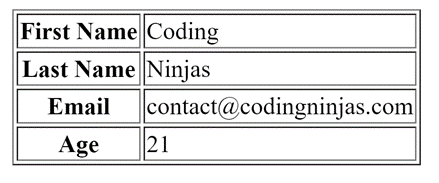
After the populating of forwarded data, the submission.HTMLpage looks like this:
Output:
Similar to the static routing and form data population, one can also code the logic for dynamic route handling and submitting form data in a flask application with powerful and robust methods of Flask.
What should be included in the “action” attribute of the form tag of HTML? The route through which we want to trigger the rendering function and send the form data must be included in the "action" attribute of the form tag of HTML. Also, keep in mind that the route has to be the full address, including the base address of the route (here, 127.0.0.1 or localhost).
How is form data in a flask application received? The form data is attached to the request attribute of the flask application object. This request object has data encapsulated as a dictionary, i.e., in a key-value pair.
How many methods are available for sending form data in a flask application? There are mainly two types of methods available to send form data, the POST method, and the GET method. In the Get method, the form data is appended into the URL of the next page, whereas in the POST method, it is not.
Is it mandatory to provide a form data method? It is not mandatory to specify the method since the default method is set as GET by an HTML form. It is advised to specify the method attribute in the form tag for better understanding and code readability.
How to parse form data sent to a template? We can send the entire data as it is and traverse through the dictionary object using the {%..%} delimiter jinja2 template engine. Please refer to submission.html above for a detailed example.
Key Takeaways
So, ninjas, we conclude the article by learning how to send form data to the flask application and forward the same to the rendering template. We used the request object from Flask to access the received form data as a dictionary which can be used accordingly.







 7+ registered

