

Table of contents
1.
Introduction
2.
Wait
2.1.
How to address those failures related to Wait?
3.
When to use Wait Commands
4.
Frequently Asked Questions
4.1.
What Database is used for data-driven testing?
4.2.
How do I run the Katalon Studio test remotely?
4.3.
Which WebDriver API is the fastest?
4.4.
Which protocol is used by the RESTful Web services?
4.5.
Define Unit Testing
5.
Conclusion
Last Updated: Mar 27, 2024
Medium

Solving Wait-time issue with Katalon Studio

Author Muskan Sharma
0 upvote
Career growth poll
Do you think IIT Guwahati certified course can help you in your career?

Introduction

Hey Readers!!

While working in Automation, the most common failure is waiting time. 

In this article, you'll learn about solving wait time failure in Katalon Studio.

Solving Wait-time issue with Katalon Studio

Wait

Wait for commands in automation testing to tell test execution to stop for a specific time before continuing to the next stage.

Examples of tests that failed due to insufficient wait time:

  • False Fail: This failure occurs because of the waiting time on the application and leads to script failing.
  • The Targeted element not present on the page: This failure occurs because of the time for the elements to be rendered in the browsers. Some of the elements may need to be loaded, which leads to the script failing.

How to address those failures related to Wait?

The following options can be used for the failures related to waiting:

  • Wait for Page Load: This logic will delay starting a step in your script until a page has fully loaded.
  • Wait For Element Present: Until the targeted element on the page appears, the present keyword blocks execution.
  • Global variable: A global variable is a programming language construct declared outside of any function and available to all functions throughout the program.

Manual Mode
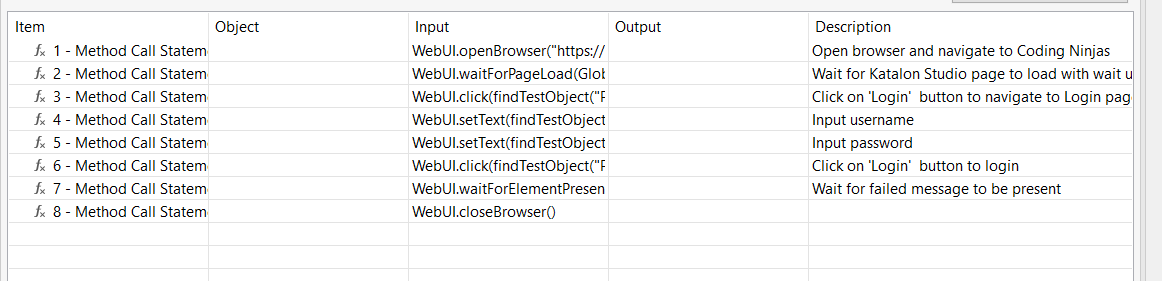
How to address those failures related to Wait?

Script Mode

'Open browser and navigate to Coding Ninjas'
WebUI.openBrowser("https://coding ninjas.com")
 
'Wait for Katalon Studio page to load with the wait used as Global Variable'
WebUI.waitForPageLoad(GlobalVariable.G_Timeout_Small)
 
'Click on \'Login\'  button to navigate to the Login page'
WebUI.click(findTestObject('Page_KatalonHomepage/btn_Login'))
 
'Input username'
WebUI.setText(findTestObject('Page_Login/txt_UserName'), Username)
 
'Input password'
WebUI.setText(findTestObject('Page_Login/txt_Password'), Password)
 
'Click on \'Login\'  button to login'
WebUI.click(findTestObject('Page_Coding NInjas Homepage/btn_Submit'))
 
'Wait for failed message to be present'
WebUI.waitForElementPresent(findTestObject('Page_Coding NinjasLogin/div_LoginMessage'), GlobalVariable.G_Timeout_Small)
 
WebUI.closeBrowser()

When to use Wait Commands

Mostly the test execution failed because of exceptions such as NoSuchElementException, ElementNotFoundException, And ElementNotVisibleException.To handle such exceptions, Katalon Studio includes a variety of built-in Wait for keywords.

  • Wait For Element Present: Until the targeted element on the page appears, the present keyword blocks execution.
  • Wait For Element Visible: Wait until the specified web element appears within the timeout.
  • Wait For Alert: Wait for the browser's alert on the screen.

Frequently Asked Questions

What Database is used for data-driven testing?

Databases like data pools, DAO objects, and ADO objects are used for data-driven testing.

How do I run the Katalon Studio test remotely?

Open Katalon Studio. Navigate to Project > Settings > Desired Capabilities > Remote > Enter the required information and then click OK.

Which WebDriver API is the fastest?

The fastest and cheapest headless browser implementation for WebDriver is HTMLUnitDriver.

Which protocol is used by the RESTful Web services?

RESTful web services use the HTTP protocol as a communication channel between the client and the server.

Define Unit Testing

A unit is the smallest testable component of an application. These components are examined separately and individually for the proper execution of software.

Conclusion

This blog has extensively discussed Solving Wait-time issues with Katalon Studio. This article helped enhance your knowledge about Wait, addressing failures related to Wait.

If you want to learn more deeply, check out the excellent content on the Coding Ninjas Website:

How to Handle Alerts with katalon studio 

How to use Selenium WebDriver in Katalon Studio 

Performing Pinch to Zoom In Action with katalon studio

Refer to our guided paths on the Coding Ninjas Studio platform to learn more about DSA, DBMS, Competitive Programming, Python, Java, JavaScript, etc. 

Refer to the links problemstop 100 SQL problemsresources, and mock tests to enhance your knowledge.

For placement preparations, visit interview experiences and interview bundle.

Thank You

Do upvote our blog to help other ninjas grow. Happy Coding!

Live masterclass

