Code💻👇
Now we will implement the same logic explained above to develop a Tic Tac Toe game in Swing.
import java.awt.*;
import java.awt.event.*;
import java.util.*;
import javax.swing.*;

class TicTacToeGameinSwing implements ActionListener
{
    JFrame frame = new JFrame();
    JPanel t_panel = new JPanel();
    JPanel bt_panel = new JPanel();
    JLabel textfield = new JLabel();
    JButton[] bton = new JButton[9];
    int chance_flag = 0;
    Random random = new Random();
    boolean pl1_chance;

    // Creating class constructor for creating grid
    TicTacToeGameinSwing()
    {
        frame.setDefaultCloseOperation(JFrame.EXIT_ON_CLOSE);
        frame.setSize(500, 500);
        frame.getContentPane().setBackground(new Color(250, 184, 97));
        frame.setTitle("Tic Tac Toe Game in Swing");
        frame.setLayout(new BorderLayout());
        frame.setVisible(true);

        textfield.setBackground(new Color(0,0,0));
        textfield.setForeground(new Color(255,0,0));
        textfield.setFont(new Font("Serif", Font.BOLD, 75));
        textfield.setHorizontalAlignment(JLabel.CENTER);
        textfield.setText("Tic Tac Toe Game in Swing");
        textfield.setOpaque(true);

        t_panel.setLayout(new BorderLayout());
        t_panel.setBounds(0, 0, 800, 100);

        bt_panel.setLayout(new GridLayout(3, 3));
        bt_panel.setBackground(new Color(0, 0, 0));

        for (int i = 0; i < 9; i++)
        {
            bton[i] = new JButton();
            bt_panel.add(bton[i]);
            bton[i].setFont(new Font("Serif", Font.BOLD, 120));
            bton[i].setFocusable(false);
            bton[i].addActionListener(this);
            bton[i].setBackground(Color.cyan);
        }

        t_panel.add(textfield);
        frame.add(t_panel, BorderLayout.NORTH);
        frame.add(bt_panel);

        startGame();
    }

    // Creating method to start the game and decide the chance
    public void startGame()
    {
        try
        {
            textfield.setText("Loading....");
            Thread.sleep(4000);
        }
        catch (InterruptedException e)
        {
            e.printStackTrace();
        }
        int chance=random.nextInt(100);

        if (chance%2 == 0)
        {
            pl1_chance = true;
            textfield.setText("Player X turn");
        }
        else
        {
            pl1_chance = false;
            textfield.setText("Player O turn");
        }
    }

    public void gameOver(String s)
    {
        chance_flag = 0;
        Object[] option={"Restart","Exit"};
        int n=JOptionPane.showOptionDialog(frame, "Game Over\n"+s,"Game Over", JOptionPane.YES_NO_CANCEL_OPTION, JOptionPane.QUESTION_MESSAGE, null, option, option[0]);
        if(n==0)
        {
            frame.dispose();
            new TicTacToeGameinSwing();
        }
        else
        {
            frame.dispose();
        }

    }

    // Creating method for checking winning conditions
    public void matchCheck()
    {
        if ((bton[0].getText() == "X") && (bton[1].getText() == "X") && (bton[2].getText() == "X"))
        {
            xWins(0, 1, 2);
        }
        else if ((bton[0].getText() == "X") && (bton[4].getText() == "X") && (bton[8].getText() == "X"))
        {
            xWins(0, 4, 8);
        }
        else if ((bton[0].getText() == "X") && (bton[3].getText() == "X") && (bton[6].getText() == "X"))
        {
            xWins(0, 3, 6);
        }
        else if ((bton[1].getText() == "X") && (bton[4].getText() == "X") && (bton[7].getText() == "X"))
        {
            xWins(1, 4, 7);
        }
        else if ((bton[2].getText() == "X") && (bton[4].getText() == "X") && (bton[6].getText() == "X"))
        {
            xWins(2, 4, 6);
        }
        else if ((bton[2].getText() == "X") && (bton[5].getText() == "X") && (bton[8].getText() == "X"))
        {
            xWins(2, 5, 8);
        }
       else if ((bton[3].getText() == "X") && (bton[4].getText() == "X") && (bton[5].getText() == "X"))
       {
            xWins(3, 4, 5);
        }
       else if ((bton[6].getText() == "X") && (bton[7].getText() == "X") && (bton[8].getText() == "X"))
       {
            xWins(6, 7, 8);
        }

        else if ((bton[0].getText() == "O") && (bton[1].getText() == "O") && (bton[2].getText() == "O"))
        {
            oWins(0, 1, 2);
        }
        else if ((bton[0].getText() == "O") && (bton[3].getText() == "O") && (bton[6].getText() == "O"))
        {
            oWins(0, 3, 6);
        }
        else if ((bton[0].getText() == "O") && (bton[4].getText() == "O") && (bton[8].getText() == "O"))
        {
            oWins(0, 4, 8);
        }
        else if ((bton[1].getText() == "O") && (bton[4].getText() == "O") && (bton[7].getText() == "O"))
        {
            oWins(1, 4, 7);
        }
        else if ((bton[2].getText() == "O") && (bton[4].getText() == "O") && (bton[6].getText() == "O"))
        {
            oWins(2, 4, 6);
        }
        else if ((bton[2].getText() == "O") && (bton[5].getText() == "O") && (bton[8].getText() == "O"))
        {
            oWins(2, 5, 8);
        }
        else if ((bton[3].getText() == "O") && (bton[4].getText() == "O") && (bton[5].getText() == "O"))
        {
            oWins(3, 4, 5);
        } else if ((bton[6].getText() == "O") && (bton[7].getText() == "O") && (bton[8].getText() == "O"))
        {
            oWins(6, 7, 8);
        }
        else if(chance_flag==9)
        {
            textfield.setText("Game Draw!!");
             gameOver("Game Draw!!");
        }
    }

    // Method to print that Player X wins
    public void xWins(int x1, int x2, int x3)
    {
    	bton[x1].setBackground(Color.YELLOW);
        bton[x2].setBackground(Color.YELLOW);
        bton[x3].setBackground(Color.YELLOW);

        for (int i = 0; i < 9; i++)
        {
            bton[i].setEnabled(false);
        }
        textfield.setText("Player X wins");
        gameOver("Player X Wins");
    }

    // Method to print that Player O wins
    public void oWins(int x1, int x2, int x3)
    {
        bton[x1].setBackground(Color.YELLOW);
        bton[x2].setBackground(Color.YELLOW);
        bton[x3].setBackground(Color.YELLOW);

        for (int i = 0; i < 9; i++)
        {
            bton[i].setEnabled(false);
        }
        textfield.setText("Player O Wins");
        gameOver("Player O Wins");
    }

    // Method for performing action after every turn
    @Override
    public void actionPerformed(ActionEvent e)
    {
        for (int i = 0; i < 9; i++)
        {
            if (e.getSource() == bton[i])
            {
                if (pl1_chance)
                {
                    if (bton[i].getText() == "")
                    {
                        bton[i].setForeground(new Color(0, 188, 255));
                        bton[i].setText("X");
                        pl1_chance = false;
                        textfield.setText("O turn");
                        chance_flag++;
                        matchCheck();
                    }
                }
                else
                {
                    if (bton[i].getText() == "")
                    {
                        bton[i].setForeground(new Color(0, 255, 9));
                        bton[i].setText("O");
                        pl1_chance = true;
                        textfield.setText("X turn");
                        chance_flag++;
                        matchCheck();
                    }
                }
            }
        }
    }
}

// Driver code
public class Main
{
    public static void main(String[] args) throws Exception
    {
       new TicTacToeGameinSwing();
    }
}

You can also try this code with Online Java Compiler
Explanation
In the code above we have created a class TicTacToeGameinSwing implemented by ActionListerner class. Inside this class, we have created frame object, panel object for text and button, label object for text, and button object array for 9 buttons of a 3X3 grid.
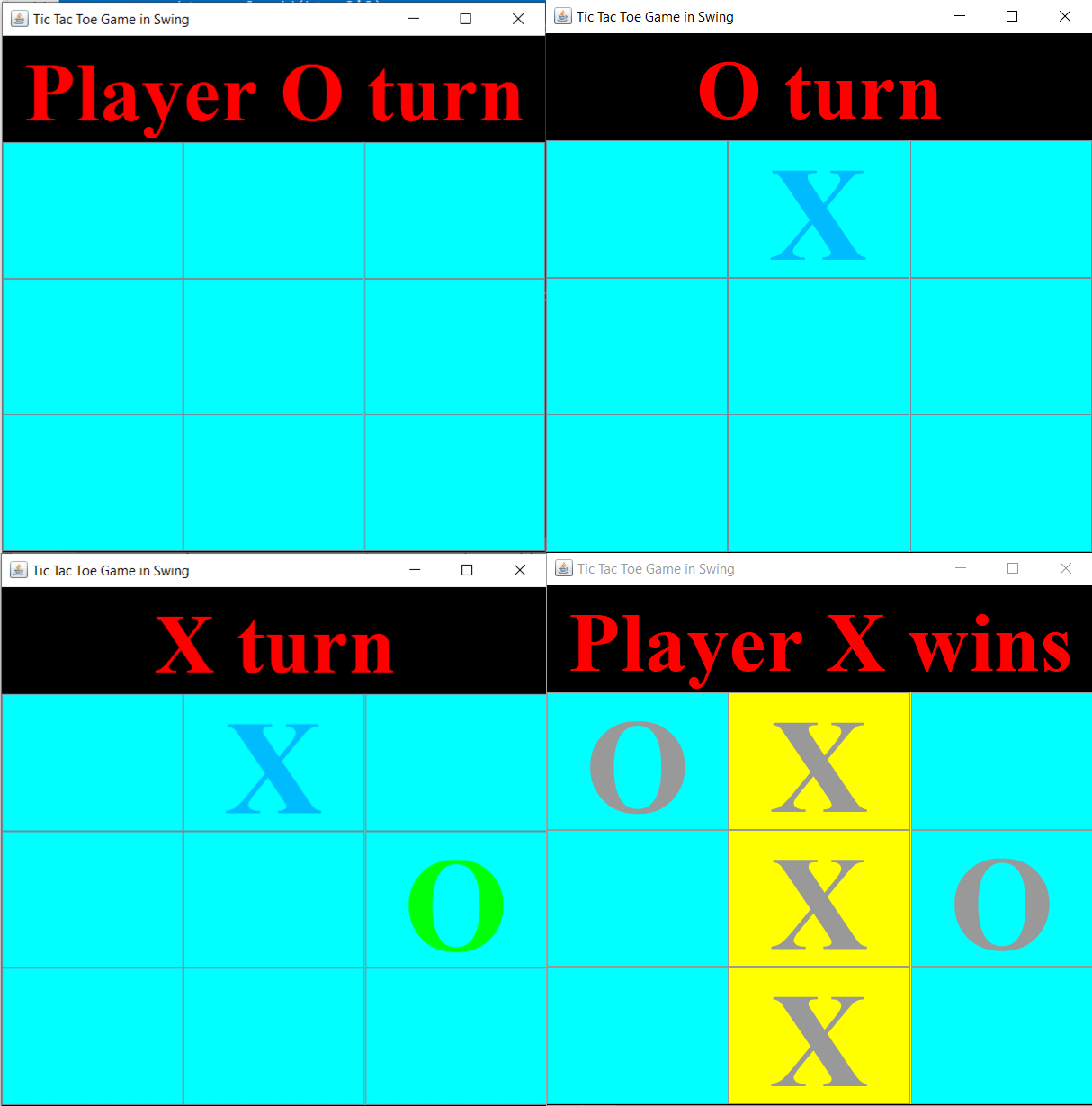
Next, we have created a default constructor of TicTacToeGameinSwing class, which is invoked whenever this class is instantiated. This constructor will display a new game window showing 9 empty buttons and a heading that shows the name of the player who has to start.
To add functionality to the game we have added a few functions, these are:
- startGame() function– In this function, we will be given a random number from 1 to 100 is selected and if the number is even then Player X will start the game otherwise player O will start.
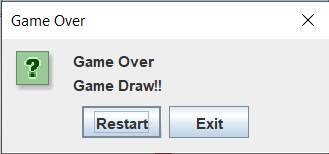
- gameOver() function- when the game is over, this function will give you two options either to start a new game or exit from the game window. This function will create a TicTacToeGameinSwing class object if we select the ‘Restart” game option for creating a new game window.
- matchCheck() function- This function is comprised of a bunch of if-else if-else conditional statements used for checking all the winning conditions. It will also check if the match is a tie or not. This function returns the cell numbers of the player who has won or calls the gameOver function if there is a tie with a message to print “Game Draw!!”.
- xWins() function– matchCheck() function call xWins() function when player X won the game. Xwins() function color the winning cells provided by matchCheck() function to YELLOW color and then it will disable all the cells using a for loop from 0 to 9 and setting the setEnable() function to false. In the end, this function calls the gameOver() function with a message to print “Player X wins!!”.
- oWins() function– matchCheck() function call oWins() function when player O won the game. owins() function color the winning cells provided by matchCheck() function to YELLOW color and then it will disable all the cells using a for loop from 0 to 9 and setting the setEnable() function to false. In the end, this function calls the gameOver() function with a message to print “Player O wins!!”.
Whenever a button is pressed, the button class has a method called actionPerformed() to do the required operation, here we have overridden this function to make it work according to us. In this, we will check if it's player O’s turn or player X’s turn. Then set the text field, button text, and button color accordingly.
Then we have instantiated the TicTacToeGameinSwing class to start the game and create a new game window.
Hope this explanation made the workflow of the code clear and understandable, build and enjoy the game.
Output
Game Draw
Check out this problem - Optimal Strategy For A Game
Frequently Asked Questions
What is Java Swing?
Java swing is a graphic user interface toolkit and AWT extension (Abstract Window Toolkit). It is used for creating window-based applications.
What is JButton?
It is used for creating a labeled button having a platform-independent implementation that results in some action when the button is clicked.
What is JLabel?
A java JLabel component is used to display a component’s label. It is commonly used with a text field or a password field.
What is JComponent used for?
JComponent provides all the basic and standard components used by Java Swing like JButton, JTable, JPanel, etc.
What is JFrame and its uses?
JFrame is a type of container in the Java AWT class. It works like the main window in which components like JLabels, JButtons, and text fields are added to create a GUI. It is used for adding support to Java Swing architecture.
Conclusion
In this article, we learned the “Tic Tac Toe game in Swing” by explanation and examples. We have also implemented the logic to program a simple Tic Tac Toe game in Swing. Build the game yourself and enjoy playing.







 1+ registered

