Example
We can create custom functions to handle the situations when specific types of errors occur in Mocha. First of all, let us create a function to handle the situation when there are no test files at the destination folder as mentioned in the package.json file.
Program:
function createNoFilesMatchPatternError(message, pattern) {
   var err = new Error(message);
   err.code = 'ERR_MOCHA_NO_FILES_MATCH_PATTERN';
   err.pattern = pattern;
   return err;
}

You can also try this code with Online Javascript Compiler
Further, let us create a function to handle the situation when the argument passed to a function/object does not match the expectation.
Program:
function createInvalidArgumentTypeError(msg, arg, expected) {
   var err = new TypeError(msg);
   err.code = 'ERR_MOCHA_INVALID_ARG_TYPE';
   err.argument = arg;
   err.expected = expected;
   err.actual = typeof argument;
   return err;
}
You can also try this code with Online Javascript Compiler
Now let us put these functions into action, i.e., when the errors occur, these functions are actually called internally.
Program:
module.exports = {
   createInvalidArgumentTypeError: createInvalidArgumentTypeError,
   createInvalidArgumentValueError: createInvalidArgumentValueError,
   createInvalidExceptionError: createInvalidExceptionError,
   createInvalidInterfaceError: createInvalidInterfaceError,
   createInvalidReporterError: createInvalidReporterError,
   createMissingArgumentError: createMissingArgumentError,
   createNoFilesMatchPatternError: createNoFilesMatchPatternError,
   createUnsupportedError: createUnsupportedError
};
You can also try this code with Online Javascript Compiler
Here, we can similarly implement the rest of the functions.
TroubleShooting
It is possible that we run into errors and we are not able to find any solution despite consistent efforts. In such cases, Mocha provides some general guidelines to identify potential sources of errors that may go undetected.
- Make sure you're using a reporter that is supported.
- Make sure you're not using any other flags that aren't supported.
- Double-check your config file; any command-line option will be combined with any config file choices.
-
In your tests, look for root hooks (they look like this). Put them all in a Root Hook Plugin.
- Do you use root hooks in any of the assertion, mock, or other test libraries you're using? For parallel mode compatibility, they may need to be relocated.
- If your tests are timing out suddenly, you may need to increase the default test timeout (via —timeout)
- Make sure your tests don't require a certain order to run.
- Make sure your tests clean up after themselves by removing transient files, handles, and sockets, among other things. Attempting to share state or resources between test files is not a good idea.
General Troubleshooting Suggestions
- Restart your machine, usually, a simple restart is enough to get any piece of software back on track.
- Make sure you have enough memory dedicated to Mocha in File>Preferences.
- Turn hardware rendering ON or OFF in File>Preferences, depending on your settings.
- Make sure your video card driver is up to date.
- Try running Mocha in 32-bit mode by using “Get Info” on the app and checking the 32-bit box.
FAQs
1. What is Mocha Testing?
Ans: Mocha is a feature-rich JavaScript test framework that runs in the browser and on Node.js, making asynchronous testing simple and fun. Mocha tests run in a sequential order, allowing for flexible and precise reporting while mapping uncaught exceptions to the appropriate test cases.
2. Does Mocha run tests in parallel?
Ans: Mocha does not run individual tests in parallel. If you only have one test file, you'll be penalised for using parallel mode.
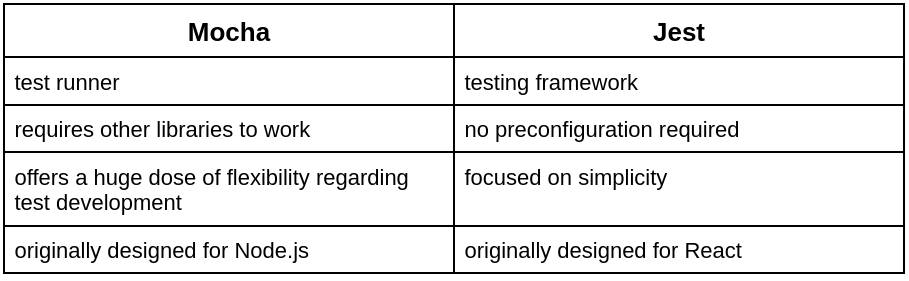
3. Which is better, jest or Mocha?
Ans: Both frameworks have their own pros and cons but let us have a look at their differences to better differentiate them.
Key Takeaways
In this blog, we had a look at the basic error codes available in Mocha. We understood the significance of various error codes and also coded down some custom functions implementing the response when an error occurs.
We also went through the guidelines provided by Mocha in case the tester is not able to resolve the error even after multiple attempts.
We hope that this blog has helped you enhance your knowledge regarding Error Codes and Troubleshooting options in Mocha and if you would like to learn more, check out our articles on Mocha Installation and Getting Started, Mocha Assertions. Do upvote our blog to help other ninjas grow. Happy Coding!





 1+ registered

