Common features
All of the features that are available in the Text field and shared input field are available in vaadin-text area. Let’s discuss them one by one.
🍁 Placeholder
The brief description of the anticipated input value is a placeholder. Only when the text field is empty is it displayed.
TextField textField = new TextField();
textField.setEnabled(false);
textField.setLabel("Disabled");
textField.setValue("Value");
add(textField);

You can also try this code with Online Java Compiler

🍁 Clear button
The field's current value is erased by the optional clear button. While the field is empty, it is hidden. For search and filter fields, where it is often for the user to want to clear the field value, clear buttons are helpful.
TextField textField = new TextField();
textField.setClearButtonVisible(true);
textField.setValue("Coding ninjas");
add(textField);
You can also try this code with Online Java Compiler

🍁 Text Alignment
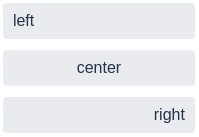
Left (the default), center, and right are the three text alignment options that are provided.
When displayed in vertical groups, numerical values should be right-aligned as this makes it simpler to understand and contrast values.
TextField right = new TextField();
right.setValue("right");
right.addThemeVariants(TextFieldVariant.LUMO_ALIGN_RIGHT);
You can also try this code with Online Java Compiler
🍁 Min and Max Input Length
By limiting text entry to the maximum length and causing a validation error if a shorter value than the minimum length is provided, these parameters have an impact on the smallest and largest number of characters a field can allow.
TextField zipCode = new TextField();
zipCode.setMinLength(5);
zipCode.setMaxLength(5);
zipCode.getStyle().set("width", "6em");
zipCode.setLabel("Zip code");
add(zipCode);

TextField username = new TextField();
username.setMaxLength(16);
username.setHelperText("Max 16 characters");
username.setLabel("Username");
add(username);
You can also try this code with Online Java Compiler

🍁 Pattern
We can define the pattern that the input must follow (using regular expressions) in order to prevent the user from submitting a false value.
TextField = new TextField();
textField.setPattern("^[+]?[(]?[0-9]{3}[)]?[-s.]?[0-9]{3}[-s.]?[0-9]{4,6}$");
textField.setHelperText("Format: +(123)456-7890");
textField.setLabel("Phone number");
add(textField);
You can also try this code with Online Java Compiler

Character Counter
Free-form inputs that are longer than a specified character limit are frequently capped. The user should be informed of the current character limit and maximum character count.
TextArea textArea = new TextArea();
textArea.setWidthFull();
textArea.setLabel("Description");
textArea.setMaxLength(charLimit);
textArea.setValueChangeMode(ValueChangeMode.EAGER);
textArea.addValueChangeListener(e -> {
  e.getSource().setHelperText(e.getValue().length() + "/" + charLimit);
});
textArea.setValue(loremIpsum);
add(textArea);
You can also try this code with Online Java Compiler

Frequently Asked Questions
What is Vaadin framework?
A Java web framework called Vaadin Flow (formerly known as Vaadin Framework) is used to create web pages and web applications. With the help of the Vaadin Flow programming model, developers may create User Interfaces (UIs) using Java without directly utilizing HTML or JavaScript.
Can Vaadin be used to create PWAs?
Yes. Applications for Vaadin are progressive web apps by default. The starters produce a manifest file and a service worker for an offline fallback page. The offline page, colors, and icons can all be changed.
What companies use Vaadin?
For the finest experience and a significant emphasis on developers' efficiency, well-known and Fortune-100 companies prefer Vaadin. PUMA, Liferay, Volkswagen, Bank of America, Rockwell Automation, Motorola, and Dell are a few businesses that use Vaadin.
Conclusion
In this article, we have extensively discussed vaadin-text area. We have also seen how different features can be implemented in vaadin-text area.
If you think this blog has helped you enhance your knowledge about Vaadin-text area and if you would like to learn more, check out our articles Vaadin-Button, Vaadin-Board, Vaadin-Environment Setup, Vaadin Architecture, and many more on our Website.
Refer to our Guided Path on Coding Ninjas Studio to upskill yourself in Data Structures and Algorithms, Competitive Programming, JavaScript, System Design, and many more! If you want to test your competency in coding, you may check out the mock test series and participate in the contests hosted on Coding Ninjas Studio! But if you have just started your learning process and are looking for questions asked by tech giants like Amazon, Microsoft, Uber, etc; you must look at the problems, interview experiences, and interview bundle for placement preparations.
Nevertheless, you may consider our paid courses to give your career an edge over others!
Please upvote our blog to help other ninjas grow.
Happy Learning!








 24+ registered

