Do you think IIT Guwahati certified course can help you in your career?
Introduction
In this article, we will discuss Vaadin Board, boards, responsive, rows-columns, column wrapping, column spans, breakpoints, breakpoint specific styling. One of the most well-liked Java web development frameworks, Vaadin, is frequently used to create robust and scalable web applications. An open-source Java framework for creating web applications is called Vaadin Flow.
You can create an app entirely using UI elements without ever touching HTML or JavaScript. If you are already familiar with Java, learning Vaadin Flow's Java API will be simple. Each component is a Java class, and you can combine simpler components with layouts to make more complicated components.
Due to its abstraction of a request and response mental model, the Java programming model is comparable to desktop application programming. The layout element called "Board" makes it simple and effective to create responsive views. It rearranges the elements inside to best utilize the space available on screens of various sizes.
Vaadin Board
The "Board" layout element makes it easy and efficient to develop responsive views. It rearranges the inside components to make the most of the space on screens of varied sizes.
// program to implement vaadin board
import com.vaadin.flow.component.board.Board;
import com.vaadin.flow.component.html.Div;
import com.vaadin.flow.router.Route;

@Route("basic-board")
public class basicboard extends Div {

  public basicboard() {
    // tag::snippet[]
    Board board = new Board();
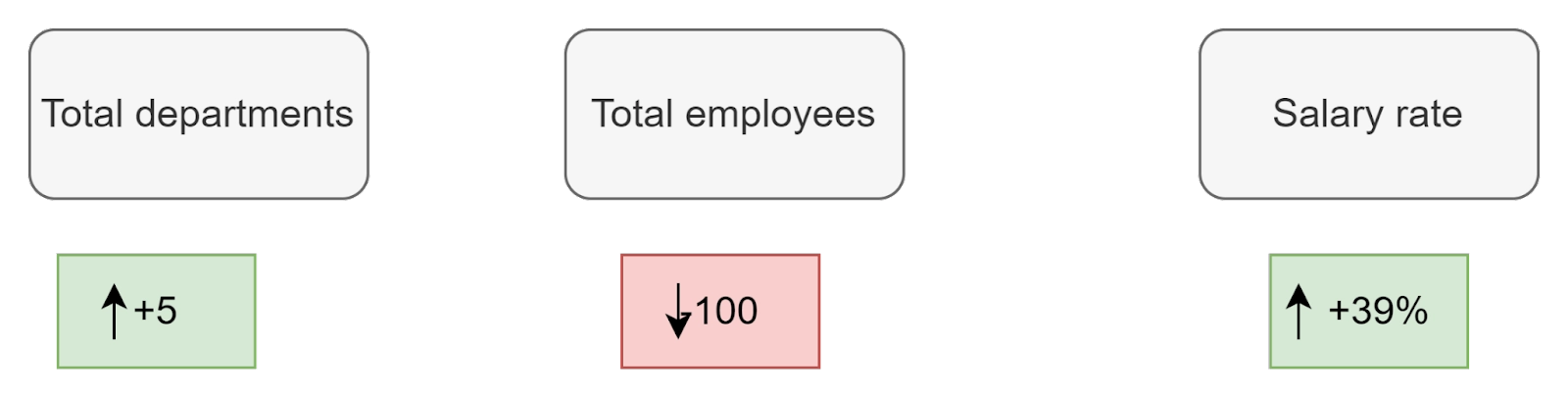
    board.addRow(
            new ExampleIndicator("Total departments", "25", "+5"),
            new ExampleIndicator("Total employees", "54.6k", "-100"),
            new ExampleIndicator("Salary rate", "15%", "+39%")
    );
    board.addRow(new ExampleChart());
    add(board);
    addClassName("basic-board");
  }
}
You can also try this code with Online Java Compiler
Board doesn't need any custom development because it is responsive by default. Its layout is automatically optimized and changed according to the size of the screen to make sure that all of the components fit within it.
Rows and columns
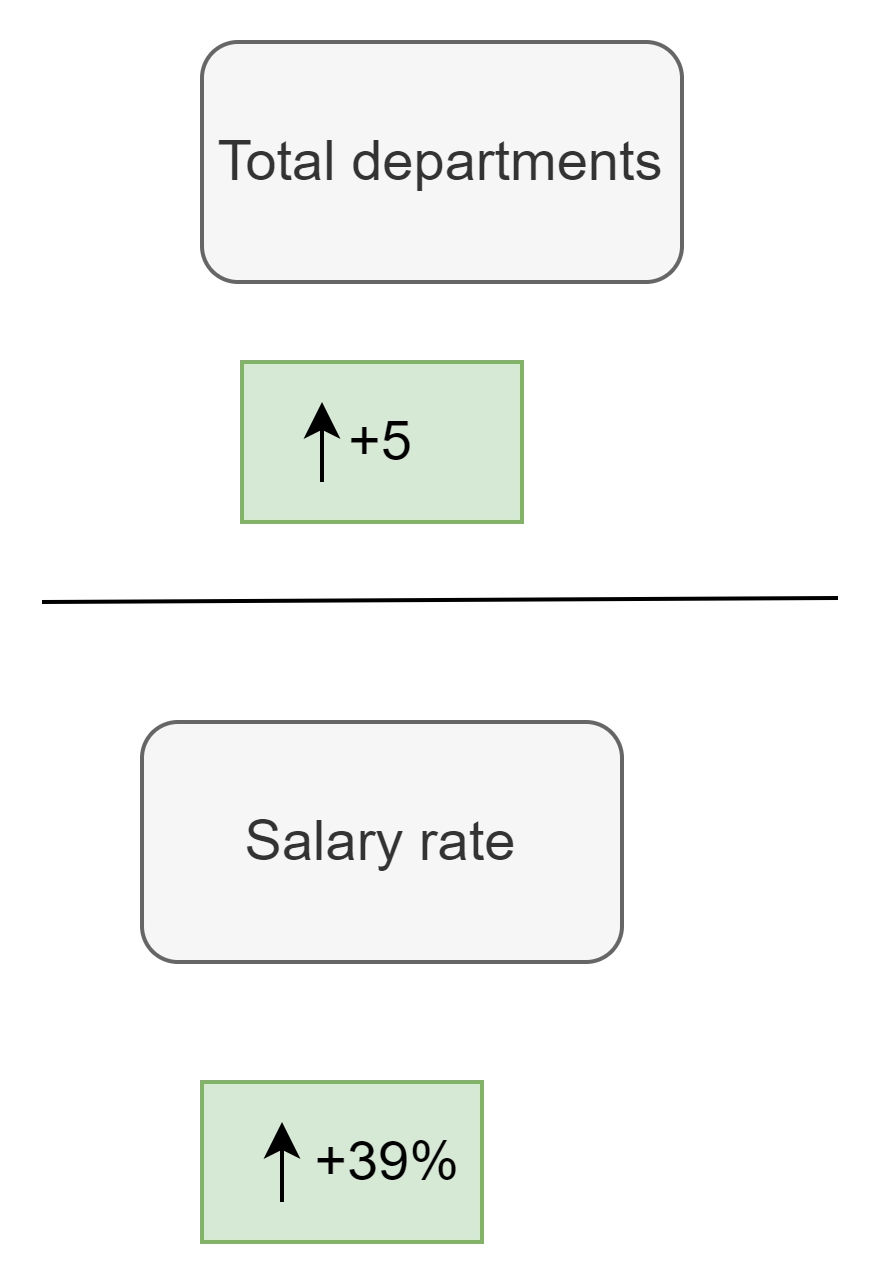
Rows make form a board. Up to four columns and up to four components can be supported by each row.
Nested Rows
Rows can be nested to provide more precise control over how certain layout elements respond to resizing and how they are presented.
//program to show the nested rows implementation of vaadin board
import com.vaadin.flow.component.board.Board;
import com.vaadin.flow.component.board.Row;
import com.vaadin.flow.component.html.Div;
import com.vaadin.flow.router.Route;

@Route("nested-board")
public class BoardNested extends Div {
    public BoardNested() {
        // tag::snippet[]
        Row rootRow = new Row();
        rootRow.add(new ExampleStatistics(), 2);

        Row nestedRow = new Row(
                new ExampleIndicator("Total departments", "25", "+5"),
                new ExampleIndicator("Conversion rate", "15%", "+39%")
        );
        rootRow.addNestedRow(nestedRow);

        Board board = new Board();
        board.add(rootRow);

        add(board);
        this.setClassName("nested-board");
    }
}
You can also try this code with Online Java Compiler
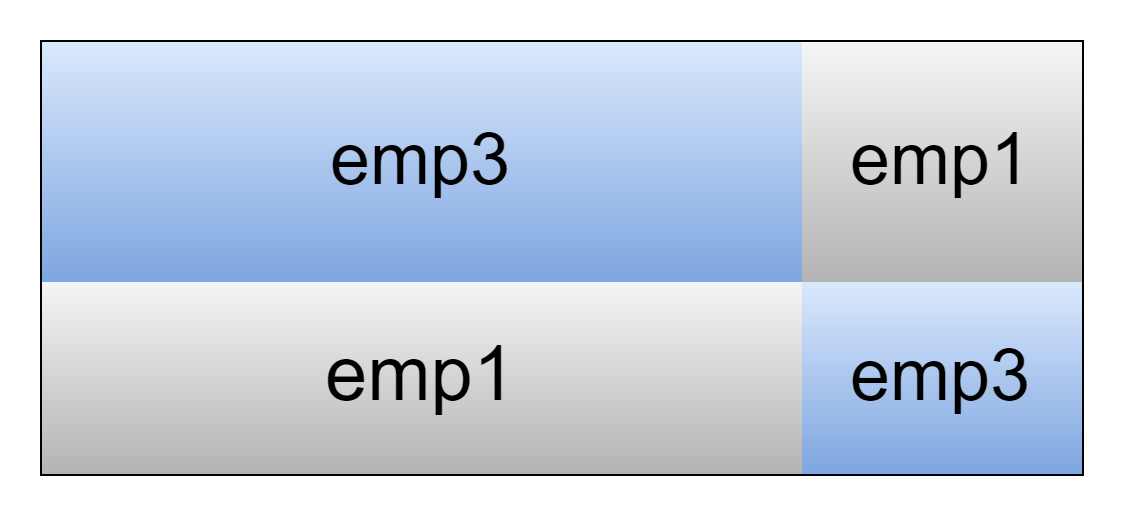
With a smaller viewport, columns automatically wrap onto new lines. The example below illustrates the wrapping behavior for a row with four columns and four components.
// program to implement columns wrapping in vaadin board
import com.vaadin.flow.component.board.Board;
import com.vaadin.flow.component.html.Div;
import com.vaadin.flow.component.splitlayout.SplitLayout;
import com.vaadin.flow.router.Route;

@Route("board-column-wrapping")
public class BoardColumnWrapping extends Div {

    public BoardColumnWrapping() {
        // tag::snippet[]
        Board board = new Board();
        board.addRow(
                createCell("emp 1"),
                createCell("emp 2"),
                createCell("emp 3"),
                createCell("emp 4")
        );
        SplitLayout splitLayout = new SplitLayout(board, new Div());

        addClassName("board-column-wrapping");
        add(splitLayout);
    }

    private static Div createCell(String text) {
        Div div = new Div();
        div.setText(text);
        div.addClassNames("emp", "color");
        return div;
    }
}
You can also try this code with Online Java Compiler
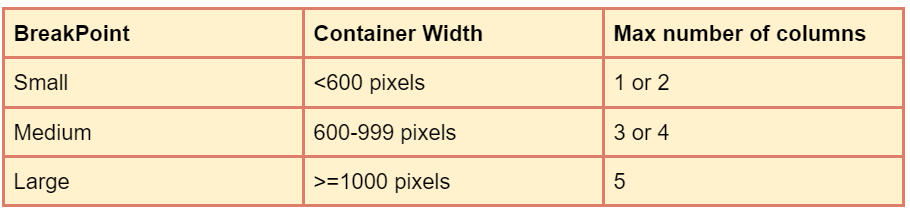
Based on the width of the layout container, Board modifies its layout. Breakpoints are the following three container widths that cause a change in the layout:
By overriding the CSS custom attributes —vaadin-board-width-small and —vaadin-board-width-medium, breakpoints can be modified.
Breakpoint-Specific Styling
For each breakpoint, you can apply a different style, such as altering the text size or the distance between components.
// program to implement breakpoint-specific styling in vaadin board
import com.vaadin.flow.component.board.Board;
import com.vaadin.flow.component.html.Div;
import com.vaadin.flow.component.splitlayout.SplitLayout;
import com.vaadin.flow.router.Route;

@Route("breakpoints-boards")
public class BoardBreakpoints extends Div {
    public BoardBreakpoints() {
        Board board = new Board();
        board.addRow(
                createCell("emp 1"),
                createCell("emp 2"),
                createCell("emp 3"),
                createCell("emp 4")
        );
        SplitLayout splitLayout = new SplitLayout(board, new Div());
        addClassName("breakpoints-boards");
        add(splitLayout);
    }
    private Div createCell(String text) {
        Div div = new Div();
        div.setText(text);
        div.addClassNames("cell");
        return div;
    }
}
You can also try this code with Online Java Compiler
You construct the UI from components, link it to a data source, and respond to user events much like you would when creating a conventional desktop application. Without having to offer REST services or find alternative methods of transferring data to the browser, the UI operates on the JVM. In the browser, Flow apps are displayed as typical HTML.
Define vaadin board Framework?
A Java web framework called Vaadin Flow (formerly known as Vaadin Framework) is used to create web pages and web applications. Without having to utilize HTML or JavaScript directly, Vaadin Flow's programming architecture enables developers to use Java as the programming language for creating User Interfaces (UIs).
Can Vaadin be scaled?
Applications for Vaadin scale well. Errors are possible with any framework, as with anything else. However, it's simple to develop applications with Vaadin that not only scale well but also look amazing and operate excellent, making your users happy, by adhering to traditional Java best practices.
Conclusion
In this article, we have extensively discussed the introduction to Vaadin Board, boards, responsive, rows-columns, column wrapping, column spans, breakpoints, breakpoint specific styling.
After reading about the Vaadin board, are you not feeling excited to read/explore more articles on the topic of file systems? Don't worry; Coding Ninjas has you covered. If you want to check out articles related to Vaadin refer to these links









 7+ registered

