




Introduction
App routing is the technique used to map the specific URL with the associated function intended to perform some task. The Latest Web frameworks use the routing technique to help users remember application URLs.
When creating an application, it’s pretty inconvenient to hard-code each URL. A better way to resolve this problem is through building Dynamic URLs.
It is also possible to build a URL dynamically by adding the variable parts to the rule parameter. This variable part is identifiable as <variable-name>. It is passed as an argument to the function associated with the rule.
Let’s understand the concept of Variable Rules in depth.
Variable Rules
Variable Rules help to create dynamic URLs. They are basically the variable sections that can be added to a URL by marking sections with <variable_name> or <converter: variable_name>. It is passed as an argument to the function associated with the rule.
Example Syntax:-
@app.route('hello/<variable_name>')OR
@app.route('hello/<converter: variable_name>')
Let’s understand how to make a dynamic URL using variable rules with an example.
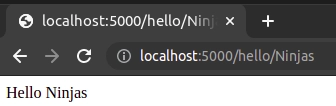
In the following example, the rule parameter of the route() decorator contains <name> variable part attached to URL ‘/hello’. Therefore, if the http://localhost:5000/hello/Ninjas is entered as a URL in the browser, ‘Ninjas’ will be supplied to the hello() function as an argument.
In app.py
from flask import Flask
app = Flask(__name__)

@app.route('/hello/<name>')
def hello_name(name):
  return 'Hello '+ name

if __name__ == '__main__':
  app.run(debug = True)
Run the above file as a Python file. You will get the following output.
Output:
We will see our application is by default running on port 5000.
URL: localhost:5000/hello/Ninjas
In addition to the default string variable part, rules can also be constructed using the following converters:-
1.) String: It is the default converter. It can accept any text without a slash.
2.) int: It takes positive integers.
3.) float: It takes positive floating-point values.
4.) path: It is similar to string but can also accept slashes.
5.) uuid: It takes UUID strings.
In the following example, we will accept the integer and float values as a part of our dynamic URLs.
In app.py
from flask import Flask
app = Flask(__name__)

@app.route('/hello/<int:age>')
def hello_age(age):
  return 'I am %d years old.' % age


@app.route('/hello/<float:gpa>')
def hello_gpa(gpa):
  return 'My current semester gpa is %f' % gpa


if __name__ == '__main__':
  app.run(debug = True)
Output:
We will see our application is by default running on port 5000.
URL: localhost:5000/hello/21
Since we have called for an integer value in the URL, the hello_age() function will run.

URL: localhost:5000/hello/8.9
Since we have called for float value in the URL, the hello_gpa() function will run.

If you type a URL that is not associated with any function or not of the same data type, it will give you an error.
URL: localhost:5000/hello/ninjas
Since we have created no String type dynamic URLs, it will show an error.

Also Read About, PHP For Loop


 7+ registered

