Table of contents
1.
Introduction 😇
2.
Playbook 📚
2.1.
Dynamic Includes and Attribute Inheritance 🧨
2.2.
Fixed handling of keywords and inline variables 🗝️🔡
2.3.
Migrating from with_X to loop 🦅
3.
Deprecated
3.1.
Jinja tests used as filters
3.2.
Ansible fact namespacing 🧑
4.
Modules 😃
5.
Plugins 🔌
5.1.
Inventory 🏠
5.2.
Shell 🐚
5.3.
Filter 🎞️
5.4.
Lookup
6.
Frequently Asked Questions 🤔
6.1.
What is a map in Ansible?
6.2.
What language does ansible use?
6.3.
How do I enable Ansible plugins?
7.
Conclusion🎉
Last Updated: Mar 27, 2024
Easy

Ansible 2.5 Porting Guide

Author Sagar Mishra
1 upvote
Career growth poll
Do you think IIT Guwahati certified course can help you in your career?

Introduction 😇

Ansible automates remote system management and maintains the desired state of the systems. Ansible is an easy IT automation tool that simplifies the deployment of your systems and apps. To deploy and update your applications, avoid writing scripts or custom code. Instead, automate using SSH and a language similar to plain English, with no agents to install on remote systems.

logo


In this article, we will discuss the intro of the Ansible 2.5 Portable Guide.

ninja chat

Playbook 📚

The first topic of the "Ansible 2.5 Porting Guide" series is Playbook. This will help you to learn how to use a Playbook. We will also discuss the types of the Playbook. 

Ansible Playbooks are sets of tasks that run against hosts automatically. Host groups make up your Ansible inventory. An Ansible Playbook has modules that each carry out a specific function. Each module provides metadata that defines when, where, and by which user a task is carried out.

Let's discuss some functions in Ansible Playbook:

Dynamic Includes and Attribute Inheritance 🧨

A static import_* would inherit any attributes assigned to it from the tasks inside, but a dynamic include_* would only apply to the include itself.

In Ansible version 2.4, this division was only partially executed. This work has been completed as of Ansible version 2.5, and the separation now works as intended. Attributes that are applied to an include_* task will not be inherited by the tasks inside.

Let's examine this by an example:

Syntax of Including tasks:

- include_tasks: "{{ ansible_distribution }}.yml"
  tags:
    - distro_include


Syntax of Included file:

- block:
    - debug:
        msg: "In included file"


    - apt:
        name: nginx
        state: latest
  tags:
    - distro_include

Fixed handling of keywords and inline variables 🗝️🔡

In the last versions of Ansible, there was a problem with handling keywords and inline variables. The issue was that you could not use the name that is already a keyword. For instance:

roles:
    - { role: myrole, name: Mike, othervar: othervalue, become: True}


But this issue is resolved in the updated version of Ansible, i.e., Ansible 2.5. We can now use any keyword as a variable name. See the below example:

roles:
    - { role: myrole, vars: {name: Mike, othervar: othervalue}, become: True}

Migrating from with_X to loop 🦅

The loop keyword works best for loops in most situations as opposed to with_X style loops. Instead of using a more complex query or lookup, filters are typically the easiest way to explain the loop syntax.

There are several methods using which you can convert with_ style loops to loop and filters. For example:

🔥 with_list

🔥 with_items

🔥 with_indexed_items

🔥 with_flattened

🔥 with_together

🔥 with_dict

🔥 with_sequence

🔥 with_subelements

🔥 with_nested/with_cartesian

🔥 with_random_choice
Deprecated

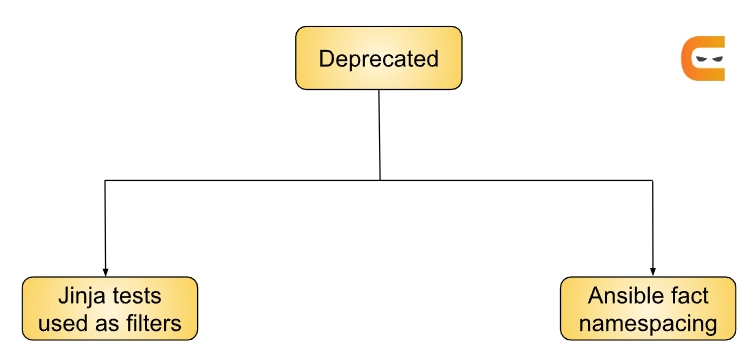
Our next topic in the "Ansible 2.5 Porting Guide" series is Deprecated. There are mainly two types of Deprecated, as shown in the image below. Let us discuss them in detail.

types of deprecated

Jinja tests used as filters

Jinja tests are used for data comparison. It was included within Ansible as commonly known as Filters in the earlier versions of Ansible. Filters are used for data manipulation in Ansible. With this change, it will be simpler to grasp the many jinja concepts and when they should be used.

Let's grasp this using an example:

In the earlier versions of Ansible:

when:
    - result | failed
    - not result | success


In the Ansible 2.5 version:
when:
    - result is failed
    - results is not successful


As you can see, there is a syntactical change in the latest version of Ansible. These tests make more sense, like successful in place of success in the jinja test syntax.

Ansible fact namespacing 🧑

Ansible facts now have their own namespace called ansible_facts.*, as opposed to the standard facts namespace where they were once written to names like ansible_*. For instance, the variable structure ansible_facts.distribution is now the best way to query the fact ansible_distribution.

Modules 😃

Our next topic in the "Ansible 2.5 Porting Guide" series is Modules. We will discuss Modules in detail in this section.

ninja chat

Ansible modules are standalone, reusable scripts that can be used by the Ansible or Ansible Playbook programs as well as the ansible API. Before exiting, they publish a JSON string to stdout to provide info to Ansible.

In the newly released version of Ansible (version 2.5), there are a lot of changes in many modules. The names are listed below:

  • github_release
  • Modules removed
  • Deprecation notices
  • Noteworthy module changes

Plugins 🔌

Our next topic in the "Ansible 2.5 Porting Guide" series is Plugins. There are mainly four types of Plugins. Let us discuss them in detail.

plugins

Plugins are pieces of code that extend the basic stuff of Ansible. A robust, adaptable, and expandable feature set is made possible via Ansible's plugin architecture. You can also develop your plugins, and note that Ansible has several valuable benefits.

Devs that work with plugin types that support the new plugin config system can now use "doc fragments" for common config choices. 

Inventory 🏠

There are some new features that are added to the Inventory. Let's discuss them.

  • In the newer version, the ability to use cache is disabled by default. The reason behind this is to avoid costly API/DB queries.
     
  • Moving to the internal cache will allow you to access the existing cache refresh/invalidation tool of Ansible.
     
  • When a plugin uses our "common YAML config format," a new "auto" plugin that is by default enabled can automatically identify the right Plugin to use.

Shell 🐚

The target UNIX Based hosts can be used to run shell commands using the Ansible shell module. Except for highly suave commands involving pipes and redirection, Ansible can run. Also, you can use the Ansible shell module to run shell scripts.

The new plugin config structure now supports shell plugins. More parameters can now be customized, and variables specific to a given host can now be used to override earlier "global" values.

Filter 🎞️

Ansible uses Jinja2 filters, which are used to change data inside a template expression. Many filters are included with Jinja2. 

If a Non Iterable value is returned from a plugin, the lookup plugin API now throws an exception. Earlier, lookup accepted numbers and other data types given by plugins without a problem. Plugins always need to return a list. Hence this adjustment was executed.

Lookup

In the "Ansible 2.5 Porting Guide" series, our last topic is Lookup. This is one of the types in Plugin.

Globally, lookup plugins now have a new option called error that lets you choose how errors caused by the lookup are handled. Prior to this option, all errors were fatal. This option's valid values are warning, ignore, and strict.

Frequently Asked Questions 🤔

faqs

What is a map in Ansible?

A map() searches for an attribute or applies a filter to a list of items. When working with lists of items, this is helpful as you are really only concerned with one particular value of it.

What language does ansible use?

Ansible uses YAML templates that are readable by humans so that users can automate the same processes without needing to learn a tricky programming language. You can develop your own modules or use the ones that come with Ansible to automate processes.

How do I enable Ansible plugins?

Most of Ansible's inventory plugins are compatible with the auto plugin. A plugin's name must coincide with the name specified in the plugin entry of the inventory source file if you choose one that supports YAML as the config source.

Conclusion🎉

We have discussed the topic of the Ansible 2.5 Porting Guide. In detail, we have seen topics like Playbook, Deprecated, Modules, and Plugins.

We hope this blog has helped you enhance your knowledge of the "Ansible 2.5 Porting Guide." If you want to learn more, check out our articles Ansible - Environment SetupIntroduction to AnsibleAnsible Interview Questions - Part 1, and many more on our platform Coding Ninjas Studio.

But suppose you have just started your learning process and are looking for questions from tech giants like Amazon, Microsoft, Uber, etc. In that case, you must look at the problemsinterview experiences, and interview bundles for placement trials.

However, you may consider our paid courses to give your career an edge over others!

Happy Learning!

thankyou

Live masterclass