Do you think IIT Guwahati certified course can help you in your career?
Introduction
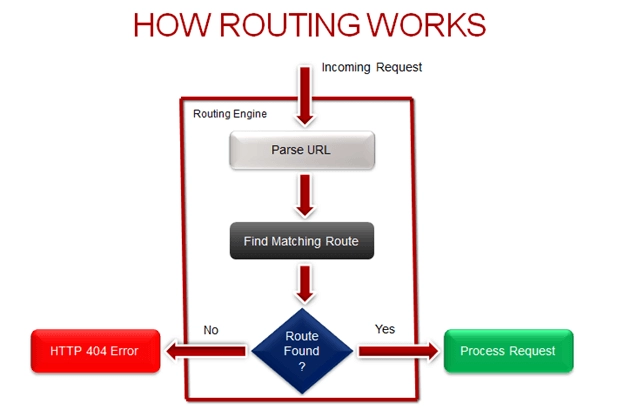
When we go on a website, we see many pages. Each page can be accessed by writing its URL on the search engine. The URL contains the domain name of the website followed by the route we are sending a request to. If the route matches the routes or route patterns the website has, we get the response accordingly. This pattern matching system that is responsible for mapping incoming browser requests is done with the help of MVC Routing in ASP.NET.
From this article, we will learn about MVC Routing in ASP.NET. Let’s dive in.
What is MVC Routing in ASP.NET?
Every URL in an ASP.NET Web Forms application must correspond to a specific.aspx file. A URL like http://domain/bloglist.aspx must match the file bloglist.aspx, which contains code and markup for displaying a browser response. Routing was added in ASP.NET to avoid linking each URL to a physical file. We can define a URL pattern corresponding to the request handler using routing. A file or a class can be used as the request handler. The request handler in an ASP.NET Webform application is the.aspx file, while in MVC, it is the Controller class and Action method. For instance, in ASP.NET Webforms, http://domain/bloglist can be mapped to http://domain/bloglist.aspx, and in MVC, the same URL can be mapped to the Contact Controller and the About action method.
The application is already configured to use ASP.NET Routing when building a new ASP.NET MVC application. ASP.NET Routing is setup in two places:
1. ASP.NET Routing is enabled in the Web configuration file of your application (Web.config file). The configuration file has four sections that are crucial to routing:
system.web.httpModules section
system.web.httpHandlers section
system.webserver.modules section
system.webserver.handlers section
2. In the Global.asax file of the program, a route table is generated. The Global.asax file is a special file that contains ASP.NET application lifecycle event handlers. During the Application Start event, the route table is constructed.
Default Global.asax file for an ASP.NET MVC application:
C#
C#
//C# code
using System;
using System.Collections.Generic;
using System.Linq;
using System.Web;
using System.Web.Mvc;
using System.Web.Routing;

namespace MvcApplication1
{
    public class MvcApplication : System.Web.HttpApplication
    {
        public static void RegisterRoutes(RouteCollection routes)
        {
            routes.IgnoreRoute("{resource}.axd/{*pathInfo}");

            routes.MapRoute(
                "Default",                                              // Route name
                "{controller}/{action}/{id}",                           // URL with parameters
                new { controller = "Home", action = "Index", id = "" }  // Parameter defaults
            );
        }
        protected void Application_Start()
        {
            RegisterRoutes(RouteTable.Routes);
        }
    }
}
The Application_Start() method is called when an MVC application first starts. This function calls the RegisterRoutes() method, which in turn calls the RegisterRoutes() method. The route table is created using the RegisterRoutes() function. There is only one route in the default route table (named Default). The first section of a URL is mapped to a controller name, the second segment to a controller action, and the third segment to a parameter named id by the Default route. Assume you type the following URL into the address bar of your web browser:
The Default route maps this URL to the following parameters: controller = Home action = Index id = 100
When you request the URL /Home/Index/100, the following code is executed: HomeController.Index(100) For all three options, the Default route includes defaults. If you don't specify a controller, the controller option will be set to Home by default. The action argument defaults to the value Index if you don't specify an action. Finally, the id parameter defaults to an empty string if you don't provide one.
How the default route maps URLs to controller actions
Let's look at how the Default route binds URLs to controller actions in a few samples.
Default Parameter
Assume you type the following URL into the address bar of your browser: /Home The Index() function of the HomeController class in the code below will be invoked if you enter this URL because the Default route parameter defaults.
HomeController.cs
C#
C#
//C# code
using System.Web.Mvc;

namespace MvcApplication1.Controllers
{
    [HandleError]
    public class HomeController : Controller
    {
        public ActionResult Index(string id)
        {
            return View();
        }
    }
}
Index() is a method in the HomeController class that receives a single parameter named Id. The Index() method is called with an empty string as the Id parameter when the URL /Home is used.
Index action with no parameter
The URL /Home also matches the Index() function of the HomeController class in the code below due to the way the MVC framework initiates controller actions.
HomeController.cs
C#
C#
//C# code
using System.Web.Mvc;

namespace MvcApplication1.Controllers
{
    [HandleError]
    public class HomeController : Controller
    {
        public ActionResult Index()
        {
            return View();
        }
    }
}
There are no parameters for the Index() function in the code above. This Index() method will be invoked when the URL /Home is entered. This procedure is likewise invoked by the URL /Home/Index/100 (the Id is ignored).
Index action with nullable parameter
The Index() method of the HomeController class in the code below also matches the URL /Home.
HomeController.cs
C#
C#
//C# code
using System.Web.Mvc;

namespace MvcApplication1.Controllers
{
    [HandleError]
    public class HomeController : Controller
    {
        public ActionResult Index(int? id)
        {
            return View();
        }
    }
}
The Index() function has one Integer parameter in the example above. Index() can be called without triggering an error since the parameter is nullable (it can have the value Null).
Index action with Id parameter
Finally, because the Id parameter is not a nullable parameter, using the Index() method in the code below with the URL /Home throws an exception.
C#
C#
//C# code
using System.Web.Mvc;

namespace MvcApplication1.Controllers
{
    [HandleError]
    public class HomeController : Controller
    {
        public ActionResult Index(int id)
        {
            return View();
        }
    }
}
In the given code, the URL /Home/Index/100, on the other hand, works perfectly with the Index controller action. The Index() method is called with an Id argument of 100 when the request /Home/Index/100 is made.
Example for ASP.NET MVC Routing
When the application first starts up, ASP.NET MVC looks through the available assemblies for a class that implements the System.Web.Mvc. IController interface or is inherited from a class that implements this interface and whose class names end in the suffix Controller. The routing framework removes the Controller suffix from all controller class names when it utilizes this list to determine which controllers it has access to. Assume we're working with a book entity to implement Create, Read, Update, and Delete operations. As a result, we'll utilize the table below to explain URL routing:
Table: Request's URLs that match the default route pattern
URL
Controller
Action
Id
http://localhost:4736/
HomeController
Index
http://localhost:4736/Book/
BookController
Index
http://localhost:4736/Book/Create
BookController
Create
http://localhost:4736/Book/Edit/100
BookController
Edit
100
Because it satisfies every segment of the route pattern, the last request's URL (http://localhost:4736/Book/Edit/100) in the table is a perfect match to the registered default URL pattern. However, if we don't provide a complete request's URL, the routing engine automatically calls the controller and action method as per the default route pattern.
Frequently Asked Questions
What is MVC in ASP.NET?
MVC is a design pattern that separates the user interface (view), data (model), and application logic (controller). This pattern aids in the separation of concerns.
What does the Route contain?
Route contains URL pattern and handler information. URL pattern starts after the domain name.
In which class is Route configured?
The RouteConfig class can be used to configure routes. It's also possible to set up multiple custom routes.
Why routing is required in MVC?
Routing in MVC (Model-View-Controller) is essential for directing incoming requests to the appropriate controller actions based on URL patterns. It helps define the application's URL structure, enabling users to access different functionalities and ensuring a clear separation between data handling and presentation.
What happens when you don’t provide the URL’s controller, action, and id?
If you don't supply a controller, the controller parameter defaults to the value Home. Suppose you don't give an action, the action parameter defaults to the value Index. If you don't provide an id, the id parameter defaults to an empty string.
Conclusion
This article has discussed the importance of MVC routing in ASP.NET, explaining its role in directing requests to the correct controller actions and enabling cleaner, more maintainable code for user-friendly applications.But this is not enough; you need something extra to excel in web development truly. If you want to learn more about web development, you can read our articlesor take our highly curated Web Development course.







 1+ registered

