Do you think IIT Guwahati certified course can help you in your career?
Introduction
Templates are files that can be converted to any text format like HTML, XML, etc. It contains the variables and tags, which help display and update the view and other logic. Template tags help in providing conditional logic to render variables onto the view.
In this blog, we will be studying template tags for boolean operators in Django.
Django Template
A context is used to render a template. Rendering executes tags and substitutes variables with values found in the context. A text file or Python string linked up using a Django template language is referred to as a Django template. The template engine can identify and understand several constructions. Variables and tags are the two primary types.
Syntax
The Django template language has four constructs in its syntax.
A tag is inside {% tag %}. Below illustrates a template tag syntax used for loop.
{%  for item in list %}
<h1> {{item.title}} </h1>
{% endfor %}
As can be seen, tags start with a {% and ends with %}, which encapsulates a block of code to execute based on the logic inside the tag. This article mainly focuses on the boolean operator in Django in templates.
Enclosing {% if(some logic) %} inside a block of code would mean that the code will only be in view if “some logic” is true; otherwise, the view will not be mounted with that code.
Boolean Operators
The “If” tags can be used with “and”, “or,” and “not” to test many variables depending on the context.
Let's look at a few examples considering we can have an employee and an employer list.
Case 1: Both employees and employers are present.
{% if emploee_list and employer_list %}

{% endif %}
Case 2: If There are no employees present.
{% if not employee_list %}

{% endif %}
Case 3: Some employees or a few employers are present.
{% if employee_list or employer_list %}

{% endif %}
Case 4: There are no employees or few employers present.
{% if not employee_list or employer_list %}

{% endif %}
Case 5: A few employees and no employers are present.
{% if employee_list and not employer_list %}

{% endif %}
Case 6: Combination of case 4 and case 5.
We can use both “and” and “or” clauses in the same tag.
Note: The ”and” clause will appear first due to the precedence rule.
{% if employee_list and employer_list or customer_list %}
This condition will be written in the following way:
if (employee_list and employer_list) or customer_list
It is improper to use literal parentheses in the "if" tag. Use nested “if” tags if you require them to show precedence. The “if” tags may also use the operators, which will be explained one by one in the following examples.
== operator
This operator shows equality conditions. For example, if the variable equals the string "a".
{% if variable == "a" %}

{% endif %}
!= operator
This operator shows inequality conditions. For example, if the variable doesn't match the letter "a" or if it isn't even there in the text.
{% if variable != "a" %}

{% endif %}
< operator
This operator shows less than condition. For example, if the variable is less than 10.
{% if variable < 10 %}

{% endif %}
> operator
This operator shows greater than condition. For example, if the variable is greater than 10.
{% if variable > 10 %}

{% endif %}
<= operator
This operator shows less than or equal to the condition. For example, if the variable is less than 10 or equal to 10.
{% if variable <= 10 %}

{% endif %}
>= operator
This operator shows greater than or equal to the condition. For example, if the variable is greater than 10 or equal to 10.
{% if variable >= 10 %}

{% endif %}
in operator
This operator shows contained within the condition. The examples below show how “a” in “x” will be written.
Case 1: If "am" is a substring of "sample".
{% if "am" in "sample" %}

{% endif %}
Case 2: If “week” is a list or set, one element is the string "Monday".
{% if "Monday" in week%}

{% endif %}
Case 3: If “employees” is a Set, and if “employee” is an instance that belongs to the Set.
{% if employee in employees%}

{% endif %}
not in operator
This operator shows not contained within the condition. This is the “in” operator's negation.
is operator
This operator shows the object identity condition. It checks whether the two values represent the same object.
Case 1: If and only if the variable is True.
{% if variable is True %}

{% endif %}
Case 2: If the variable is none or is not found.
{% if variable is None %}

{% endif %}
is not operator
This operator shows the negated object identity condition. It checks whether the two values do not represent the same object. This is the “is” operator's negation.
Case 1: If the variable is not True or is not found.
{% if variable is not True %}

{% endif %}
Case 2: If and only if the variable is not “none”.
{% if variable is not None %}

{% endif %}
Implementation
Let's see how these templates can be used in a program.
Step 1:
First, install Django if you already haven't installed it in your system. For windows, follow the first command, macOS/Unix the second.
Windows:
py -m pip install Django
MacOS/Unix:
python -m pip install Django
Step 2:
Create a project tempAppfor the Django template by running the following command
django-admin startproject tempApp
Step 3:
Navigate to the tempApp folder and create an application temp for the Django template by running the following command
py manage.py startapp temp
Step 4:
In your application’s views.py file, define a view that returns a template.
Create a folder named templates. In this folder, create a file called template.html. Add the following code to the template.html.
template.html
<!DOCTYPE html>
<html lang="en">
<head>
	<meta charset="UTF-8">
	<meta http-equiv="X-UA-Compatible" content="IE=edge">
	<meta name="viewport" content="width=device-width, initial-scale=1.0">
	<title>Templates</title>
</head>
<body>
	{% if var1 == 4 %}
	<p>Value of var1 is equal to 4</p>
	{% endif %}

	{% if var2 != 11 %}
	<p>Value of var2 is not equal to 11</p>
	{% endif %}

	{% if var3 < 22 %}
	<p>Value of var3 is less than 22</p>
	{% endif %}

	{% if var4 <= 28 %}
	<p>Value of var4 is less than or equal to 28</p>
	{% endif %}

	{% if var5 > 40 %}
	<p>Value of var5 is greater than 40</p>
	{% endif %}

	{% if var6 >= 49 %}
	<p>Value of var6 is greater than or equal to 49</p>
	{% endif %}

	{% if 9 in list %}
	<p>9 is in the list</p>
	{% endif %}

	{% if not var7 %}
	<p>Value of var7 is False</p>
	{% endif %}

	{% if var1 == 4 and var5 > 11 %}
	<p>Value of var1 is equal to 4 and var5 is greater than 11</p>
	{% endif %}

	{% if var1 == 4 or var2 != 0 %}
	<p>Value of var1 is equal to 4 or var2 is not equal to 0</p>
	{% endif %}
</body>
</html>
Step 7: Add the application name under the INSTALLED_APPS in the settings.py file.
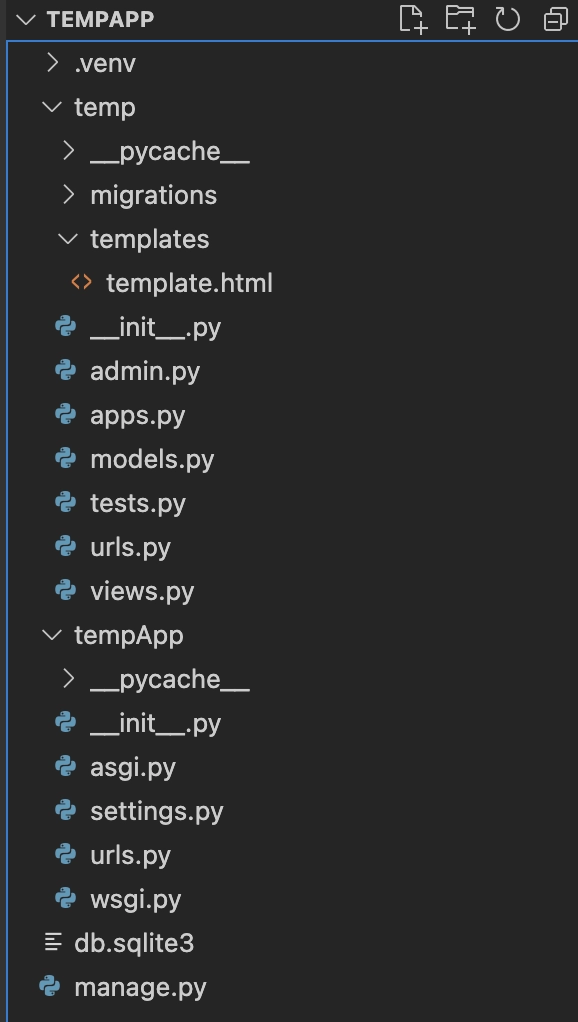
Note: After following the above steps, your file structure should look like this.
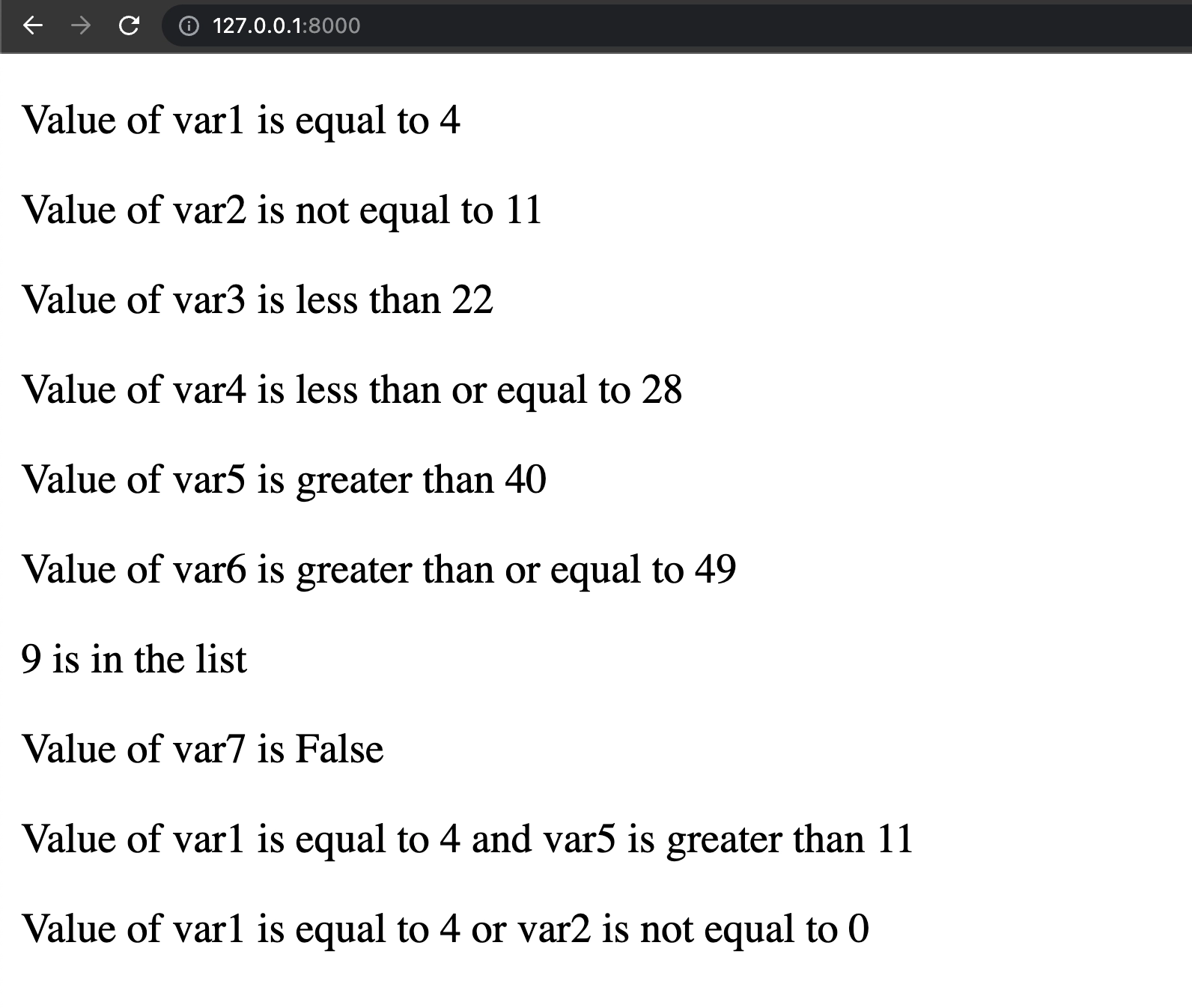
Output
Start the Django development server by running the following command on your terminal to attain an output.
python manage.py runserver
A link should be displayed on your terminal. Click on the link to see the template.
Here we can see how the templates work based on the above explanation.
Example:
var1 = 4 = val1
Therefore, in the template.html, when we give
......
{% if var1 == 4 %}
<p>Value of var1 is equal to 4</p>
{% endif %}
......
We get the output “Value of var1 is equal to 4”.
Frequently Asked Questions
What is a Django template?
It is a text file that is written using Django templating language. It gets rendered along with a set of variables defined in its context that can be used for updating the view the template will generate.
How does Django achieve scalability?
The Django web nodes do not have any stored state. This allows it to scale horizontally by firing up more web nodes when required.
What are templates in Django?
Templates are a way of creating dynamic Html pages with the help of python.
Are tags and filters the same?
No, they are not the same. With the help of filters, we can change the value, but we cannot do this using tags.
What are some other tags in Django templates?
Some other essential tags in Django are firstof, now, url, load, etc.
Conclusion
Congratulations on getting through this far! You saw how Django templates use template tags to manipulate the view. The examples clearly showed how we could use boolean operators in Django, like ==, !=, >=, < is, in, not inside template tags. To learn more about Django, you can go through the following blogs:







 7+ registered

