Implementation
The first step to getting started with ScrollView Widget is that you need first to import it.
from kivy.uix.carousel import Carousel
Basic Method
1. import kivy App
2. import Gridlayout
3. import Carousel
4. Create as much as widget class as needed
5. create the App class
6. return the widget/layout etc class
7. Create Carousel.kv file:
7.1 Create button( or what is needed)
7.2 Arrange the on_release / on_press function
8. Run an instance of the class
Python program
from kivy.app import App
from kivy.uix.carousel import Carousel
from kivy.lang import Builder
from kivy.uix.image import AsyncImage

class CarouselApp(App):
   def build(self):
       carousel = Carousel(direction='right')
       for i in range(4):
           src = [
               'https://images.unsplash.com/photo-1469474968028-56623f02e42e?ixlib=rb-1.2.1&ixid=MnwxMjA3fDB8MHxwaG90by1wYWdlfHx8fGVufDB8fHx8&auto=format&fit=crop&w=874&q=80',
               'https://images.unsplash.com/photo-1501854140801-50d01698950b?ixlib=rb-1.2.1&ixid=MnwxMjA3fDB8MHxwaG90by1wYWdlfHx8fGVufDB8fHx8&auto=format&fit=crop&w=975&q=80',
               'https://images.unsplash.com/photo-1447752875215-b2761acb3c5d?ixlib=rb-1.2.1&ixid=MnwxMjA3fDB8MHxwaG90by1wYWdlfHx8fGVufDB8fHx8&auto=format&fit=crop&w=870&q=80',
               'https://images.unsplash.com/photo-1441974231531-c6227db76b6e?ixlib=rb-1.2.1&ixid=MnwxMjA3fDB8MHxwaG90by1wYWdlfHx8fGVufDB8fHx8&auto=format&fit=crop&w=871&q=80'
           ]
           for img in src:
               image = AsyncImage(source=img, allow_stretch=True)
               carousel.add_widget(image)

       return carousel


CarouselApp().run()

You can also try this code with Online Python Compiler
Kivy File
<CarouselApp>:
   Carousel:
       direction: 'right'
       AsyncImage:
           source: 'https://images.unsplash.com/photo-1469474968028-56623f02e42e?ixlib=rb-1.2.1&ixid=MnwxMjA3fDB8MHxwaG90by1wYWdlfHx8fGVufDB8fHx8&auto=format&fit=crop&w=874&q=80'
       AsyncImage:
           source: 'https://images.unsplash.com/photo-1501854140801-50d01698950b?ixlib=rb-1.2.1&ixid=MnwxMjA3fDB8MHxwaG90by1wYWdlfHx8fGVufDB8fHx8&auto=format&fit=crop&w=975&q=80'
       AsyncImage:
           source: 'https://images.unsplash.com/photo-1447752875215-b2761acb3c5d?ixlib=rb-1.2.1&ixid=MnwxMjA3fDB8MHxwaG90by1wYWdlfHx8fGVufDB8fHx8&auto=format&fit=crop&w=870&q=80'
       AsyncImage:
           source: 'https://images.unsplash.com/photo-1441974231531-c6227db76b6e?ixlib=rb-1.2.1&ixid=MnwxMjA3fDB8MHxwaG90by1wYWdlfHx8fGVufDB8fHx8&auto=format&fit=crop&w=871&q=80'
You can also try this code with Online Python Compiler
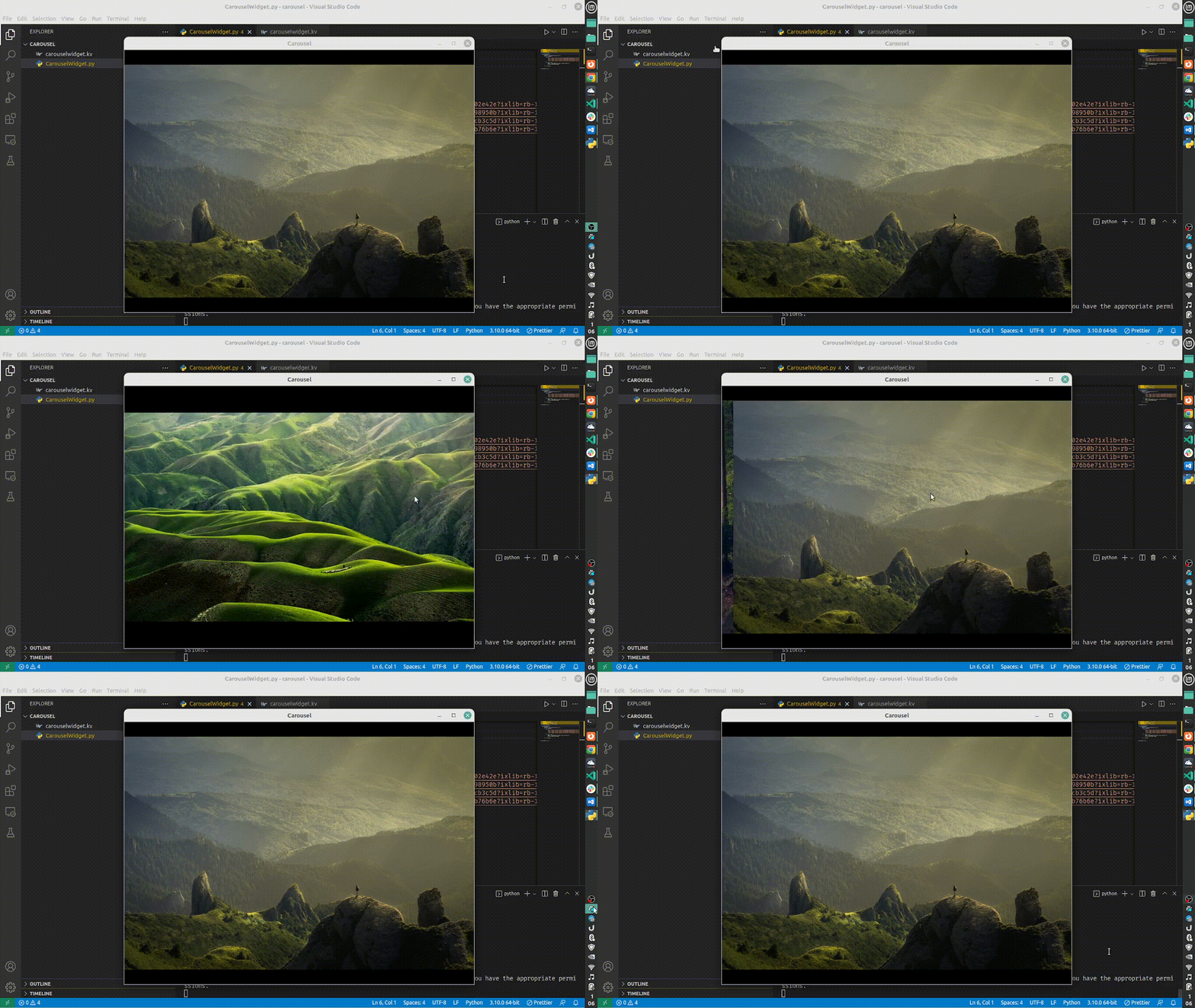
App Output

Frequently Asked Questions
What are Kivy widgets?
In Kivy, a Widget is the fundamental component of a graphical user interface. It comes with a canvas on which you may draw on the screen. It takes in information and responds to it.
What is Kivy Uix, exactly?
A module is kivy.uix. Widgets are part of the User Experience and are graphical user interface components. The kivy.uix module contains classes for creating and managing Widgets.
Is Kivy good for Android?
Kivy is a great tool for developing Android Apps. Kivy is an excellent tool for creating Android applications. The nicest thing about kivy is that it is cross-platform, which means that the same project can be used to create apps for iOS, Android, Windows, and OS X.
It does, however, have certain performance drawbacks (as do most cross-platform tools like unity, cocos etc).
What is Kivy's relative layout?
Relative Layout: This layout allows you to assign children relative coordinates. Use the FloatLayout if you want absolute placement. The RelativeLayout class is similar to the FloatLayout class, with the exception that its child widgets are positioned relative to the layout.
Conclusion
If you have reached here that means, you really enjoyed this article. This article covers the implementation of the Carousel widget in kivy with code snippets and their use cases. You might be interested in articles such as Floating Layout in Kivy, Carousel Layout in Kivy, Button Action in Kivy, Button Color in Kivy and Slider widget in Kivy.
Do upvote our blog to help other ninjas grow, and head over to our practice platform Coding Ninjas Studio to practise top problems, attempt mock tests, read interview experiences, and much more.
Happy Learning!








 1+ registered

