Do you think IIT Guwahati certified course can help you in your career?
Introduction
We will discuss gridbaglayout in java, gridbaglayout constructors, and examples of gridbaglayout in java. We will start with a brief introduction to gridbaglayout in java and swing class.
One of the most intricate, potent, and challenging layout managers available in Java is GridBagLayout. The components are aligned either vertically, horizontally, or along the baseline by GridBagLayout. Depending on the need, the components may or may not have the same width. These components are connected to the GridBagConstraints instance, where the constraints' objects aid in organizing the component displays on the grid. The java.awt package contains GridBagLayout.
Java Swing
A huge collection of widgets are included in the toolkit Java Swing, which is used to build graphical user interfaces (GUIs) in Java. It includes a number of packages for developing Java-rich desktop applications and is a component of the Java Foundation Classes (JFC). Trees, picture buttons, tabbed windows, sliders, toolbars, color pickers, tables, and text areas are just a few of the built-in tools Swing supports for presenting HTTP or rich text format (RTF). Due to their complete Java development, Swing components are platform-independent.
Class GridBagLayout extends Object
Implements LayoutManager, Serializable
Constructor in gridBaglayout
GridBagLayout () is a GridBagLayout constructor that helps to create a grid architecture manager. First, we build a GridBagLayout class object with the help of a no-argument constructor.
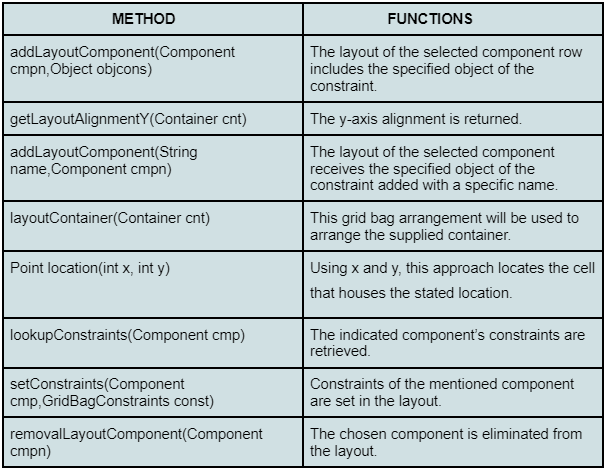
GridBagLayout methods
There are various methods in GridBagLayout which are described below
Now let’s understand gridBaglayout in java with the help of some examples
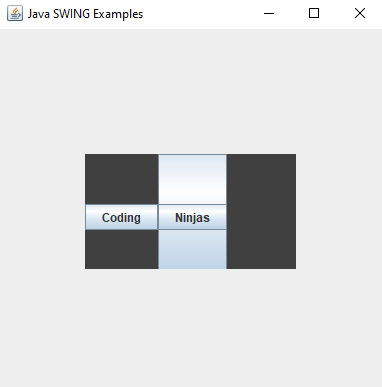
Java GridBagLayout() constructor
//program to implement the GridBaglayout in java with constructor.
import java.awt.*;
import java.awt.event.*;
import javax.swing.*;
public class SwingLayoutDemo
{
   private JFrame mainFrame;
   private JLabel headerLabel;
   private JLabel statusLabel;
   private JPanel controlPanel;
   private JLabel msglabel;

     public SwingLayoutDemo()
     {
      preparingtable();
     }
     public static void main(String[] args)
     {
      SwingLayoutDemo swingLayoutDemo = new SwingLayoutDemo();
      swingLayoutDemo.showGridBagLayoutDemo();
     }
     private void preparingtable()
     {
      mainFrame = new JFrame("Java SWING Examples");
      mainFrame.setSize(400,400);
      mainFrame.setLayout(new GridLayout(3, 1));

      headerLabel = new JLabel("",JLabel.CENTER );
      statusLabel = new JLabel("",JLabel.CENTER);
      statusLabel.setSize(350,100);

      mainFrame.addWindowListener(new WindowAdapter()
      {
         public void windowClosing(WindowEvent windowEvent)
         {
            System.exit(0);
         }
      });
      controlPanel = new JPanel();
      controlPanel.setLayout(new FlowLayout());

      mainFrame.add(headerLabel);
      mainFrame.add(controlPanel);
      mainFrame.add(statusLabel);
      mainFrame.setVisible(true);
   }
   private void showGridBagLayoutDemo()
   {
      JPanel panel = new JPanel();
      panel.setBackground(Color.darkGray);
      panel.setSize(300,300);
      GridBagLayout layout = new GridBagLayout();

      panel.setLayout(layout);
      GridBagConstraints bag = new GridBagConstraints();

      bag.fill = GridBagConstraints.HORIZONTAL;
      bag.gridx = 0;
      bag.gridy = 10;
      panel.add(new JButton("Coding"),bag);

      bag.gridx = 50;
      bag.gridy = 10;
      panel.add(new JButton("Ninjas"),bag);

      bag.fill = GridBagConstraints.HORIZONTAL;
      bag.ipady = 100;
      bag.gridx = 50;
      bag.gridy = 10;
      panel.add(new JButton("Code"),bag);

      bag.gridx = 150;
      bag.gridy = 20;
      panel.add(new JButton("studio"),bag);

      controlPanel.add(panel);
      mainFrame.setVisible(true);
   }
}
GridBagLayout is a flexible layout manager in Java that arranges components in a grid, allowing custom sizes, alignments, and spacings for each cell.
What is GridLayout in Java?
GridLayout is a simple layout manager in Java that arranges components in a uniform grid, with equal-sized rows and columns.
What is the difference between GridBagLayout and GridLayout?
GridBagLayout offers flexibility with varying cell sizes and alignments, while GridLayout creates a uniform grid with fixed cell sizes.
Conclusion
We have extensively discussed gridBaglayout in java, gridBaglayout constructors, swing class in java, and examples of gridBaglayout. We started with a brief introduction to gridBaglayout in java and swing class then constructors in gridBaglayout, declaration of gridBaglayout.






 7+ registered

