Do you think IIT Guwahati certified course can help you in your career?
Introduction 📚
GWT (Google Web Toolkit) is an open-source framework in Java for making software development easy. With GWT, you can develop and debug AJAX (Asynchronous JavaScript And XML (Extensible Markup Language)) applications in the Java language using the Java development tools. When you deploy your application, the GWT compiler translates your Java application to browser-compliant JavaScript and HTML(HyperText Markup Language).
In this blog, we will study about GWT MenuBar Widget of this toolkit, its class declaration, constructors, and methods.
What is GWT MenuBar Widget❓
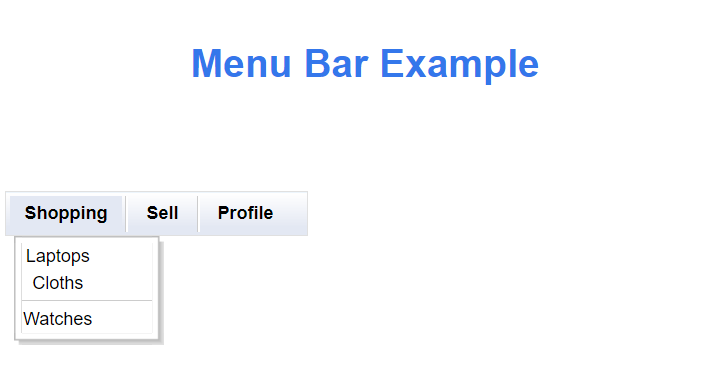
GWT MenuBar Widget is a menu bar containing any number of menu items, each of which can fire a Scheduler.ScheduledCommand or open a cascaded menu bar.
Class Declaration
public class MenuBar extends Widget implements PopupListener, HasAnimation, HasCloseHandlers <PopupPanel>
You can also try this code with Online Java Compiler
Creates an empty menu bar that uses the specified ClientBundle for menu images.
MenuBar ( MenuBar.Resources resource)
Creates an empty horizontal menu bar that uses the specified ClientBundle for menu images.
Class Methods📝
After learning about the types of constructors used in MenuBar Widget, we will now learn about methods commonly used in GWT MenuBar Widget.
protected void onDetach():When a widget is detached from the browser’s document this method is invoked.
MenuItem addItem(SafeHtml, MenuBar m):This method is used for adding new menu items to the menu bar for opening the selected menu item.
MenuItemSeperator addSeparator():For separating different sections of menu items this method adds a thin line to the MenuBar.
void clearItems():As the method name suggests this method is used for removing all items from the menu bar.
MenuItem addItem(MenuItem item):For adding new items to the menu bar addItems method is called.
void onBrowserEvent(Event event):Whenever a browser even is received this method is invoked by default.
void selectItem(MenuItem item):Used for selecting given MenuItem, which is the direct child of specified MenuBar.
private updateSubmenuIcon(MenuItem E):Show or hide the icon used for items with a submenu.
protected MenuItem getSelectedItem():This method returns the currently highlighted MenuItem by the user.
Inherited Methods📝
We have already seen many commonly used methods of the MenuBar Widget. All the methods can not be implemented for every class, so a few methods of this class are inherited by some other classes.
This GWT MenuBar Widget class inherits methods from the following classes −
com.google.gwt.user.client.ui.UIObject:It is the superclass of all UI (User-Interface) objects. It simply wraps a DOM (Domain Object Model) element, and it cannot receive events.
com.google.gwt.user.client.ui.Widget:It is the base class for the majority of UI objects. The widget class supports receiving events from the browser and adding them to panels.
java.lang.Object: It is the root class of every class. All the objects implement the methods of this object class.
GWT MenuBar Example
This example will walk you through some basic GWT MenuBar Widget usage procedures.
Create a project with the name ‘HelloWorld’ under your package(com.your_email_id)
Create files ‘HelloWorld.gwt.xml’, ‘HelloWorld.css’, ‘HelloWorld.html’, and ‘HelloWorld.java’
Compile and run the GWT application.
Here is what the changed module descriptor contains( src/com.example/ HelloWorld.gwt.xml):
<?xml version = "1.0" encoding = "UTF-8"?>
<module rename-to = 'helloworld'>
   <!-- Inherit the core Web Toolkit stuff.                        -->
   <inherits name = 'com.google.gwt.user.User'/>

   <!-- Inherit the default GWT style sheet.                       -->
   <inherits name = 'com.google.gwt.user.theme.clean.Clean'/>

   <!-- Specify the app entry point class.                         -->
   <entry-point class = 'com.codingninjas.client.HelloWorld'/>

   <!-- Specify the paths for translatable code                    -->
   <source path = 'client'/>
   <source path = 'shared'/>

</module>
The changed Style Sheet file ‘HelloWorld.css’ content is listed below:
GWT is a development toolkit used to create and improve sophisticated browser-based apps.
What is a GWT client?
GWT contains a number of HTTP client classes that simplify making custom HTTP requests to your server and optionally processing a JSON- or XML-formatted response. GWT includes a set of HTTP client classes that allow your application to make generic HTTP requests.
How does the GWT compiler work?
The heart of Google Web Toolkit is a compiler that helps in converting Java sources into JavaScript and transforming your working Java app into an equivalent JavaScript app.
What are the benefits of GWT?
GWT provides a library of widgets for many tasks required in an application. It also generates browser-specific and optimized JavaScript code. Moreover, using GWT, one can easily integrate with Maven and Junit.
What is the GWT MenuBar Widget?
The MenuBar Widget is used to create any number of menu items, each of which can either open a cascaded menu bar or fire a Command.
Conclusion
In this article, we have covered the GWT MenuBar Widget. We have also discussed its class declaration, constructors, and class and inherited methods.
If you would like to learn more, check out our articles on-












 1+ registered

