Get a skill gap analysis, personalised roadmap, and AI-powered resume optimisation.
Introduction
In the world of data science and analytics, you might have heard some great things about Spark SQL. In the Spark module, we have Spark SQL, which combines SQL, Dataframes and integrates with the Spark ecosystem to give us a complete solution to data analytics.
In this blog, we will discuss Apache Spark SQL, its features, and various libraries in Spark SQL, and we will also implement some simple queries using Spark SQL.
What is Apache Spark SQL?
Ninjas, you might be wondering about Spark SQL. Spark SQL formerly originated in Apache hive but was later on integrated into Spark stack. It is a module of Spark that is used for structured data processing.
The best part about Spark SQL is that data frames are used as programming abstractions, making the SQL queries efficient. It is the most popular open-source framework used for big calculations in datasets.
Features of Spark SQL
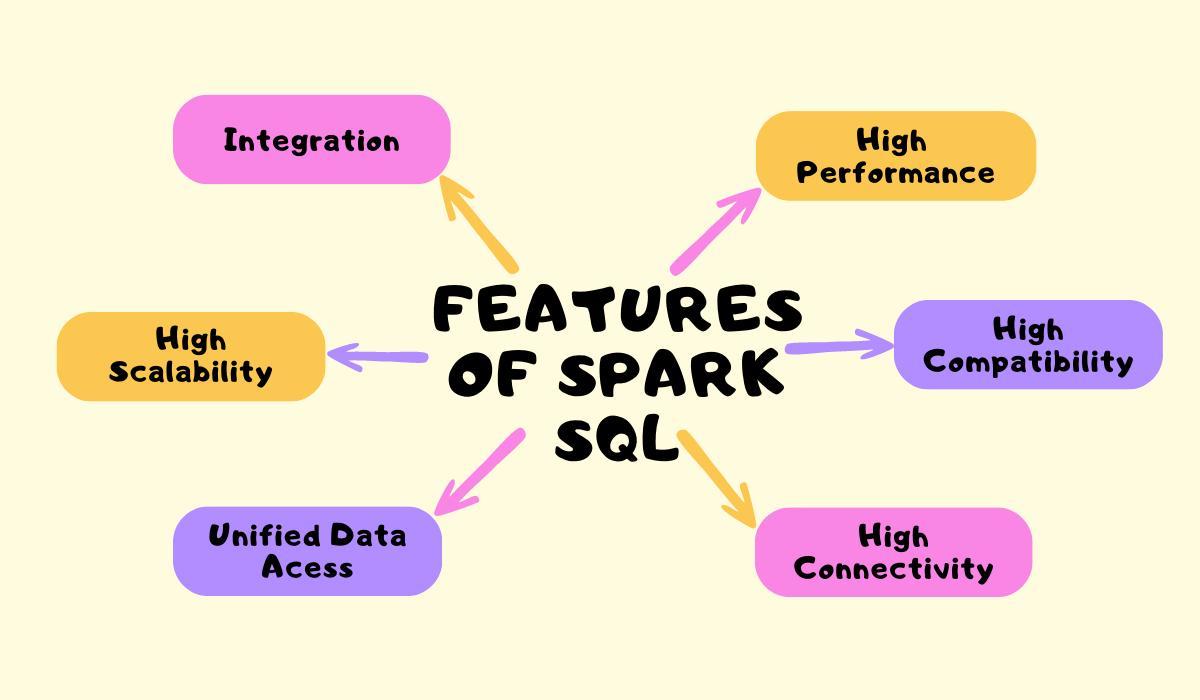
Let us look at some of the features of Spark SQL.
It integrates with the Spark ecosystem to give us end-to-end solutions for data processing.
It provides us with an interface for querying data in programming languages such as Java, Python, and R.
Spark SQL supports various types of data formats, such as JSON and Hive tables.
Hive queries can also be run on Spark SQL without needing to make any changes.
Spark SQL also gets integrated easily with business intelligence tools like Tableau and Power BI.
It uses a cost-based optimizer for code generation and efficient storage, which increases the performance and scalability of any Spark SQL queries.
There are four libraries available in Spark SQL. Let us understand each of them along with examples.
Data Source API
Spark SQL has a data source API that can be used to store and load the data. It also supports various formats and storage systems. These provide API for different programming languages, including Python, Java and R.
Now let us look at the examples of various formats Spark SQL supports.
Avro
CSV
Elastic Search
Cassandra
Various storage systems that Spark SQL supports include the following.
HDFS
HIVE Tables
MySQL
DataFrame API
It is a collection of data into various columns similar to a relational database and tables. DataFrame API can also be accessed from SQL and Hive queries. These queries can be used to construct DataFrame API.
Let us look at some of the examples of DataFrame API in Spark SQL.
We can create DataFrame from different sources, such as CSV and JSON. We use spark.read.csv() to read CSV files in Spark SQL.
We can use the filter() condition to select the rows matching our conditions.
The sql() method is used in Spark SQL to execute the SQL queries and returns the result as a DataFrame.
SQL Service
SQL service is also a way of working with structured data in Spark SQL. We create the DataFrame and execute SQL queries for efficient data analysis. We can also manage the SQL queries using SQL service in Spark SQL.
Let us look at an example of using this library in Spark SQL.
# Executing SQL queries using the SQL Service
result = spark.sql("SELECT Name, Age FROM people WHERE Age > 30")
SQL Interpreter and Optimizer
It is the newest library addition in Spark SQL. It is based on functional programming in Scala. It gives a framework for changing trees for analysis, planning and optimization, which generally helps in better performance and scalability as it reduces query time.
While executing SQL queries, this library performs various kinds of operations, such as query planning and column pruning, to reduce the query time.
Implementing Queries using Spark SQL
Let us look at the steps to implement Spark SQL in Python.
Step 1: We will install all the required libraries and create a SparkSession, which allows us to run SQL queries.
In this step, we import the SparkSession class from pyspark.sql, and if not previously created, we create a new SparkSession with the application name Spark SQL Example.
Step 2: Now, we will load the data into Spark DataFrame. We can load data from various sources such as CSV, JSON and Parquet.
data = spark.read.csv("dataset.csv", header=True, inferSchema=True)
The header parameter tells us that the first row of CSV files contains the column names. Spark SQL uses the first row as the column name when we set the header to true.
The infer parameter automatically understands the data type of columns in our dataset when we set it to true.
Step 3: We will register the Spark DataFrame as a table in this step.
data.createOrReplaceTempView("table_name")
This code snippet creates a temporary View “table_name” that can be easily queried using SQL.
Step 4: Now, we will run the query using the spark.sql() method.
result = spark.sql("SELECT * FROM table_name WHERE column_name = 'xyz'")
spark.sql() contains the SQL query we need to run inside the brackets. Now we will show the query results using the result.show() method.
Don't worry if you haven't understood the above steps. We will make the process clear for you by taking an Example.
Example:
We have a sample Employees data which tells about the salaries of the employees in a company.
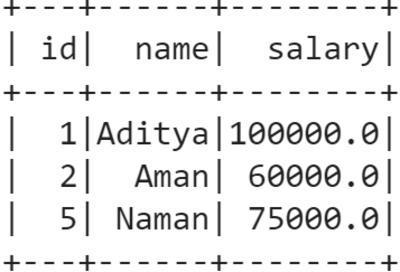
Now we will try to use Spark SQL to run SQL query to get the employees' names whose salaries are greater than 50000.
# step 1
from pyspark.sql import SparkSession
spark = SparkSession.builder \
    .appName("Spark SQL Example") \
    .getOrCreate()
# step 2
data = spark.read.csv('employees.csv', header=True, inferSchema=True)
# step 3
data.createOrReplaceTempView("employees")
# step 4
result = spark.sql("SELECT * FROM employees WHERE salary > 50000")
result.show()
Explanation
We can clearly see from the employees table that the names of the employees whose salaries are greater than 50000 are Aditya, Aman and Naman.
It is a module of Spark that is used for structured data processing. The best part about Spark SQL is that data frames are used as programming abstractions which makes the SQL queries efficient.
What are the benefits of using Spark SQL?
Some benefits of using Spark SQL include Unified data access, Wide support for data sources, and High compatibility.
What is the difference between DataFrame API and SQL queries?
The DataFrame API provides us with a programmatic interface for data manipulation. While SQL queries provide a similar syntax to SQL for interacting with data.
Can we access data from external databases in Spark SQL?
We can read and modify data from external databases through JDBC connectors in Spark SQL.
Does Spark SQL support user-defined functions (UDFs)?
Yes, Spark SQL supports UDFs which are used in SQL queries and DataFrames.
Conclusion
This article discusses the topic of Apache Spark SQL with a detailed explanation of its libraries. we have discussed Apache Spark SQL, its features, and various libraries in Spark SQL and implemented some simple queries using Spark SQL.
We hope this blog has helped you enhance your knowledge about Spark SQL. If you want to learn more, then check out our articles.
But suppose you have just started your learning process and are looking for questions from tech giants like Amazon, Microsoft, Uber, etc. In that case, you must look at the problems, interview experiences, and interview bundles for placement preparations.
However, you may consider our paid courses to give your career an edge over others!









 1+ registered

