Working Example
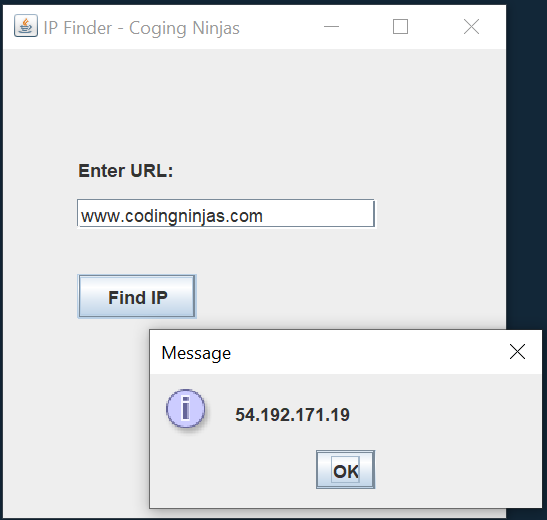
Here is an example to demonstrate the working of IP Finder in Java. It is implemented using java Swing.
import javax.swing.*;
import java.awt.event.*;
import java.net.*;

public class IPFinder extends JFrame implements ActionListener {
	JLabel l;
	JTextField text;
	JButton b;

	IPFinder() {
		super("IP Finder - Coging Ninjas");
		l = new JLabel("Enter URL:");
		l.setBounds(50, 70, 150, 20);

		text = new JTextField();
		text.setBounds(50, 100, 200, 20);

		b = new JButton("Find IP");
		b.setBounds(50, 150, 80, 30);
		b.addActionListener(this);
		add(l);
		add(text);
		add(b);
		setSize(350, 350);
		setLayout(null);
		setVisible(true);
	}

	public void actionPerformed(ActionEvent e) {
		String url = text.getText();
		try {
			InetAddress iadds = InetAddress.getByName(url);
			String ip = iadds.getHostAddress();
			JOptionPane.showMessageDialog(this, ip);
		} catch (UnknownHostException e1) {
			JOptionPane.showMessageDialog(this, e1.toString());
		}
	}

	public static void main(String[] args) {
		new IPFinder();
	}
}

You can also try this code with Online Java Compiler
Output
Frequently Asked Questions
What is an IP address in Java?
The IP address is a 32-bit or 128-bit unsigned number used by the IP, a lower-level protocol on which protocols like UDP & TCP are built. The InetAddress class represents an IP(Internet Protocol) address in Java.
How do I find the IP address of a link?
The most direct way to find the IP address of a website is to use our DNS Lookup Tool. Go to the DNS Lookup Tool, type the website URL into the text entry, and select Lookup. The search yielded an array of IPv4 addresses that differ from the IPs displayed using the other methods.
What's the IP of a website?
An IP address is a string of numbers divided by periods that acts as a unique identifier for gadgets on the internet or a local network. IP or "Internet Protocol" is the set of rules governing the format of data sent via the internet or a local network.
Can websites see your IP address?
Websites can't trace unique IP addresses to your physical home or business address. Rather, websites can tie your IP address to your internet service provider, city, region, and even your ZIP code. That's why you see ads for local businesses online.
Can you hack a computer with an IP address?
The internet uses ports & your IP address to connect. Since there are thousands of ports for every IP address, a hacker having your IP can try all the ports to brute-force a connection, taking over your device and stealing your information.
Conclusion
This article gives information on the IP Finder in Java. We see how one can use IP Finder in Java and find the IP address of any computer.
Also read,
Refer to our guided paths on Coding Ninjas Studio to learn more about DSA, Competitive Programming, JavaScript, System Design, etc. Enroll in our courses and refer to the mock test and problems available. Take a look at the interview experiences and interview bundle for placement preparations. Also, Check our CN Library for free online coding resources.
Do upvote our blog to help other ninjas grow.
Happy Learning!









 1+ registered

