

Table of contents
1.
Introduction
2.
Box Class
2.1.
Constructors
2.2.
Common Methods
2.3.
Usage
3.
Implementation
4.
Frequently Asked Questions
4.1.
What is JavaFX used for?
4.2.
What is a Box in JavaFX?
4.3.
How do I add a box in JavaFX?
5.
Conclusion
Last Updated: Mar 27, 2024
Medium

JavaFX Box

Career growth poll
Do you think IIT Guwahati certified course can help you in your career?

Introduction

JavaFX is a collection of media and graphics packages that provide developers the ability to create, design, test, debug, and deploy rich client applications that work consistently on various platforms.

In this blog, we will discuss the JavaFX Box class present in the JavaFX framework. We will look into the different types of constructors and methods present inside the Box class. We will also discuss how we can use these different methods inside our code.

Javafx logo

Source: Wikipedia

Box Class

The Box class is a part of JavaFX. The Box class is used in the JavaFX application to draw a box. We can create 3D shapes with rectangular faces using the box. The box is centered at the origin. The following graphic shows a cube's (box) height, width, and depth.
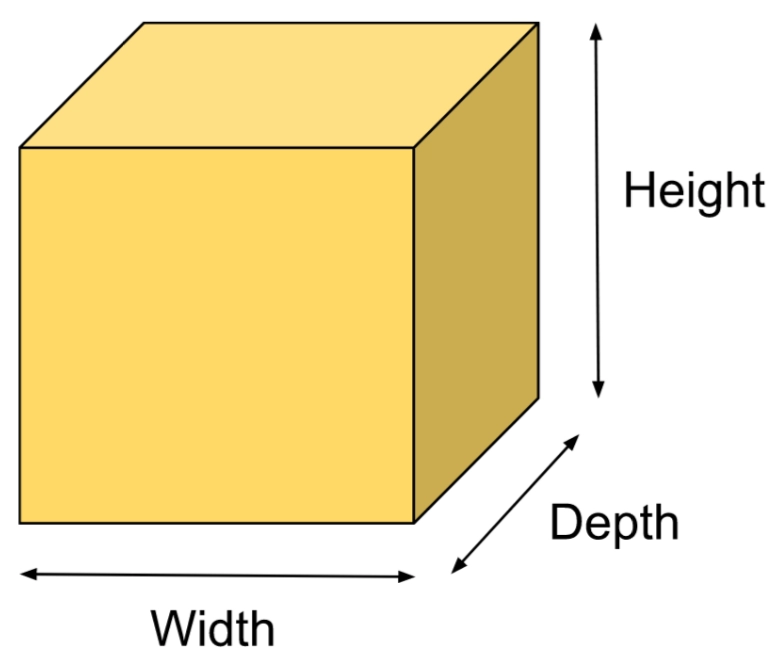
Description of Dimensions


The box is a part of the JavaFX framework and the javafx.scene.shape.Box class contains all the methods required for our goal.

Constructors

There are two different types of constructors available in theJavaFX box:

  1. public Box(): Creates an empty Box class instance. It requires setters to set values of height, width, and depth.
     
  2. public Box(double width_value, double height_value, double depth_value): It is the parameterized constructor and allows us to pass width, height, and depth values in its constructor.

Common Methods

The class contains various commonly used methods that are described below.

  1. setDepth(double val): It is used to set the depth of the box. It represents the Z-dimension.
     
  2. setHeight(double val): It is used to set the height of the box. It represents the Y-dimension.
     
  3. setWidth(double val): It is used to set the height of the box. It represents the X-dimension.

Usage

We got some ideas about JavaFX Box class and the different functions and constructors available in it. But where do we actually use the Box class in our JavaFX application? Whenever we want to draw boxes in our application we use JavaFX Box class. The Box class is used as the layout in JavaFX applications. Now, let’s see the implementation.

Implementation

We’ll look at the program in which we’ll implement the JavaFX box object.

import javafx.application.Application;
import javafx.stage.Stage;
import javafx.scene.Group;
import javafx.scene.Scene;
import javafx.scene.PerspectiveCamera;
import javafx.scene.paint.Color;
import javafx.scene.shape.Box;
import javafx.scene.paint.PhongMaterial;

public class BoxUI extends Application {  

    @Override  
    public void start(Stage primaryStage) throws Exception 
    {
        // create a box
        Box box1 = new Box();  
        box1.setLayoutX(50);
        box1.setLayoutY(50);

        //Setting properties for the box 
        box1.setWidth(200);
        box1.setHeight(200);
        box1.setDepth(400);  

        // translate the box to a position
        box1.setTranslateX(200);
        box1.setTranslateZ(200);  
        box1.setTranslateY(200);
        PhongMaterial blueStuff = new PhongMaterial();

        //set the color
        blueStuff.setDiffuseColor(Color.YELLOW);
        box1.setMaterial(blueStuff);

        // create a perspective camera
        // to view the 3D shape of the container.
        PerspectiveCamera camera = new PerspectiveCamera();  
        camera.setTranslateY(100);
        camera.setTranslateX(100);  
        camera.setTranslateZ(50);  
          
         Group box = new Group();  
         box.getChildren().addAll(box1);
         box.getChildren().addAll();  

         // create a scene   
         Scene scene = new Scene(box,600,400);  
         scene.setCamera(camera);
         
         // set the scene
         primaryStage.setScene(scene);  

         //Setting title to the Stage 
         primaryStage.setTitle("Box Example"); 

         //displays the content 
         primaryStage.show();  
        }

    public static void main(String[] args) {
        Application.launch(args);
    }
}
You can also try this code with Online Java Compiler
Run Code


Execution

To execute the above program. You can follow the given steps:

  1. Open the terminal in the same folder where you have saved your source code.
     
  2. Enter the below code and hit enter.
    javac --module-path path/to/your/javaFx/modules --add-modules javafx.fxml,javafx.controls filename.java
    After you hit enter a new file will automatically be generated namely yourFilename.class
     
  3. Now, enter the below command and hit enter to execute the above program.
    java --module-path path/to/your/javaFx/modules --add-modules javafx.fxml,javafx.controls filename.java
     
  4. You have successfully executed the JavaFX program.
     

Output

javafx box output

Frequently Asked Questions

What is JavaFX used for?

Rich client applications can be created, tested, debugged, and deployed using JavaFX, a set of graphics and media packages, across various platforms.
 

What is a Box in JavaFX?

A Box is a 3D geometry primitive with a specified depth, width, and height. It is centered at the start.
 

How do I add a box in JavaFX?

The class javafx.scene.shape.Box represents a box in JavaFX. To create the box, we only need to instantiate this class.

Conclusion

In this article, we have extensively discussed the JavaFX Box Class present inside JavaFX Framework. We have seen different constructors to initialize the JavaFX Box object. Also, we have seen various methods available inside the class along with the implementation.

If you think this blog has helped you enhance your knowledge about JavaFx Box and if you would like to learn more, check out our articles JavaFXJavaFX Scale TransitionJavaFX Arc, and JavaFX Fill Transition.

Refer to our Guided Path on Coding Ninjas Studio to upskill yourself in Data Structures and AlgorithmsCompetitive ProgrammingJavaScriptSystem Design, and many more! If you want to test your competency in coding, you may check out the mock test series and participate in the contests hosted on Coding Ninjas Studio! But suppose you have just started your learning process and are looking for questions asked by tech giants like Amazon, Microsoft, Uber, etc. In that case, you must look at the problemsinterview experiences, and interview bundle for placement preparations.

Do upvote our blogs if you find them helpful and engaging!

Happy Learning!

Live masterclass


