




Introduction
JSlider is a class that is available in Java Swing component. We will see how we can import this class into our code and utilise it. But before learning about that, let us have a brief introduction to Java Swing for a better understanding of the topic.

Java Swing is a GUI widget toolkit part of the java foundation class. It contains various components or packages like buttons, text fields, and many more that we can utilise to create a graphical user interface for window-based applications. It is lightweight and platform-independent. Swing packages provide classes we can use, such as JDesktopPane, JButton, JSlider, and many more.
Syntax to import Swing:
Import java.swing.*; // (* includes all the classes it contains in swing package)
JSlider
The java JSlider is a class that we can import from the package java swing when we add a slider with graphically integrated values that can be selected within the internal values. And there are many methods available in the JSlider that we can use to implement different variations in the slider according to our demands.
Constructors
Constructors that we can use to initialise a slider in our frame.
SNO. |
METHODS AND DESCRIPTION |
1 |
JSlider() This makes a slider with value 0 to 100 with initial value of 50 |
2 |
JSlider(BoundedRangeModel bm) This constructor create a horizontal using the BoundedRangeModel |
3 |
JSlider(int orientation) Using specified orientation it create a slider from value 0 to 100 with initial value 50 |
4 |
JSlider(int min, int max) create a slider horizontal with the min and max value specified on the slider and initial value is average of both min and max. |
5 |
JSlider(int min,int max,int value) A horizontal slider with specified min , max and value |
6 |
JSlider(int orient , int min, int max, int value) A slider with specified orientation,min , max and initial value |
Implementation
Program 1
import javax.swing.event.*;
import java.awt.*;
import javax.swing.*;
class Main extends JFrame {
// main class
public static void main(String[] args)
{
// create a new frame object with frametitle
JFrame frameobject = new JFrame("frame-CodingNinjas");


// create a object
Main mainclassobject = new Main();


// create a panel
JPanel panel = new JPanel();


// create a slider object with no argument
JSlider sliderobject = new JSlider();


// add slider to panel
panel.add(sliderobject);
                        // adding panel in the frame
frameobject.add(panel);


// set the size of frame
frameobject.setSize(400, 400);
frameobject.setVisible(true);
}
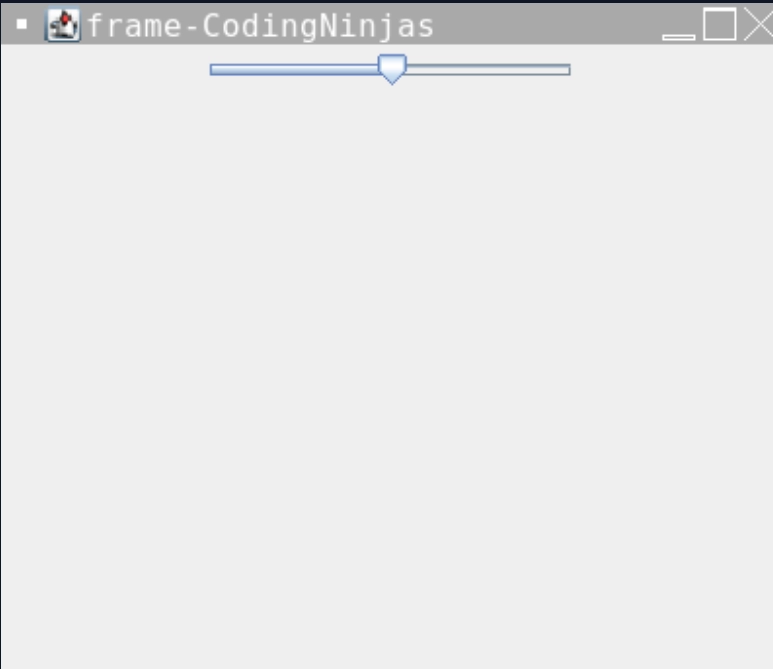
}default one with the slider() constructor.
Output
Program 2
import javax.swing.event.*;
import java.awt.*;
import javax.swing.*;
class Main extends JFrame implements ChangeListener {
  static JLabel label;
  static JPanel panel;
  static JSlider slider;
  static JFrame frameobject;
// main class
public static void main(String[] args)
{
// create a new frame
frameobject = new JFrame("frame-CodingNinjas");


// create a object
Main object = new Main();


// create label
label = new JLabel();


// create a panel
panel = new JPanel();


// create a slider
slider = new JSlider(0, 100, 50);


// paint the ticks and tracks
slider.setPaintTrack(true);
slider.setPaintTicks(true);
slider.setPaintLabels(true);


// set spacing or markings in the slider
slider.setMajorTickSpacing(20);
slider.setMinorTickSpacing(5);


// setChangeListener
slider.addChangeListener(object);


// add slider to panel
panel.add(slider);
panel.add(label);


frameobject.add(panel);


// set the text of label
label.setText("value of Slider is =" + slider.getValue());


// set the size of frame
frameobject.setSize(300, 300);


frameobject.show();
}
// if JSlider value is changed
public void stateChanged(ChangeEvent e)
{
label.setText("value of Slider is =" + slider.getValue());
}
}
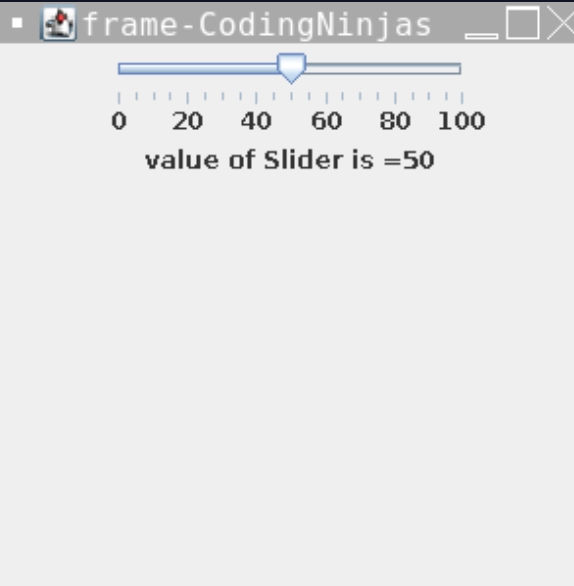
The above program implements the slider class with its inbuilt methods, which marks the values on the slider, and also, we can see the current value on the frame. Methods setMajorTickSpacing() and setMinorTickSpacing() allows us to add the scale value in the slider. Function stateChanged() tracks the slider's current value with the knob and prints it on the frame we can see in the output.
Output
Methods
1.setOrientation(int n): changes the slider's orientation to the provided value.
2. setValue(int v): changes the slider's value to the provided value.
3. setPaintTicks(boolean b): this function determines whether or not the ticks are painted on the slider.
4. setPaintTrack(boolean b): this function determines whether or not the track is painted on the slider.
5. setMajorTickSpacing(int n): sets the major tick spacing.
6. setMinorTickSpacing(int n): specifies the minor tick spacing.
7. setFont(Font f): change the font of the slider's text.
8. setMaximum(int m): set the slider's maximum value.
9. setMinimum(int m): sets the slider's minimum value.
10.updateUI(): Resets the value of the UI property to the current look and feel.



 1+ registered

