Do you think IIT Guwahati certified course can help you in your career?
Introduction
JList in Java is one of the Java Swing components whose role is to display a list of elements. These swing components are the foundation of an application. These components include buttons, sliders, list boxes, checkboxes, etc.
The JList in Java lets the user choose one or more items from a depicted list. JList works similarly to ListViews in other programming languages, allowing us to display a scrollable list of items arranged linearly.
In this article, we will look at how to work with JList in Java alongside an example.
What is a JList❓
JList is defined in Java in the ‘java.swing’ package. JList is a component that shows a list of objects and allows the user to choose one or more of them. JList is inherited from the JComponent class. JComponent is an abstract class that serves as the foundation for all Swing components.
JList is a simple way to display a collection of vectors. JList also supports javax.swing.Scrollable. This interface provides a scrolling container, similar to JScrollPane and java.swingAccessible.
Class Declaration 📌
Let's have a look at the javax.swing.JList class declaration.
public class JList extends JComponent implements Scrollable, Accessible
You can also try this code with Online Java Compiler
The constructors of JList are explained further below:
JList Constructors
Explanation
JList()
The JList class's constructor will generate a List with a read-only, empty model.
JList(Array[] list data)
The JList class's constructor will create a list that shows the elements from the Array specified in the parameter.
JList(ListModel <Array> data model)
The JList class's constructor will create a list that shows the components from the specified, no-null model.
JList(Vector <?> data list)
This Constructor in the JList class will generate a list that will show the elements from the vector stated in the parameter.
JList Methods💫
JList methods that are frequently used are:
JList Constructors
Explanation
Int get selected value( )
The value of the element chosen in the Jlist is returned using this method.
Int gets selectedIndex( )
This method is used to add an event listener to the Jlist so that it can give a notification whenever the selection in the list is changed.
Void setListData( Object [ ] list data )
This function creates a read-only model from the given parameter's array of the objects.
ListModel getModel( )
The data model that holds the list items in the JList component is returned by this method.
Creating a Simple JList ✍️
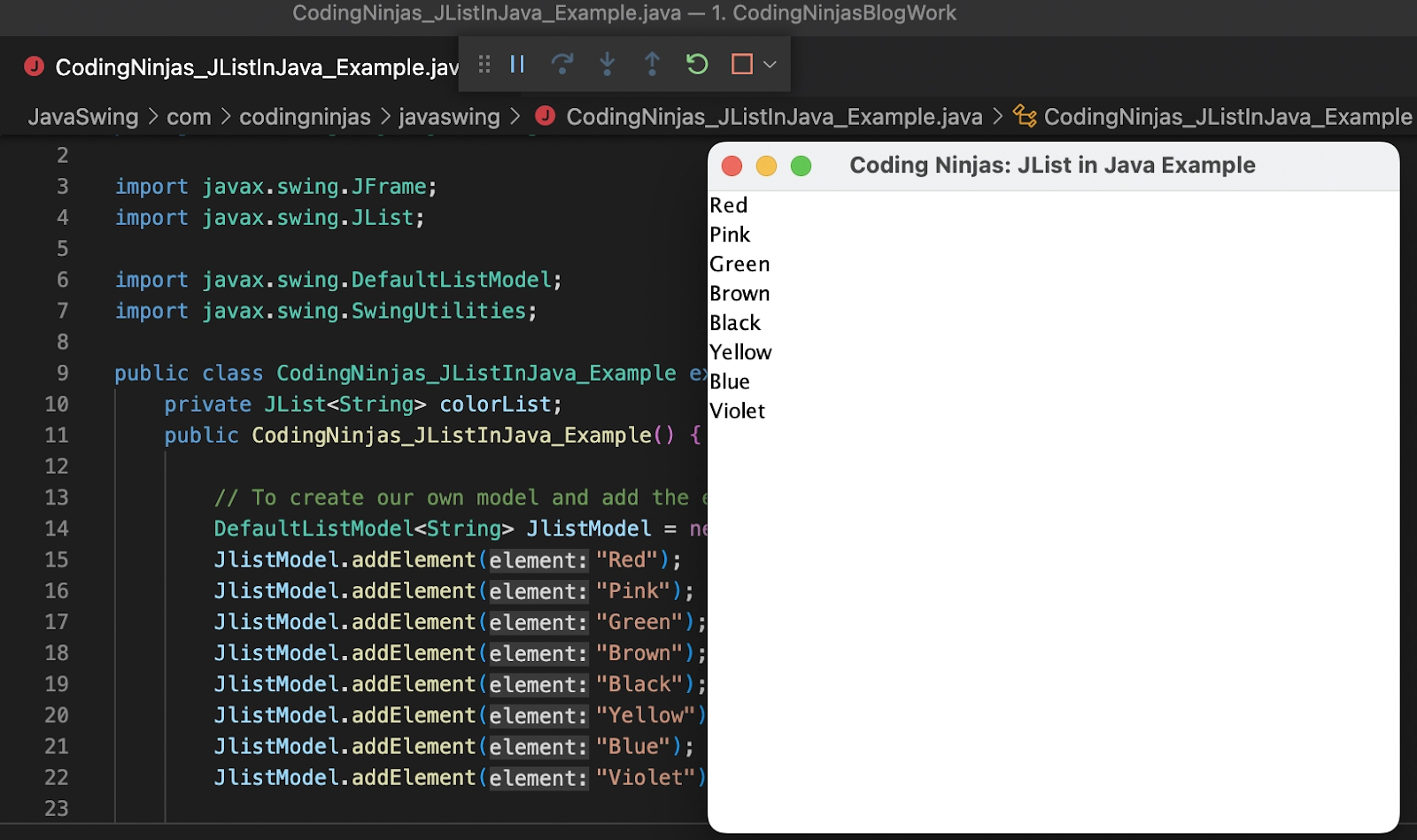
We will be creating a simple JList in Java, in which the list will be of various colors. To run the below program, you should use offline IDE(Integrated Development Environment).
Code
package com.codingninjas.javaswing;

import javax.swing.JFrame;
import javax.swing.JList;
import javax.swing.DefaultListModel;
import javax.swing.SwingUtilities;

public class CodingNinjas_JListInJava_Example extends JFrame {
   private JList<String> colorList;
   public CodingNinjas_JListInJava_Example() {

       // To create our own model and add the elements in JList
       DefaultListModel<String> JlistModel = new DefaultListModel<>();
       JlistModel.addElement("Red");
       JlistModel.addElement("Pink");
       JlistModel.addElement("Green");
       JlistModel.addElement("Brown");
       JlistModel.addElement("Black");
       JlistModel.addElement("Yellow");
       JlistModel.addElement("Blue");
       JlistModel.addElement("Violet");

       // To create the Jlist in Java
       colorList = new JList<>(JlistModel);
       add(colorList);

       this.setDefaultCloseOperation(JFrame.EXIT_ON_CLOSE);
       this.setTitle("Coding Ninjas: JList in Java Example");

       // To set the size of frame
       this.setSize(400,400);
       this.setVisible(true);
       this.setLocationRelativeTo(null);
   }

   public static void main(String[] args) {
       SwingUtilities.invokeLater(new Runnable() {
           @Override
           public void run() {
               new CodingNinjas_JListInJava_Example();
           }
       });
   }
}
You can also try this code with Online Java Compiler
Tip: Try the code in VSCode after installing the Java extensions.
Creating Scrollbar in JList ✨
To insert a scrollbar to the frame, we will have to add the command: “ add(new JScrollPane(colorList)); ” under the public class in the above code. After adding the scrollbar, the frame will generate a scrollbar upon resizing the frame. The output has been shown below:
Creating Event Listener in JList 😎
We will be creating an event listener in JList in Java, where we will be getting the element as output upon selecting it in JList. We have provided the working output for your better understanding.
Code
package com.codingninjas.javaswing;

import javax.swing.JFrame;
import javax.swing.JList;
import javax.swing.JScrollPane;
import java.util.List;
import javax.swing.DefaultListModel;
import javax.swing.SwingUtilities;
import javax.swing.event.ListSelectionEvent;
import javax.swing.event.ListSelectionListener;

public class CodingNinjas_JListInJava_Example extends JFrame {
   private JList<String> colorList;
   public CodingNinjas_JListInJava_Example() {

       // To create our own model and add the elements in JList
       DefaultListModel<String> JlistModel = new DefaultListModel<>();
       JlistModel.addElement("Red");
       JlistModel.addElement("Pink");
       JlistModel.addElement("Green");
       JlistModel.addElement("Brown");
       JlistModel.addElement("Black");
       JlistModel.addElement("Yellow");
       JlistModel.addElement("Blue");
       JlistModel.addElement("Violet");

       // To create the Jlist in Java
       colorList = new JList<>(JlistModel);
       add(colorList);

       colorList.addListSelectionListener(new ListSelectionListener() {
           @Override
           public void valueChanged(ListSelectionEvent e) {
               if (!e.getValueIsAdjusting()) {
                   final List<String> selectedValuesList = colorList.getSelectedValuesList();
                   System.out.println(selectedValuesList);
               }
           }
       });

       this.setDefaultCloseOperation(JFrame.EXIT_ON_CLOSE);
       this.setTitle("Coding Ninjas: JList in Java Example");

       // To set the size of frame
       this.setSize(400,400);
       this.setVisible(true);
       this.setLocationRelativeTo(null);
       add(new JScrollPane(colorList));
   }

   public static void main(String[] args) {
       SwingUtilities.invokeLater(new Runnable() {
           @Override
           public void run() {
               new CodingNinjas_JListInJava_Example();
           }
       });
   }
}
You can also try this code with Online Java Compiler
Java.swing package contains all the Java components like JList.
What exactly is a Swing Event?
A swing event is defined as a change in an object's state.
How do we add the data to JList in Java?
We don't explicitly insert data to JLists. We utilize a different model instead. The contents of the list will be maintained by that model. If we wish to render items from an array or vector, we will simply feed the array into the JList constructor, and the JList will create the ListModel for us. When working with data from collections, however, we should almost always use ListModel. ListModel also defines a number of methods that we can utilize to alter our data.
What are the advantages of using Swing's lightweight components?
Components that are lightweight can rely on a native collection of other components. These components are simple kinds that allow the outcome to be transparent to others while displaying themselves on the screen. Each component renders itself using the graphics objects and operations that are available.
What is the function of a layout manager?
It is the manager of all layouts or the framework that offers functionality amongst the components automatically.
It also establishes the space between each component as well as provides support for it.
Conclusion
In this blog, we learned about JList in Java and also discussed the class declaration, constructors and methods of JList in Java, along with a working example. We learned that JList is a Java class that can be used to display object data in a list. It can be used to trigger events based on the selection of a specific value from a list. JList can be used in Java applications to represent data in a very orderly manner.









 1+ registered

