Do you think IIT Guwahati certified course can help you in your career?
Introduction
Chef Infra is an effective tool used to manage and automate infrastructure. It helps to do repetitive tasks and erases manual efforts for infrastructure management.
In this article, we will discuss in detail about Chef Infra Server and will get to know about its services and components. So let’s get started.
About Chef Infra Server
Let’s try to understand what Chef Infra Server actually is and how it helps in automating the IT infrastructure of organizations, with the help of the following points:
The Chef Infra Server is an effective solution for managing and automating infrastructure. It plays the role of a repository that is centralized in nature.
The Chef Infra Server is also known as the Enterprise Chef Server.
Chef Infra Server is an integral part of Chef’s configuration management and acts as the hub for configuration data.
The Chef Infra Server holds cookbooks, policies applied to nodes, and metadata about each registered node managed by the chef-client.
Added to this, the Chef Infra Server offers a huge variety of features and benefits which makes it an indispensable tool for automating your infrastructure.
Components of the Chef Infra Server
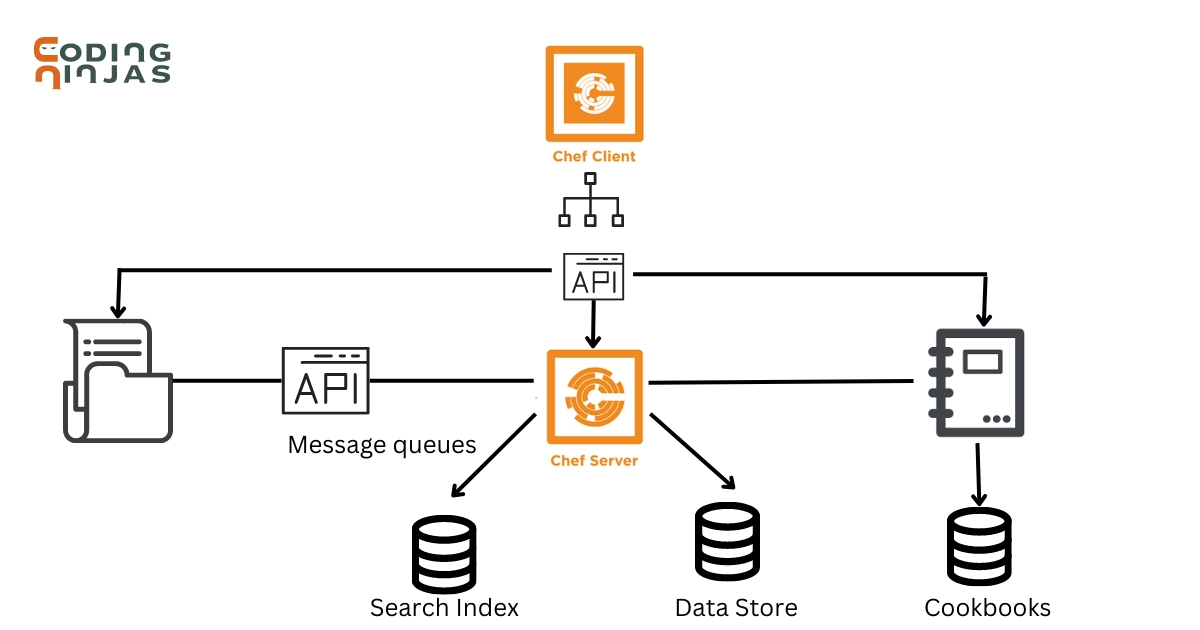
The Chef Infra Server has many components to it and these components are related to each other in some way or another.
Let us have a look at these components now.
Chef Infra Server
‘Erchef’ is a thorough redesign of the Chef Infra Server's fundamental API(Application Programming Interface), allowing it to be quicker and extra scalable than earlier versions. Cookbooks and recipes written for the Ruby-based Chef Infra Server operate on the Erlang-based Chef Infra Server. Chef Infra Client continues to be written in Ruby.
Clients
As the Chef Infra Client runs, the Chef Infra Server is largely accessible by nodes under Chef's supervision. Individuals who manage cookbooks and policies stored on the Chef Infra Server can also access it, generally from a workstation. Individual users with access to Chef Infra Server components can also access them.
Chef Manage
Chef Infra Server’s web interface is called Chef manage. It communicates with the Chef Infra Server via the Chef Infra Server API.
Load Balancer
Nginx is a reverse proxy server that serves as the Chef Infra Server's front-end load balancer and is an open-source HTTP (Hypertext Transfer Protocol). Nginx handles all queries to the Chef Infra Server API.
Messages
Elastisearch is wrapped with chef-elasticsearch, which exposes its REST API(Restful Application Programming Interface) for indexing and searching. All messages are saved in a search index repository.
Bookshelf
Bookshelf stores the cookbook content that has been uploaded to the Chef Infra Server as part of a cookbook version. The content checksum is used to store cookbook content. If the same file or template appears in two distinct cookbooks or revisions of the same cookbook, Bookshelf will only keep it once. Bookshelf manages cookbook material in flat files that are distinct from the Chef Infra Server.
PostgreSQL
The Chef Infra Server’s data storage repository is PostgreSQL.
Services of the Chef Infra Server
The Chef Infra Server includes the following services:
bifrost
The oc-bifrost service validates every request to access or manage objects stored on the Chef Infra Server.
bookshelf
The bookshelf is a service that is compatible with Amazon Simple Storage Service (S3) that is used to store cookbooks, including all associated data (recipes, templates, and so on).
elasticsearch
Elastisearch is wrapped with chef-elasticsearch, which exposes its REST API for indexing and searching.
nginx
The nginx service manages traffic to the Chef Infra Server, including virtual hosts for internal and external API request/response routing, external add-on request routing, and front-end and back-end component routing.
opscode-erchef
The opscode-erchef service is based on Erlang that handles Chef Infra Server API queries to the following Chef Infra Server areas:
Cookbooks
Data bags
Environments
Nodes
Roles
Sandboxes
Search
redis-lb
The Chef Infra Server uses a key-value store in conjunction with Nginx to route requests and populates request data.
Subcommands of Service
This command includes a built-in process supervisor that guarantees all essential services are in the proper status at all times. The supervisor launches two processes for each service and makes available the following subcommands for service management: hup, int, kill, once, restart, service-list, start, status, stop, tail, and term.
hup
The hup subcommand is used to notify all services of a SIGHUP. This command can also be run for a specific service by supplying its name in the command.
Syntax:
chef-server-ctl hup SERVICE_NAME
int
To transmit a SIGINT toall services, use the int subcommand. You can also run this command for a specific service by supplying its name in the command.
Syntax:
chef-server-ctl int SERVICE_NAME
kill
The kill subcommand sends a SIGKILL signal to all services. You can also run this command for a specific service by supplying its name in the command.
Syntax:
chef-server-ctl kill SERVICE_NAME
once
The Chef Infra Server's supervisor is set to restart any service that fails, unless that service has been instructed to change its state. The once subcommand instructs the supervisor not to attempt to restart any failed services.
Syntax:
chef-server-ctl once SERVICE_NAME
restart
The restart subcommand is used to restart all services that are enabled on the Chef Infra Server, or it can be used to restart a specific service by supplying its name in the command.
Syntax:
chef-server-ctl restart SERVICE_NAME
service-list
The service-list subcommand displays a list of all currently available services. An enabled service is denoted by an asterisk (*).
Syntax:
chef-server-ctl service-list
start
The start subcommand is used to launch all of the Chef Infra Server's services. This command can also be run for a specific service by supplying its name in the command.
Syntax:
chef-server-ctl start SERVICE_NAME
status
The status subcommand displays the status of all available services to the Chef Infra Server. The results will differ depending on the server settings.
Syntax:
chef-server-ctl status SERVICE_NAME
stop
The stop subcommand is used to terminate all services on the Chef Infra Server. This command can also be run for a specific service by supplying its name in the command.
Syntax:
chef-server-ctl stop SERVICE_NAME
tail
The tail subcommand traverses all Chef Infra Server logs for all services. You can run this command for a specific service by supplying its name in the command.
Syntax:
chef-server-ctl tail SERVICE_NAME
term
To send a SIGTERM to all services, the term subcommand is used. You can also run this command for a specific service by supplying its name in the command.
Syntax:
chef-server-ctl term SERVICE_NAME
Frequently Asked Questions
What is the purpose of a chef server?
Recipes, cookbooks, node policies, roles, environments, and node metadata are all stored on the Chef server. Policies describe and match the organization's business and operational requirements, processes, and workflow to server settings and objects.
How does Chef Infra Server function?
The Chef Infra Server serves as a repository for all configuration data. It keeps cookbooks, roles, environments, data bags, and other items. The Chef Infra Server can be used to manage your infrastructure and automate basic activities. The Chef Infra Server is a powerful tool that can assist you in better managing your infrastructure.
What ports are used by the Chef Server?
Ports 22, 443, and 8443 are used by the Chef Server.
How many different ways can a Chef server be configured?
The two methods of setting up a Chef Server are ‘Use hosted Chef’ or 'install an instance on your own infrastructure.'
In Chef, how are nodes configured?
The node object is made up of the run-list and node properties, which are kept in a JSON file on the Chef server. During each chef-client run, the chef-client obtains a copy of the node object from the Chef server and stores an updated copy on the Chef server at the end of each chef-client run.
Conclusion
In this article, we had an overview of Chef Infra Server. We looked at what it is, its features, components, and services followed by the subcommands of the services. We hope that this blog provided you with a clear overview of Chef Infra Server and helped to add some knowledge about configuration management.
To learn more about Chef Infra and its components, refer to the following articles:








 1+ registered

