One-Time Setup
In some situations, you need to perform the setup only once for all the tests at the beginning of a file. One-time setup can be especially troublesome when it is asynchronous, so it can't be done inline. The jest framework provides beforeAll and afterAll to handle this case.
- beforeAll: Runs a function before any of the tests in the file that runs. If the function returns a promise or is a generator, Jest waits for that promise to resolve before running tests.
- Afterall: Runs a function after all the tests in this file have been completed. If the function returns a promise or is a generator, Jest will wait for that promise to resolve before continuing.
For example, if both initializeDatabase and clearDatabase returned promises, and we could reuse the city database between tests, we may change our test code from the above example like:
Program
beforeAll(() => {
return initializeDatabase();
});
afterAll(() => {
return clearDatabase();
});
test("city database has New Delhi", () => {
expect(isCity("New Delhi")).toBeTruthy();
});
test("city database has Mumbai", () => {
expect(isCity("Mumbai")).toBeTruthy();
});

You can also try this code with Online Javascript Compiler
Scoping
In the jest framework, beforeAll and afterAll blocks apply to every test in a file by default. You can also group multiple tests using a describe block. In simpler terms, describe(name, fn) creates a block that can group various related tests.
When beforeAll and afterAll are inside a describe block, these blocks only apply to the tests within that particular describe block.
For example, let's assume we didn't just have a city database but also had a food database. We could then have a different setup for different tests like this.
Program
// Applies to all tests here.
beforeEach(() => {
  return initializeDatabase();
});
test("city database has New Delhi", () => {
expect(isCity("New Delhi")).toBeTruthy();
});
test("city database has Mumbai", () => {
expect(isCity("Mumbai")).toBeTruthy();
});
describe("matching cities with foods", () => {
// Applies only to the tests inside this describe block.
beforeEach(() => {
return initializeFoodDatabase();
});
test("New Delhi <3 Momos", () => {
expect(isValidCityFoodPair("Vienna", "Momos")).toBe(true);
});
test("Mumbai <3 Pav", () => {
expect(isValidCityFoodPair("San Juan", "Vada Pav")).toBe(true);
});
});
You can also try this code with Online Javascript Compiler
Note that at the top-level, beforeEach block is executed before the beforeEach block that is inside the describe block. An illustration of the order of execution of all hooks may be helpful to understand.
Program
beforeAll(() => console.log("1 : beforeAll"));
afterAll(() => console.log("1 : afterAll"));
beforeEach(() => console.log("1 : beforeEach"));
afterEach(() => console.log("1 : afterEach"));
test("", () => console.log("1 : test"));
describe("Scoped or Nested block", () => {
  beforeAll(() => console.log("2 : beforeAll"));
  afterAll(() => console.log("2 : afterAll"));
  beforeEach(() => console.log("2 : beforeEach"));
  afterEach(() => console.log("2 : afterEach"));
  test("", () => console.log("2 : test"));
});
You can also try this code with Online Javascript Compiler
Output
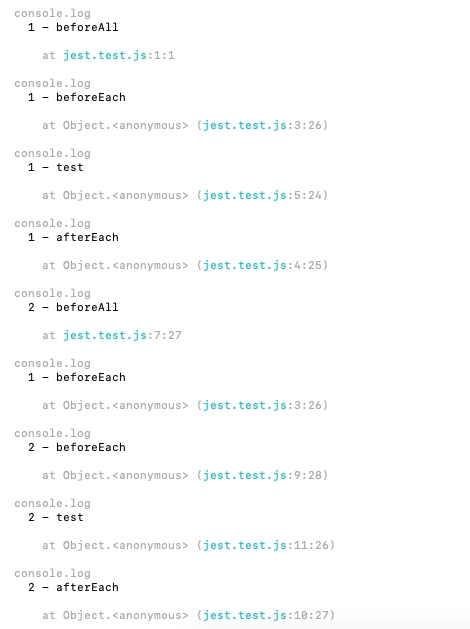
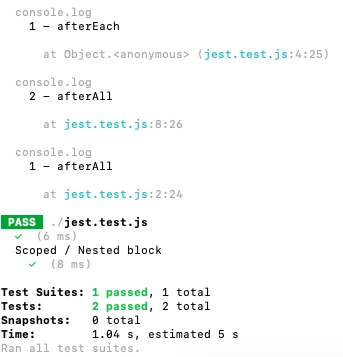
As seen above, Jest executes all describe handlers in a test file before running any actual tests. That is is another reason to perform setup inside before*and after* handlers rather than inside a describe block. Once completing describe blocks, Jest runs all the tests serially in the order they were encountered in the collection phase by default, waiting for each one to finish and tie up before moving on.
FAQs
-
What is a teardown function?
Code written in a teardown() block is run upon completion of a test file, even if an error exists. Jest executes multiple calls to teardown() in the order they were created.
-
What is setUp and teardown in unit testing?
When we define a setUp() method, the test runner runs that method prior to each test. Similarly, if we define a tearDown() method, the test runner will invoke that method after each test.
-
How do you test a Promise reject on Jest?
You can use the .resolves matcher in your expected statement, and Jest will wait for the promise to resolve. If that promise is rejected, the test will fail automatically.
-
How do you mock a Promise in Jest?
You can call jest.mock('../request'), which tells Jest to use a manual mock and expects the return value of a Promise that resolves. You can follow this article to understand mocking in Jest.
Key Takeaways
This article has gone through different approaches to set up and teardown a test file in the jest framework. In other testing situations, we call different setups as per the requirements. A proper setup and teardown structure are often essential to a test file.
We have also learned about the scope of testing in jest and understood the order of execution. When you work on more testing examples on jest, the concept of scoping and setup will become more apparent. You can start here.
Hence learning never stops, and there is a lot more to learn.
So head over to our practice platform Coding Ninjas Studio to practice top problems, attempt mock tests, read interview experiences, and much more. Till then, Happy Learning!





 1+ registered

