Do you think IIT Guwahati certified course can help you in your career?
Introduction
Hello Ninjas! Have you ever wondered how authentication is done using token in puppet? Don't worry, In this article, we are going to discuss the topic of Token based authentication in Puppet. We will also read about tokenswhich allows users to enter their info once and receives a numeric token to access various services or system infrastructure components.
Authentication tokens give users the working key to HTTP requests by rights assigned to them via role-based access control (RBAC).
Puppet
It is a free and open-source software control and deployment tool. OS like Linux and Windows is the most widely used OS for managing several application servers at once. But a wide range of systems, including Mac OS servers, Cisco routers, and IBM data centres, can also use Puppet.
You can check our article to learn more about Puppet.
Token in Puppet
Tokens enable a user to log in once and then obtain an alphanumeric "token" to use to access various services or components of the system infrastructure. The necessary access to HTTP requests is given to the user through authentication tokens, which are linked to the permissions granted to the user by RBAC.
Access control for Puppet Enterprise services
Code Manager.
Puppet orchestrator.
Node classifier.
Activity service.
PuppetDB.
RBAC.
The RBAC API v1 Tokens endpoints, puppet-access command and Puppet Enterprise console can all be used to create authentication tokens. Also, you can make one-time tokens, which are often used by services.
On the Tokens tab of the My Account page of the Puppet Enterprise console, you can view or revoke your own tokens. Admin can view and revoke tokens for other users on the User Info page. In the Puppet Enterprise Infrastructure node group, you can additionally set up RBAC and token-based authentication.
Set up Puppet Access
From the command line of any workstation, users can create and manage authentication tokens by using the puppet-access command. Before using puppet-access to create authentication tokens, make sure it is configured properly.
To generate tokens from the command-line interface (CLI) without passing more parameters, you can establish default values in the puppet-access configuration file.
Regardless of whether puppet-access is installed on a different workstation or is operating on a PE-managed server. Both a global configuration file and a configuration file that the user specifies are required.
Location of the Global Configuration File
You don't have to build the global configuration file on the computers that Puppet Enterprise (PE) manages. The configuration file has a JSON format. For instance:
The user-specified configuration file can be obtained at for both *nix and Windows systems.
/.puppetlabs/client-tools/puppet-access.conf.
Global settings files are never more important than user-specified settings files. For instance, the user-specified setting for the token file will take the lead if the two files contain different settings.
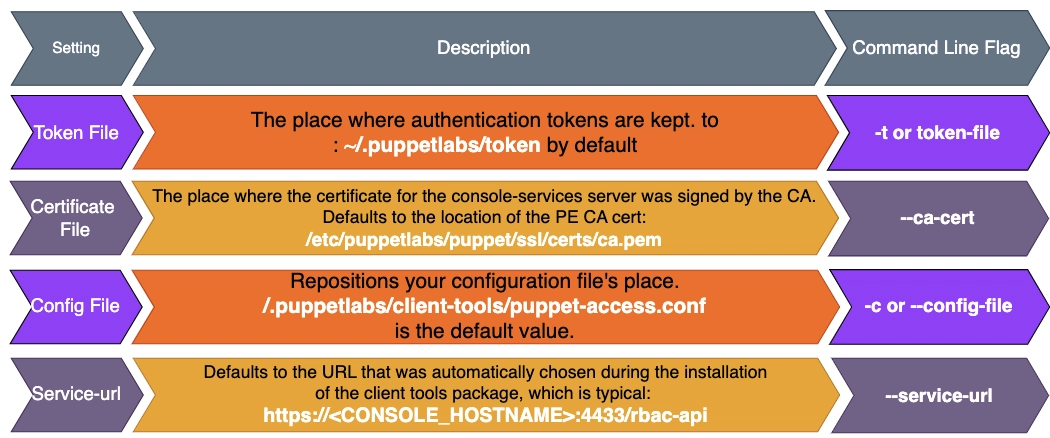
The user-specified file must be made and filled out using the layout file settings. A collection of layout file settings can be found in the puppet-access layout file settings.
Configuration file for Puppet-access contains Settings.
You can add or modify settings parameters manually. It is done in user-specified or global puppet-access settings files. The global settings file is controlled by the class puppet. Here we could alter all the settings by ourselves.
enterprise::profile::controller.
By adding flags when you Generate a token with puppet-access on the command line. You can also modify configuration parameters.
Token creation in the console
Utilize the console.
Use CLI tools, such as good jobs or PuppetDB queries launched from the command line. If SAML is configured, you must have a token.
Create a token and export it to the computer you wish to use to execute the CLI program.
Click the Tokens tab on the My Account page in the console.
To create a fresh token, click.
Give your new token a description under Description.
Choose how long you want your token to be valid \under Lifetime.
Press Get tokens.
Select Copy token.
Create a token by use of the RBAC API.
Call the endpoint for POST /auth/token or POST /tokens.
Copying the token into a text file is one way to save it.
Using export, save the token as an environment variable. TOKEN=<TOKEN>.
Conclusion
The Token is valid for use until it expires or your access is terminated. The Token shares the file with the user's permissions.
Create a token that a service can use.
Use the —print option with the puppet-access command if you need to create a token that a Puppet Enterprise (PE) service can use. But the token doesn't need to be saved.
Run: To create a token for a service.
sudo puppet-access login [username] --print
This command creates a token instead of storing it on a disc. It outputs the Token's content as standard output.
Look at the token activity.
The activity service records token activity. You can view recent token activity on any user's account in the console.
Select the full name of the user you are interested in by clicking the Users tab on the Access control page in the console.
On the Activity tab, click.
Modify the token lifetime default.
The console allows users to change the default authentication lifetime for tokens, which is set to one hour by default. The maximum permitted Lifetime, which by default is ten years, can also be modified.
Click Node groups in the terminal.
Click the Puppet Enterprise Console node group after opening the Puppet Enterprise Infrastructure node group.
Locate the puppet enterprise::profile::console class under the Classes tab.
Choose the parameter you want to change in the Parameter field:
rbac_token_auth_lifetime: Set the token lifetime default. One hour is the standard.
rbac_token_maximum_lifetime: Set the longest possible lifespan for each token. Ten years is the standard.
Enter the new default authentication lifetime in the Value column.
Enter a number, then the word
h (hours).
d (days).
m (minutes).
y (years).
s (seconds).
For instance, the lifespan is set at 12 hours.
A space should not separate the numerical value and the unit of measurement.
When you don't specify a unit, seconds are taken as the default (s).
The value of rbac_token_maximum_lifetime must not be exceeded by rbac_token_auth_lifetime.
Add the parameter and then save your changes.
Revoke a token.
You can revoke your tokens on the My Account tab in the console. Admin may also revoke other users' tokens.
On the User Info page, the admin can revoke another user's token.
Self-token cancellation:
Click the Tokens tab on the My Account page in the console.
Click Revoke token after selecting the token you want to cancel.
Deletion of a Token File
Run the delete-token-file action to delete the token file if you created it with puppet-access. This is helpful if you are working on many users' servers.
Although it stops other users from using your working Token, deleting the token file does not make it invalid. There is no chance of getting the contents of the token file after the token has expired.
Depending on the location of your token file, issue one of the following commands from the command line:
If your Token is in the token file's default location, execute the following:
puppet-access delete-token-file.
Run this command if you saved your token file in a different path:
TOKEN PATH>: puppet-access delete-token-file.
Frequently Asked Questions
What are some examples of authentication using tokens?
Three distinct categories of authentication tokens are connected: For access, physical objects such as discs, discs, and keys plug into the system. You've used a connected token if you've ever used a USB device or smart card to log into a system.
What is the use of token-based authentication?
A technique called token-based authentication creates security tokens that are encrypted. Users can use it to authenticate themselves to websites, which makes a special, encrypted authentication token.
Why is authentication using tokens more secure?
It offers tokens of Strong Security. Only a secret key can validate a stateless token like JWT when it is received at the server-side application that generated it. They are therefore regarded as the best and most secure authentication method.
Where is the Web API's token stored?
By default, the server does not save the token. It is only in your client's possession. And it is being sent to the server via the permission header. If you used Visual Studio's default template, the Startup Configure Auth function would call the following IAppBuilder extension by the name app.
How secure is token authentication?
Token authorization systems are considered very safe and efficient because tokens can only be obtained from the device that generates them, whether a key fob or smartphone. But even with all of the benefits of using an authentication token platform, there is always a tiny possibility of risk.
Conclusion
In this article, we have learnt about the Token based Authentication in Puppet. This topic contains access control, puppet access configuration, token creation etc. If you want to learn more about the Puppet, refer here to the article below:







 1+ registered

