Do you think IIT Guwahati certified course can help you in your career?
Introduction
The word "gradient" in Java refers to progression, and "JavaFX" is a toolkit for creating graphical user interfaces. The JavaFX facility allows us to develop window-based applications containing various shapes and exciting color progressions. Using some examples, this article will show us how to design or draw gradients inside geometric shapes using JavaFX GUI. Let us dive into the topic.
Gradient Color
In Computer Graphics, Gradient Colors or Color Progression specify the position-dependent colors to fill a particular region. Gradient colors change with position. By varying the color value continuously with position, gradient colors produce smooth color transitions in the region. JavaFX implements two types of Gradient color transitions:
Linear Gradient
Radial Gradient
Linear Gradient
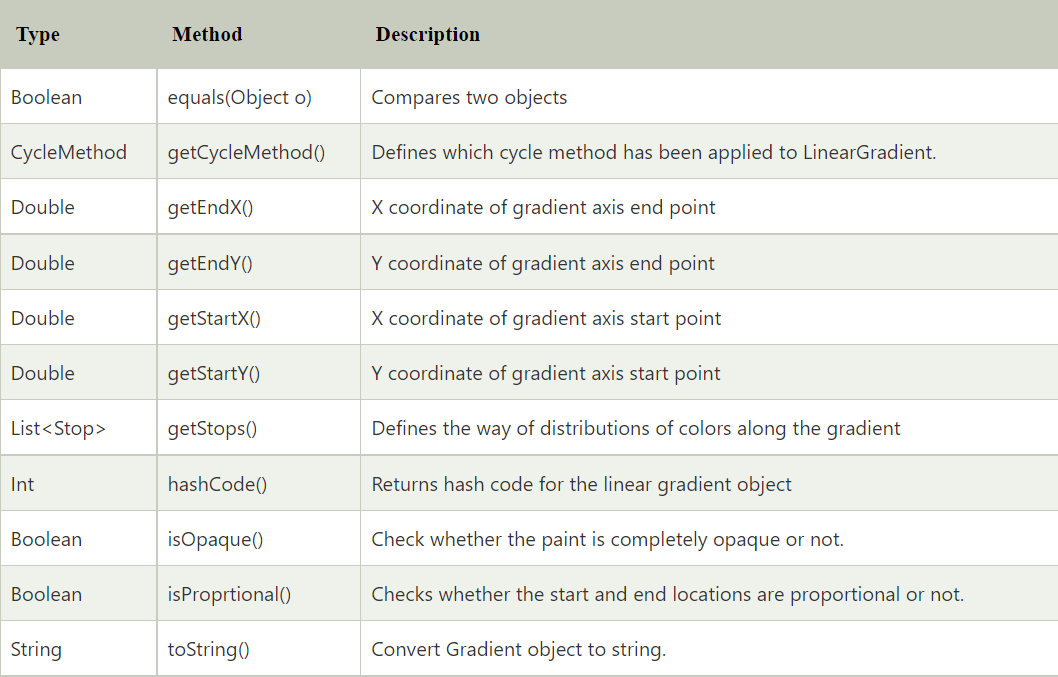
You can apply linear gradient patterns to the shapes by instantiating the LinearGradient class. This class contains various instance methods described below in the table.
Instance Methods
The methods of the LinearGradient class are listed below
Constructors
The Constructor of LinearGradient class accepts five parameters: startX, startY, endX, endY, Proportional, CycleMethod, Stops
Syntax:
new LinearGradient(parameter)
(startX,startY): They define the x and y coordinates of the starting point of the gradient color.
(endX,endY): They define the x and y coordinates of the endpoint of the gradient color.
Proportional: This property is boolean-type. If its value is true, the starting and ending point of the gradient becomes proportional.
CycleMethod: This defines the cycle method applied to the gradient.
Stops: It defines the color distribution along the gradient.
Example
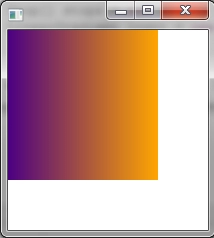
Let us see an example that shows how to use linear gradients to paint a rectangle.
Code:
import javafx.application.Application;
import javafx.scene.*;
import javafx.scene.shape.*;
import javafx.scene.paint.*;
import javafx.scene.layout.*;
import javafx.stage.Stage;
public class LinearGradientOfSquare extends Application {
@Override
public void start(Stage stg) {
VBox windw = new VBox();
final Scene scn = new Scene(windw,200, 200);
scn.setFill(null);
Stop[] stops = new Stop[] { new Stop(0, Color.INDIGO), new Stop(1, Color.ORANGE)};
LinearGradient lngnt = new LinearGradient(0, 0, 1, 0, true, CycleMethod.NO_CYCLE, stops);
Rectangle sqre1 = new Rectangle(0, 0, 150, 150);
sqre1.setFill(lngnt);
windw.getChildren().add(sqre1);
stg.setScene(scn);
stg.show();
}
public static void main(String[] args) {
launch(args);
}
}
Output:
Radial Gradient
You can apply Radial gradient to the shapes by instantiating javafx.scene.paint.RadialGradient class.
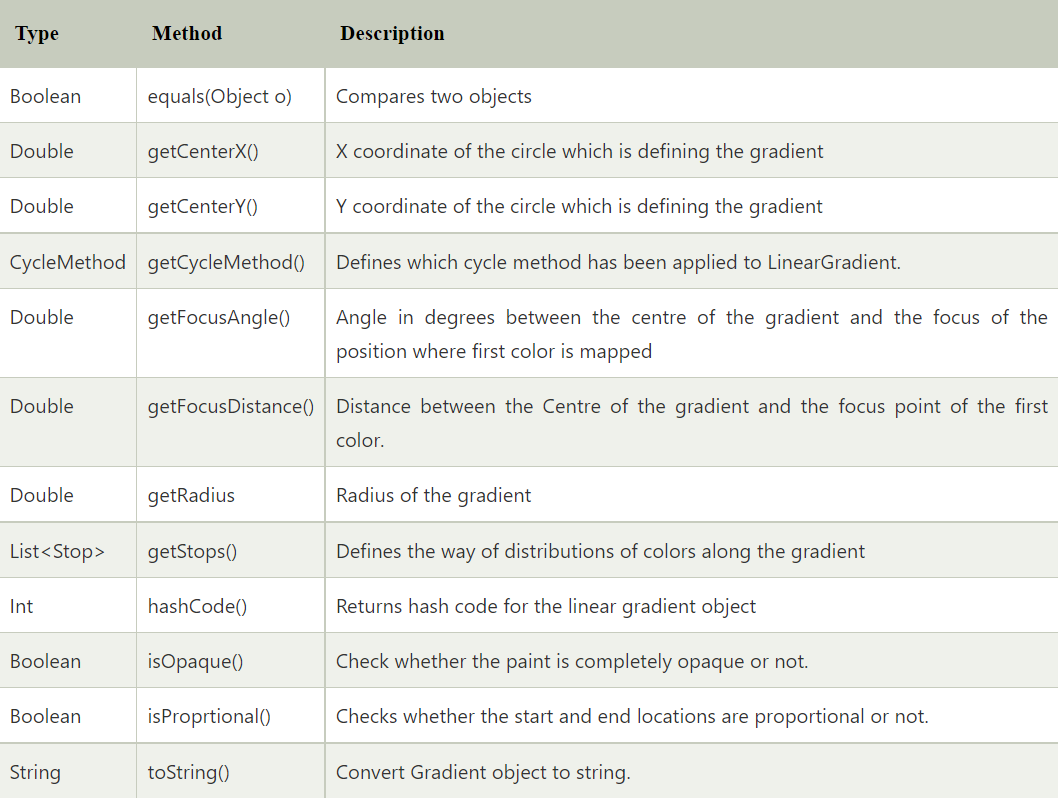
Instance methods
This class contains different instance methods, as described below.
Constructor
The constructor of the class accepts a few parameters. The syntax of the constructor is given below.
Syntax:
RadialGradient rgt = new RadialGradient(parameters)
The parameters can be the following described methods.
focusAngleValue: The data type of this method is double. It demonstrates the value of the angle in degree from the center to the focus point of the first mapped color.
focusDistanceValue: The data type of this method is double. It indicates the value of the distance from the center to the focus point of the first mapped color.
centerOfXCoordinate: The datatype of this method is double. It indicates the x coordinate of the center point of the gradient-colored circle.
centerOfYCoordinate: The datatype of this method is double. It indicates the y coordinate of the center point of the gradient-colored circle.
radiusValue: The datatype of this method is double. It indicates the value of the radius of the circle.
ProportionalOrNot: The datatype of this method is boolean. If its value is true, then the starting and ending point of the gradient color will become proportional.
CycleMethodType: This method defines the cycle method applied to the gradient.
stopsList: this defines the color distribution along the gradient. This is of a List type.
Example
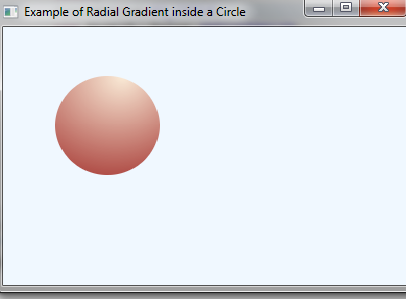
Let us take an example of the implementation of radial gradient coloring in coloring a circle using two different colors.
Code:
import javafx.application.Application;
import javafx.scene.*;
import javafx.scene.shape.*;
import javafx.scene.paint.*;
import javafx.stage.Stage;
public class RadialGradientOfCircle extends Application {
public static void main(String[] args) {
Application.launch(args);
}
@Override
public void start(final Stage primaryStage) {
primaryStage.setTitle("Example of Radial Gradient inside a Circle");
Group root = new Group();
Scene scene = new Scene(root, 300, 200, Color.ALICEBLUE);
primaryStage.setScene(scene);
addRectangle(scene);
primaryStage.show();
}
private void addRectangle(final Scene scene) {
Circle C = new Circle(100,100,50);
RadialGradient gradient1 = new RadialGradient(0,
.1,
100,
50,
150,
false,
CycleMethod.NO_CYCLE,
new Stop(0, Color.ANTIQUEWHITE),
new Stop(1, Color.DARKRED));
C.setFill(gradient1);
final Group root = (Group) scene.getRoot();
root.getChildren().add(C);
}
}
Output:
Semitransparent Gradients
We can add semitransparent gradient to a rectangle as shown in the following code
Code:
import javafx.application.Application;
import javafx.scene.Scene;
import javafx.scene.layout.VBox;
import javafx.scene.paint.Color;
import javafx.scene.paint.CycleMethod;
import javafx.scene.paint.LinearGradient;
import javafx.scene.paint.Stop;
import javafx.scene.shape.Rectangle;
import javafx.stage.Stage;
/*from w w w. jav a2 s.c om*/
public class Main extends Application {
    @Override
    public void start(Stage stage) {
        VBox box = new VBox();
        final Scene scene = new Scene(box,300, 250);
        scene.setFill(null);
        // A rectangle filled with a linear gradient with a translucent color.
        Rectangle rectangle = new Rectangle();
        rectangle.setX(50);
        rectangle.setY(50);
        rectangle.setWidth(100);
        rectangle.setHeight(70);
        LinearGradient linearGrad = new LinearGradient(
                0,   // start X
                0,   // start Y
                0,   // end X
                1, // end Y
                true, // proportional
                CycleMethod.NO_CYCLE, // cycle colors
                // stops
                new Stop(0.1f, Color.rgb(25, 200, 0, .4)),
                new Stop(1.0f, Color.rgb(0, 0, 0, .1)));
        rectangle.setFill(linearGrad);
        box.getChildren().add(rectangle);
        stage.setScene(scene);
        stage.show();
    }
    public static void main(String[] args) {
        launch(args);
    }
}
Output:
The code above generates the following result.
Reflective Cycle Gradients
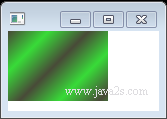
The following example code creates a rectangle with a repeating pattern of a gradient using green and black in a diagonal direction. The start X, Y and end X, Y values are set in a diagonal position, and the cycle method is set to reflect CycleMethod.REFLECT. CycleMethod.REFLECT makes the gradient pattern repeat or cycle between the stop colors.
Code:
import javafx.application.Application;
import javafx.scene.Scene;
import javafx.scene.layout.VBox;
import javafx.scene.paint.Color;
import javafx.scene.paint.CycleMethod;
import javafx.scene.paint.LinearGradient;
import javafx.scene.paint.Stop;
import javafx.scene.shape.Rectangle;
import javafx.stage.Stage;
/*from w w w . ja va 2 s . c o m*/
public class Main extends Application {
  @Override
  public void start(Stage stage) {
    VBox box = new VBox();
    final Scene scene = new Scene(box, 300, 250);
    scene.setFill(null);
    // A rectangle filled with a linear gradient with a translucent color.
    Rectangle rectangle = new Rectangle();
    rectangle.setX(50);
    rectangle.setY(50);
    rectangle.setWidth(100);
    rectangle.setHeight(70);
    LinearGradient cycleGrad = new LinearGradient(50, // start X
        50, // start Y
        70, // end X
        70, // end Y
        false, // proportional
        CycleMethod.REFLECT, // cycleMethod
        new Stop(0f, Color.rgb(21, 25, 0, .784)), new Stop(1.0f, Color.rgb(0,
            210, 0, .784)));
    rectangle.setFill(cycleGrad);
    box.getChildren().add(rectangle);
    stage.setScene(scene);
    stage.show();
  }
  public static void main(String[] args) {
    launch(args);
  }
}
Output:
The code above generates the following result.
Frequently Asked Questions
What does gradation mean in art?
Gradation in art is a visual technique of gradually transitioning from one colour hue to another.
What is gradient tool?
The gradient tool creates a continuous, even blend of colors. It can also be used to blend color and transparency.
How do you adjust the blend between colors in a gradient?
Double-click any of the color stops below the gradient slider to show different color options and change the color. Then, to add a color to the gradient, move the pointer just below the gradient slider and click when a plus sign shows next to the pointer.
Conclusion
In this article, we have extensively discussed the two types of gradient colors: Linear and Radial gradients, their instance methods, and constructors with the help of examples. Having gone through this article, I am sure you must be excited to read similar blogs. Coding Ninjas has got you covered. Here are some similar blogs to redirect: Java FX, CSS Gradients, Gradient Descent Algorithm, and CSS colors. We hope this blog has helped you enhance your knowledge, and if you wish to learn more, check out our Coding Ninjas Blog site and visit our Library. Here are some courses provided by Coding Ninjas: Basics of C++ with DSA, Competitive Programming, and MERN Stack Web Development. Do upvote our blog to help other ninjas grow. Happy Learning!









 7+ registered

