Table of contents
1.
Introduction
2.
Authentication and Authorisation
2.1.
Key storage
2.2.
API Authentication
3.
Organisations and Groups
3.1.
Role-Based Access Control
3.2.
Organisation Permissions
3.2.1.
Object Permissions
3.2.2.
Global Permissions
3.3.
Groups Permissions
3.4.
Manage Organisations
3.5.
Server Admins
4.
Server Users
5.
Frequently Asked Questions
5.1.
Can a user belong to multiple organisations?
5.2.
What are the different key-related endpoints in the Chef Infra Server API?
5.3.
What is a chef node?
6.
Conclusion
Last Updated: Mar 27, 2024

Users in Chef Infra Server

Author Yashesvinee V
0 upvote
Career growth poll
Do you think IIT Guwahati certified course can help you in your career?

Introduction

Chef Infra Server is a hub used to configure data. Chef Infra Server cookbooks store policies applied to nodes, and the Chef Infra Client manages the metadata describing each registered node. Nodes seek configuration data from Chef Infra Server via Chef Infra Client. Communication between the Chef Infra Client and the Chef Workstation is monitored and handled by the Chef Infra Server API. Let us discuss how users and clients are managed in Chef Infra Server. 

Chef Infra Server Users

Authentication and Authorisation

Requests received by the Chef Infra Server are authenticated and authorised by Chef Infra Server API and a public key. This ensures that responses are sent only to trusted users and clients. Chef Infra Server uses public key encryption. Private and public keys are created while configuring the Chef Infra server or setting up the Chef Workstation. Chef Infra Server stores the public key, and the private key is stored by the Chef Infra Client and Chef Workstation in ~/.chef/ and /etc/chef, respectively.

Chef Infra Client performs authentication using RSA public key pairs whenever it needs access to data stored on the Chef Infra Server. This prevents a node from accessing restricted data and ensures that only registered nodes are managed.

Key storage

Keys can be stored in a node or workstation. Every node stores its private ley locally. The key is generated as part of the bootstrap process that initialises the Chef Infra Client on the node. A chef-validator performs authentication when Chef Infra Client runs on that node for the first time. For each subsequent run, it uses the generated private key for that client.

A workstation stores its private key in the ~/.chef directory. The Chef Infra Server generates the key and must be manually downloaded from the server and copied to the ~/.chef directory. The exact process is repeated if a new private key is generated. A chef-repo directory stores everything needed to define the infrastructure with Chef Infra on the workstation. This includes cookbooks, data bags and policies. The chef-repo directory must be synchronised with a version control system, and all data must be treated as source code.

The chef and knife commands upload data to the Chef Infra Server from a chef-repo directory. The Chef Infra Client uses the uploaded data to manage the registered nodes and ensure that it applies the right cookbooks, policy files, and settings in the correct order. The .chef directory is a hidden directory that stores validation key files.

API Authentication

A knife plugin is a set of one or more subcommands added to knife to give additional functionality that is not built-in. Knife plugins can authenticate API requests using specific methods, as shown below.

rest methods

Authentication can also be performed from the web Chef Infra Server user interface. The authentication process is automated and not managed by the users of the hosted Chef Infra Server. The authentication keys used by the web interface are maintained by individual administrators responsible for managing the server.
Organisations and Groups

Controlling access to cookbooks, nodes, environments and data bags is essential to ensure that only authorised users and Chef Infra Clients can access the data. Access control of the Chef Infra Server is fine-grained and can be defined by organisation, groups, object or object types. Permissions set the actions a user can perform while interacting with the Chef Infra Server.

Role-Based Access Control

Chef Infra Server Roles

The key roles of the Chef Infra Server are

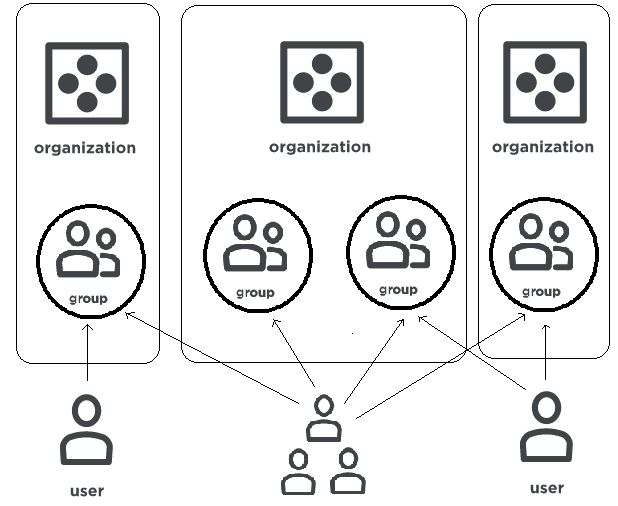
  1. Organisation: It is a top-level entity that contains default groups like admin, clients, and users for the hosted Chef Infra Server. The Chef Infra Server can support many organisations, one of which is a default organisation defined during setup.
     
  2. Group: A group defines access to objects and object types in the Chef Infra Server. It also assigns permissions that determine the types of tasks available to the members of that group. They are configured per organisation. Individual members of a group inherit the permissions assigned to the group. The default groups are admins, clients, and users.
     
  3. User: A user is a non-administrator who manages the data uploaded to the Chef Infra Server from a workstation or the Chef management console in a web interface. The Chef Infra Server has a default user defined during setup, which is automatically added to the admin's group.
     
  4. Chef Client: A client has permission to access the Chef Infra Server. It could be a node, workstation, or another machine configured to use the Chef Infra Server API. 

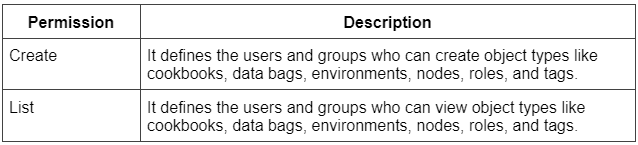
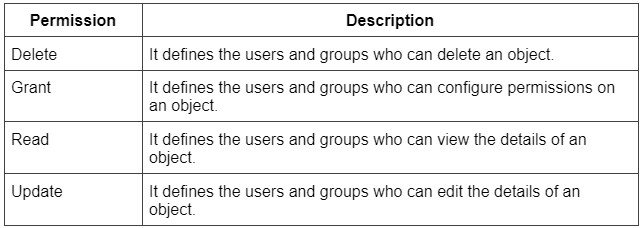
Organisation Permissions

An organisation could be a set of groups or users managing a unique set of nodes. The organisation's role can have object, global and client key permissions.

Object Permissions

Object permissions

Global Permissions

Global permissions

Groups Permissions

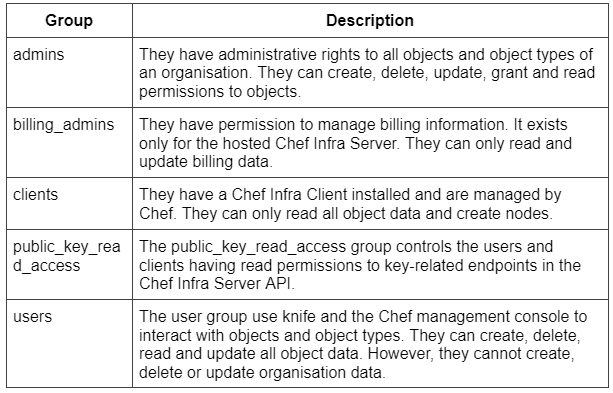
The following table shows the default groups of the Chef Infra Server.

Groups permissions

Manage Organisations

There are various commands to manage an organisation in the Chef Infra Server.

  • org-create - It is used to create an organisation.
    Syntax:
chef-server-ctl org-create ORG_NAME "ORG_FULL_NAME" (options)
  • org-delete - It is used to delete an organisation.
    Syntax:
chef-server-ctl org-delete ORG_NAME
  • org-list - It lists all the organisations currently in the Chef Infra Server.
    Syntax:
chef-server-ctl org-list (options)
  • org-show - It displays an organisation's details.
    Syntax:
chef-server-ctl org-show ORG_NAME
  • org-user-add - It is used to add a user to an organisation.
    Syntax:
chef-server-ctl org-user-add ORG_NAME USER_NAME (options)
  • org-user-remove - It is used to remove a user from an organisation.
    Syntax:
chef-server-ctl org-user-remove ORG_NAME USER_NAME (options)

Server Admins

The server-admins is a global group that grants its members permission to create, read, update, and delete user accounts except for superuser accounts. It is useful for users who manage the day-to-day administration of the Chef Infra Server. The membership of the server-admins group is managed using a set of chef-server-ctl subcommands.

  • Members can be added using the grant-server-admin-permissions subcommand.
    Syntax:
chef-server-ctl grant-server-admin-permissions USER_NAME
  • Members can be removed from the server-admins group using the remove-server-admin-permissions subcommand.
    Syntax:
chef-server-ctl remove-server-admin-permissions USER_NAME
  • A list of all the members of the servers-admin group can be displayed using the list-server-admins subcommand.
    Syntax:
chef-server-ctl list-server-admins

Server Users

User management in the Chef Infra Server involves creating users, viewing and editing a user’s profile, changing and recovering a password and regenerating private keys. Chef-server-ctl is a common line utility used to run services, configure the Chef Infra Server and view log files. Some of the commands have already been discussed in the Managing Organisations section.

  • org-create
     
  • org-delete
     
  • org-list
     
  • org-show
     
  • org-user-add
     
  • org-user-remove
     
  • user-create - It is used to create a user.
    Syntax:
chef-server-ctl user-create USER_NAME FIRST_NAME [MIDDLE_NAME] LAST_NAME EMAIL 'PASSWORD' (options)
  • user-delete - It is used to delete a user.
    Syntax:
chef-server-ctl user-delete USER_NAME
  • user-list - It lists all the users present in the Chef Infra Server.
    Syntax:
chef-server-ctl user-list (options)
  • user-edit - It is used to edit the details of a user.
    Syntax:
chef-server-ctl user-edit USER_NAME
  • user-show - It displays the details of a user.
    Syntax:
chef-server-ctl user-show USER_NAME (options)

Frequently Asked Questions

Can a user belong to multiple organisations?

A user can belong to multiple organisations if role-based access control is configured per organisation. Single users have to edit the config.rb file before interacting with the Chef Infra Server using knife from the chef-repo. The file is present in the .chef directory.

What are the different key-related endpoints in the Chef Infra Server API?

The different key-related endpoints in the Chef Infra Server API are GET /clients/CLIENT/keys, GET /clients/CLIENT/keys/KEY, GET /users/USER/keys and GET /users/USER/keys/.

What is a chef node?

A Chef node is a client responsible for catering resources and data across multiple networks. It could be a virtual machine, a physical server, a container instance or any other computer resource effectively maintained by Chef. 

Conclusion

This blog discusses the management of users in the Chef Infra Server. It explains the authentication of users, organisation and group permissions and chef-server commands. Check out our articles on Chef InSpec TerminologyChef Shell for Debugging and Troubleshooting Chef Workstation. Explore our Library on Coding Ninjas Studio to gain knowledge on Data Structures and Algorithms, Machine Learning, Deep Learning, Cloud Computing and many more! 

Recommended Readings:

Test your coding skills by solving our test series and participating in the contests hosted on Coding Ninjas Studio! 

Looking for questions from tech giants like Amazon, Microsoft, Uber, etc.? Look at the problems, interview experiences, and interview bundle for placement preparations. Upvote our blogs if you find them insightful and engaging! Happy Coding!

Thank you

Live masterclass