Do you think IIT Guwahati certified course can help you in your career?
✨Introduction
Chef is an automation business. Their eponymous software, Chef Infra, has been uniting developers and system administrators since 2008. The definition of automation has changed over time. Chef now offers a comprehensive automation solution that takes you from development to production for infrastructure and apps.
✨CHEF - Backup & Restore Overview
The computer system protects data from theft, unauthorized access, and other threats by computer security. It prevents and recognizes unauthorized access to your computer system. Data security is the process of protecting data from fraud or natural disasters. The following terminologies are there in this process:
Data Backup
Data Restore
🎭Data Backup
Making copies of data or files for use in case the original data or files are lost or destroyed is a backup.
A data backup in information technology is a copy of computer data that and kept elsewhere to replace the original in the case of a data loss incident. Each piece of data is necessary to save in at least one copy on a backup system. The need for data storage may be substantial. An information repository model may provide the structure of this storage. Documents, media files, configuration and registry files, and computer images are all typically included in backup data.
🎭Data Restore
The act of copying backup data from secondary storage and restoring it to its original place or a new location is known as data restoration. A restoration procedure is used to restore lost, stolen, or damaged data to its original state or move it to a new location.
🎭Chef Automate High Availability (HA) Backups
The data and configurations for the OpenSearch, Postgres, and Chef Automate Servers can be manually backed up. No automated backup process regularly backs up the data in the built-in Chef Automate CLI.
🎭Backup Types
Chef Automate HA data backup options include using an external file system (EFS) or an Amazon S3 bucket.
🎭EFS System
Any non-volatile storage system external to the computer is called an external file system: any storage system that supplements the computer's primary storage, RAM, and cache memory qualifies. EFS helps with disaster recovery, long-term preservation of rarely accessed data, and storing non-critical data on less expensive, lower-performing discs. It also helps with backing up data used for future restores. The computer's CPU is not directly engaged by these systems (Central Processing Unit).
Devices like Solid-state drives (SSDs), Hard disc drives (HDDs), Cloud storage, CD/DVD/Blu-ray drives, USB flash drives, SD cards, and tape drives are external file systems.
🎭Amazon’s S3 Bucket
A public cloud storage resource offered by Amazon Web Services (AWS) Simple Storage Service (S3), an object storage service, is an Amazon S3 bucket. Similar to file folders, Amazon S3 buckets hold objects made up of data and accompanying illustrative information. As the foundational storage layer for your data lake, Amazon S3 is a program designed to store, safeguard, and retrieve data from buckets at any time, from any location, on any device, including websites, mobile apps, archiving, data backups, and restorations, IoT devices, and enterprise application store.
Using the exception of the AWS GovCloud Regions, you can start using Amazon S3 for free with the AWS Free Usage Tier*. See for further details.
✨CHEF - Backup & Restore Prerequisites
The prerequisites for the backup are described on this page. Either the efs or s3 backup option is available if we decide to deploy Automate-HA via the AWS Deployment method. As configured, it will be: The steps below are not necessary if backup config in config.toml is backup_config = "efs" OR backup_config = "s3". The deployment takes care of the following steps. The actions listed below must be taken if the backup config field has been left empty.
🎭AWS Backed Backup
For AWS, there are two pre-backup configurations:
For S3 Backup
For EFS Backup
🎭Pre Backup Configuration for S3 Backup
The IAM users need the proper permissions to execute the Terraform scripts. We'll talk more about the necessary permissions later on. To regenerate a new access key, you must have your secret access key and key id.
Permissions Necessary
Verify that the IAM user has every necessary permission. The following is a list of the permission policies:
To grant OpenSearch instances access to S3, create an IAM role. As the OpenSearch model attempts to communicate with S3, the role should already be assigned.
The user can be given the permissions directly or through an IAM Group.
🎭Elastic File System(EFS) Configuration for Backup
Follow the instructions below to perform a backup on the AWS shared file system:
Construct the EFS on AWS. (Be careful to grant network access to all VPC's available AZs.)
Open port (2049) proto (NFS) for the EFS Security Group.
In every OpenSearch node, mount the produced EFS using DNS or IP on the same path (mount point). For instance, verify that the directory /mnt/automate backups are present for this example
/mnt/automate backups
After being mounted to the mount point (/mnt/automate backups), the shared EFS filesystem can be used.
Establish rights on one of the OpenSearch servers and create a sub-directory for OpenSearch (only if the network mount is correctly mounted).
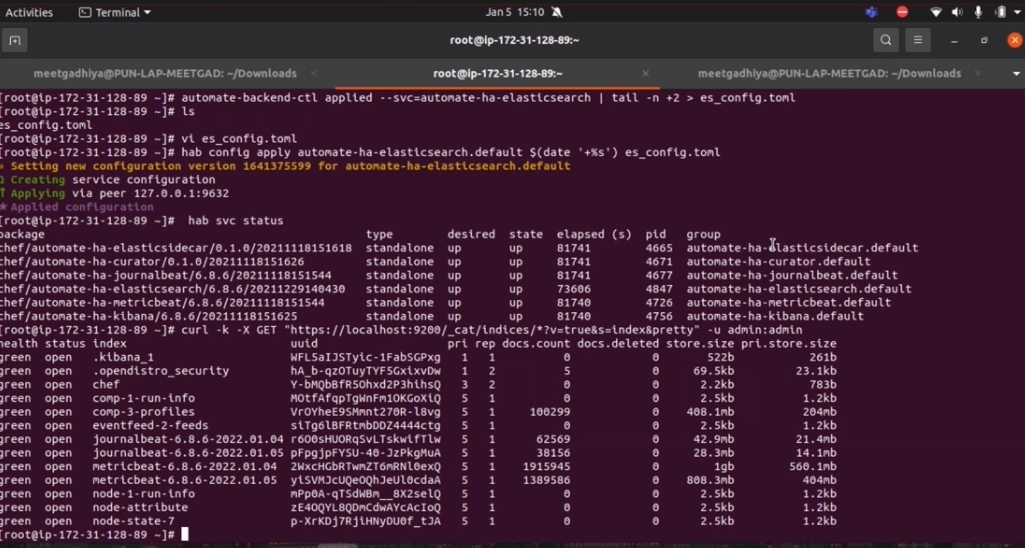
From the Habitat manager, export the current OpenSearch configuration.
After editing the file, the following values should be added at the end of
es config.toml
Automate should be configured to handle external OpenSearch backups.
On the provisioning server, create a file:
automate.toml
To start the deployment, patch the configuration.
🎭On-Premise Backed Backup
For On-Premise, there are two pre-backup configurations:
For File System Backup
For Object Storage
🎭Pre Backup Configuration for File System Backup
OpenSearch snapshot creation always requires a shared file system. It is essential to mount the shared filesystem to the same place on all primary and data nodes to register the snapshot repository using OpenSearch. Add the location (or one of its parent folders) to the path on all controller and data nodes.repo property.
Once the shared filesystem has been mounted at
/mnt/automate backups
configuring Automate such that the OpenSearch database recognizes the snapshot locations.
🎭Pre-Backup Configuration for Object Storage
The pre-backup settings needed to backup data on Object Storage Systems (other than AWS S3) like Minio and Non-AWS S3 are provided in this section.
✨CHEF - Backup & Restore
🎭Backup
You can make a new backup using Chef Automate. By executing the backup command from a Chef Automate front-end node, you can build it. The backup command looks like this:
chef-automate backup create
🎭Restore
The steps to restore the data that was backed up by the Chef Automate High Availability (HA) utilizing the External File System (EFS) and the Amazon Web Services (AWS) S3 bucket are included in this section.
All data is restored during the restore operation while the backup is running. The continuing backup process ends when the restore operation does. Let's use a scenario to comprehend the entire process better:
Make a UserA automate and produce UserA's Token1 API token.
Make a backup, with the backup ID 20220708044530.
Make a new user named UserB and a corresponding Token2 API token.
Consider the scenario when you want to recover data within the same automation cluster.
🎭Restoring the S3 Backed-up Data
Follow the instructions below to recover data that was previously backed up using Chef Automate High Availability (HA) and an Amazon Web Services (AWS) S3 bucket:
Use the below command to view the current status of each front-end node for Chef Automate and Chef Infra Server.
chef-automate status
Turn off Chef Automate on all front-end nodes.
In all Chef Automate nodes, issue the commands do
systemctl stop chef-automate
Log into the same instance of Chef Automate front-end node from which the backup was taken.
Use the sudo systemctl start chef-automate command to launch each front-end node for Chef Automate and Chef Infra Server.
🎭Restoring the EFS Backed-up Data
Follow the instructions below to recover data that was previously backed up using the External File System (EFS) for Chef Automate High Availability (HA):
Use the chef-automate status command to view the current status of each front-end node for Chef Automate and Chef Infra Server.
Turn off Chef Automate on all front-end nodes.
In all Chef Automate nodes, issue the command
sudo systemctl stop
Log into the same instance of Chef Automate front-end node from which the backup was taken, and then run the sudo systemctl stop chef-automate command on all Chef Infra Server.
The hub of the workstation and the nodes is the Chef Server. Here, all of the metadata, cookbooks, and recipes are kept. The workstation uses a knife to deliver the cookbook to the server. The nodes use the Chef client to connect to the server.
Chef servers, are they free?
Only one Chef Server is 100 percent free and open source. Open Source Chef users and Enterprise Chef customers gain from this in various ways: The multi-tenancy and role-based access control features of Enterprise Chef are included in Chef Server 12.
Why is it vital to back up servers?
As it permits data storage off-site or online, it ensures a high level of security and peace of mind. You can save money and time this way. It offers a lot stronger defense against natural disasters.
What kinds of backups are there?
Backups can be divided into three categories: full, differential, and incremental.
Conclusion
In this article, we have extensively discussed CHEF - Backup & Restore. We have also addressed the Overview of CHEF - Backup & Restore. Under Overview, we have discussed Data Restore and Data Backup. Then we have seen the Prerequisites of CHEF - Backup & Restore. Under this topic, we discussed subtopics like AWS Backed Backup and S3 Backup. Then finally, we have seen CHEF - Backup & Restore.
Refer to the following links for more information:







 1+ registered

