Do you think IIT Guwahati certified course can help you in your career?
Introduction
A chef resource is a piece of an operating system that outlines the intended state of a node to which one wants to transition from the existing configuration using resource providers.
It helps in knowing the current status of the target machine using the Ohai mechanism of Chef.
It also helps in getting the target machine to that state. The resources are in a group of recipes that describe the working configuration.
The primary use of the windows_desktop_screensaver resource is configuring secure screensaver settings on Windows systems.
Syntax
Here is the complete syntax for all the available properties of the windows_desktop_screensaver resource:
windows_desktop_screensaver 'name' do
allow_lower_user_idle_time true, false # default value: false
idle_time Integer # default value: 20
require_password true, false # default value: true
screensaver_name String
action Symbol # defaults to: enable if not given
end
Here :
The resource is windows_desktop_screensaver.
The name given to the resource block is the name.
Here the action identifies the steps Chef Infra Client will take to bring the node into the desired state.
The properties available to this resource are allow_lower_user_idle_time, idle_time, require_password, and screensaver_name.
Actions
Following are the actions the windows_desktop_screensaver chef resource has:
:disable
It disables the dekstop screen saver
:enable
It enables the desktop screen saver
:nothing
The resource block do not take action unless another resource notifies it to take action. Once it is notified, this resource block either runs immediately
Or is lined up to run at the ending of a Chef Infra Client run.
Properties
Following are the properties windows_desktop_screensaver resource has :
allow_lower_user_idle_time
Ruby Type: true, false | Default Value: false
It allows users to set their screen saver idle time, which can be lower than the system's requirements.
idle_time
Ruby Type: Integer | Default Value: 20
It is the idle time in minutes before the screensaver starts.
require_password
Ruby Type: true, false | Default Value: true
While waking from the screensaver, it requires a password.
screensaver_name
Ruby Type: String
It is the name of a specific or custom screensaver to enable.
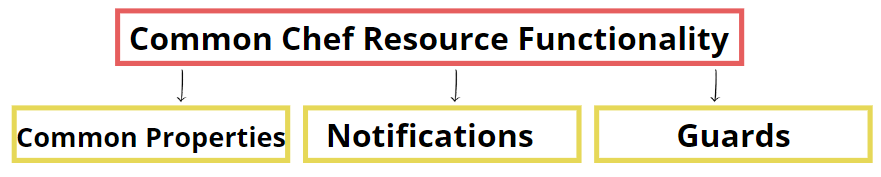
Common Resource
Common Properties
The following properties are common to every chef resource:
compile_time
Ruby Type: true, false | Default Value:false
It controls the phase in which the resource is run on the node. It is set to false while Chef Infra Client configures the node and sets it to true while the resource collection is built.
In this chef resource :quiet will not display the full stack trace, and the recipe will continue to run if a resource fails.
retries
Ruby Type: Integer | Default Value:0
Retries are number of attempts to catch exceptions and retry the resource.
retry_delay
Ruby Type: Integer | Default Value:2
The delay in seconds between retry attempts.
sensitive
Ruby Type: true, false | Default Value:false
Ensure that Chef Infra Client does not log sensitive resource data.
Notifications
notifies
Ruby Type: Symbol, 'Chef::Resource[String]'
The syntax for notifies is:
notifies :action, 'resource[name]', :timer
When a state of a resource changes, it notifies another resource to take action.
Set the 'resource[name]', the :action that the resource should take, and then the :timer to complete that action.
A resource use a notifies statement for each resource to be notified. It may notify more than one resource at a time.
If the referenced resource does not exist, we get an error.
subscribes
Ruby Type: Symbol, 'Chef::Resource[String]'
The syntax for subscribes is:
subscribes :action, 'resource[name]', :timer
If the status of the resource being listened to changes, one resource may listen to another resource and then take appropriate action.
Set the 'resource[name]', the :action that the resource should take, and then the :timer to complete that action.
The subscription will not raise an error if the other resource does not exist.
A timer specifies the point at which a notification run during a Chef Infra Client run.
:before
Specifies that the action should run on a notified resource before processing the resource block in which the notification is present.
:delayed
Specifies that a notification should be in a queue and executed at the end of a Chef Infra Client run.
:immediate, :immediately
It specifies that a notification should be run immediately, for each resource notified.
Guards
During the execution stage of a Chef Infra Client run, the state of a node can be evaluated using a guard property. A guard property informs Chef Infra Client if it should continue executing a resource based on the results of this analysis. A guard property accepts either a Ruby block value or a string value.
A string executes as a shell command. The guard is applied when the command returns 0. If the command returns any other value, the guard property is useless.In a powershell_script, string guards can return true in addition to 0 and run Windows PowerShell commands.
If the block, executed as a ruby code, returns true, the guard property is applied else the guard property remains unused for the false condition.
A guard property enables a resource to check for the desired state as it is being executed, and if it is present, Chef Infra Client will do nothing to help verify that a resource is idempotent.
Properties
A guard evaluated during the execution phase of a Chef Infra Client run can be defined using the following properties:
not_if
It prevents a resource from executing when the condition is true.
only_if
This property allow a resource to execute only if the condition is true.
Examples
The given examples shows different approaches for using the windows_desktop_screensaver resource in recipes:
Secure the Desktop with a Screensaver and Password
desktop_screensaver 'Sets up a Screensaver to come on and require a password after xx minutes' do
 require_password true
 idle_time 20
 allow_lower_user_idle_time false
 screensaver_name 'mystify.scr'
 action :enable
end
Disable Requiring a Screensaver with a Password
desktop_screensaver 'Disable the screensaver' do
 action :disable
end
Frequently Asked Questions
What is chef software used for?
The Chef application is an open-source cloud configuration management and deployment application that converts infrastructure to code.
What is a chef, and how it works?
A chef is a ruby-based open-source configuration management tool. It develops essential building blocks like cookbooks and recipes. It is an automation app that converts infrastructure to code. It focuses on writing code instead of using the manual process.
How do I check my chef's server status?
To check the status of all the services, you can use the chef-server-ctl status command.
What is Chef infra server?
Chef Infra Server is a hub for configuration data, storing cookbooks, node policies, and managed node metadata.
How do I find my Chef client version?
If you have Chef installed from the package version should be in node["chef_packages"]["chef"]["version"] . If this does not work, you should be able to read Chef::VERSION from the recipe.
Conclusion
This article contains the basic information of Chef Resource windows_desktop_screensaver Resource. In this article, we have discussed the different properties and common resources of the chef resource. The reader can carry out a thorough understanding of the topic by referring to the Official Documentation. For more information on Chef and DevOps, Refer-







 1+ registered

