




Introduction
As an internet user, you must have come across many applications. Some of them are web-based applications, whereas some are just regular applications. Some are multi-linguistic, whereas others are not. A few are complex, and others are not, so how can you make your applications with many constraints?

The answer is by using GWT, which refers to Google Web Toolkit. With the help of this, you can make browser applications quickly, and with its feature of internationalization, you can quickly achieve your multi-linguistic application goal. So don’t worry. We will learn about GWT internationalization while moving further in this blog, so let's get on with our topic without wasting time.
GWT Internationalization and its Types
It is a technique used to design an application so that it can be applied to different countries' languages and regions. We cannot internationalize all the data as it will be a waste of time and other resources as well as. So first, we segregate the important data, or you can say that the usage data. Generally, GWT requires segregation of usage data, which will be internationalized. You can refer to this as similar to java programming as the resource bundles are used to implement internationalization in the java programming language by creating a .properties file for each locale that needs to be supported.
Types of GWT Internationalization
There are mainly three types of GWT internationalization. We will learn about all three of them in this blog section.
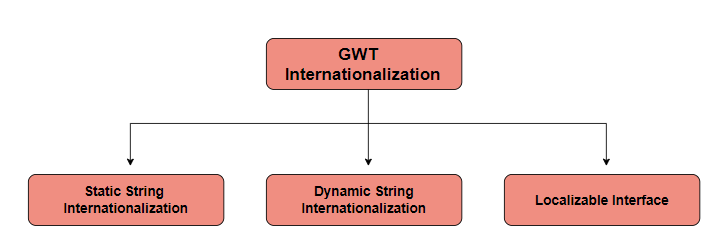
Static String Internationalization
- It is one of the earliest and most valuable techniques for translating parameterized and constant strings.
- The reason for this technique to be simple is the ease of its implementation, as it requires significantly less overhead.
- Static string internationalization uses standard Java properties files to store translated strings and parameterized messages, and strongly-typed Java interfaces are created to retrieve their values.
Dynamic String Internationalization
- As the name suggests, this technique is dynamic, which means it can be changed. It is slower than static string but advantageous as it can be changed according to requirements.
- Applications that employ this strategy are displayed on the module's home page as localized strings. This method eliminates the requirement for them to be recompiled whenever a new locale is added.
- This method must be used if the GWT application is to be integrated with an existing server-side localization system.
Localizable Interface
- It is the most important and powerful technique for implementing the interface.
- It comes under the category of advanced internationalization techniques that are used rarely.
- We need to develop a localizable interface at an advanced level for simple string substitution. Additionally, it produces customized types in localized form.



 7+ registered

