Do you think IIT Guwahati certified course can help you in your career?
Introduction
In this article, we will discuss JavaFX Event Handling and its types, processing, and delivery process. Ultimately, we will look into a coded example of JavaFX Event Handling. We will start with a brief introduction to JavaFX Event Handling and move further into the topic for a detailed description.
Without further ado, let's start by learning JavaFX Event Handling.
JavaFX Event Handling
We can create GUI, web, and graphical apps using JavaFX. In these apps, an event is stated to have occurred whenever a user interacts with the application (nodes). The actions that trigger an event include, for instance, pressing a button, moving the mouse, typing a character on the keyboard, choosing an item from a list, and scrolling the page.
JavaFX allows us to develop a wide range of applications, including desktop, web, and graphical apps. In today's applications, the users like smooth operations of the program. Most of the time, the user engages with the application. The ideal application is the one that processes events in the shortest time possible.
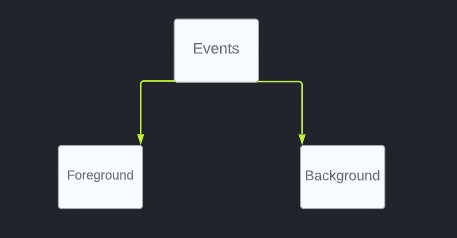
Types of JavaFX Events
Foreground Events
Events that need a user's direct interaction are known as foreground events. As a result of a user engaging with the graphical elements of a Graphical User Interface, they are produced. For instance, they are pressing a button, dragging the mouse, typing a character, choosing anything from a list, scrolling the website, etc.
Background Events
Background events take place in the background and don't involve the end-user. Examples of background events include operating system disruptions, hardware or software failure, timer expiration, and process completion.
Events in JavaFX
A variety of events can be handled with the help of JavaFX. The foundation class for an event is in the package JavaFX.event and called Event. Events are instances of any of their subclasses. The events available with JavaFX are rather diverse. The following is a list of some of them.
Events
Description
Key Event
This input event indicates a key press that occurred on the node. It is represented by a class named KeyEvent. This Event includes actions such as the button being pressed, the button being released
Drag Event
This is an input event that is seen when you drag the mouse. This is represented by a class named DragEvent. This includes actions such as Enter, Drag, Drop; Drag Entered Target, Drag Abandoned Target, and Drag Over.
Mouse Event
This is an input event that is seen when the mouse is clicked. This is represented by a class named MouseEvent. This includes actions such as mouse click, mouse down, mouse release, mouse move, mouse input target, and mouse left target.
Window Event
This is an event related to the show/hide action of the window. The WindowEvent class represents this. This includes measures such as hiding windows, showing windows, hiding windows, and showing windows.
Event Handling
Components
Description
Target
The node where the event occurred. The target can be a window, a scene, and a node.
Source
The source of the Event is where the start of the event was generated.
Type
It is the type of event that occurred. Mouse down and mouse up are the types of events for mouse events.
Each time an event is generated, JavaFX goes through the following phase:
Route Construction
Each time an event is generated, the default / initial route for the Event is determined by building the event dispatch chain. The path from the stage to the source node. Below is the event dispatch chain for the events generated when the play button is clicked.
Event Capturing Phase
The root node of the application transmits events after constructing the event dispatch chain. This Event spreads (top to bottom) to every delivery chain node. If any of these nodes has a filter registered for the created Event, it will be executed. The created event will be passed to the target node if no other node in the dispatch chain has a filter for it, and the target node will then process the Event.
Event Bubbling Phase
Events are transferred from the target node to the stage node during the event bubble phase (from bottom to top). A handler for the created Event will be performed if it has been registered by one of the nodes in the event dispatch chain. The procedure ends when the event reaches the root node if none of these nodes have a handler to handle it.
Event Handlers and Filters
Application logic for managing events is contained in event filters and handlers. Nodes can register with a variety of handlers and filters. When using parent-child nodes, you can give the parent a standard filter or handler that will be used by all child nodes by default.
As was previously indicated, this is a filter that is processed during the Event, and the handler is carried out during the Event's bubbling stage. In the JavaFX.event package, all handlers and filters implement the EventHandler interface.
Coded example for event handlers:
//inserting javafx modules
import javafx.application.Application;
import static javafx.application.Application.launch;
//initializing javafx event handlers
import javafx.event.EventHandler;
 //setting scene group
import javafx.scene.Group;
//setting scene
import javafx.scene.Scene;
import javafx.scene.input.MouseEvent;
//setting colour pallets
import javafx.scene.paint.Color;
//choosing our shape in this case circle
import javafx.scene.shape.Circle;
//choosing text fonts
import javafx.scene.text.Font;
//defining font weight
import javafx.scene.text.FontWeight;
import javafx.scene.text.Text;
//setting stage
import javafx.stage.Stage;
//defining our eventfilter class
public class EventFiltersExample extends Application {
    //ovverriding
   @Override
   public void start(Stage stage) {
      //step towards creating a Circle
      Circle circle = new Circle();

      //coordinates of the circle
      circle.setCenterX(200.0f);
      circle.setCenterY(135.0f);

      //radius of circle
      circle.setRadius(30.0f);

      //circle colour
      circle.setFill(Color.GOLD);

      //stroke width of circle
      circle.setStrokeWidth(15);

      //text to be displayed
      Text text = new Text("Click the circle to change colour");

      //font weight
      text.setFont(Font.font(null, FontWeight.BOLD, 14));

      //text colour
      text.setFill(Color.BLACK);

      //ssetting position of text
      text.setX(170);
      text.setY(50);

      //setting mouse handler event
      EventHandler<MouseEvent> eventHandler = new EventHandler<MouseEvent>() {
        //ovverriding
         @Override
         //defining mouseevent handler
         public void handle(MouseEvent e) {
            //printing out hello world
            System.out.println("Hello World");
            circle.setFill(Color.GOLD);
         }
      };
      //event filter registration
      circle.addEventFilter(MouseEvent.MOUSE_CLICKED, eventHandler);

      //group object creation
      Group root = new Group(circle, text);

      // scene object creation
      Scene scene = new Scene(root, 500, 250);

      //Setting colour on change
      scene.setFill(Color.PURPLE);

      //title on stge
      stage.setTitle("Event Filters");

      //scene addition
      stage.setScene(scene);

      //showing stage content
      stage.show();
   }
   // defining main class
   public static void main(String args[]){
      launch(args);
   }
}
You can also try this code with Online Java Compiler
JavaFX is a collection of graphics and media packages that allow programmers to design, build, debug, test, and deploy rich client applications that work reliably across several platforms.
What is the JavaFX group?
The JavaFX group class is a component of JavaFX. A Group's node count is contained within it. A Group is not immediately resizable and will take on the aggregate boundaries of its offspring.
Which library is used for using JavaFX applications in Web browsers?
The Deployment Toolkit library is suggested for usage when launching a JavaFX application from a web page or embedding one there.
What are the three main components of a JavaFX application?
A JavaFX application typically consists of three main parts: Stage, Scene, and Nodes.
Conclusion
In this article, we have extensively discussed the details of the JavaFX Event Handling, its events, types, phases, and coded example. We hope that this blog has helped you enhance your knowledge of JavaFX Event Handling, and if you want to learn more, check out our articles on JavaFX.







 7+ registered

