Do you think IIT Guwahati certified course can help you in your career?
Introduction
JavaFX allows us to color-fill the shapes. The setFill() method allows us to freely build our own color using a variety of methods and give it there as a Paint object. Let's talk about the various ways JavaFX may create color. In this article, you will learn about what is JavaFX, JavaFX Color, and different ways to color using RGB color, by color name, and HSB color.
JavaFX
The JavaFX is an open-source library in Java, which is used to create both desktop and Rich Internet Applications (RIA). It can create next-generation client applications for mobile, desktop, and embedded systems built on Java. The JavaFX replaces the Swing framework as the GUI framework in building the Java applications because it has more features than Swing. JavaFX provides its own components and is independent of the operating system, just like Swing. It is hardware accelerated, lightweight, and supports various operating systems like Windows, Linux, and Mac OS.
JavaFX Color
In the package javafx.scene.paint, JavaFX offers a number of classes that can be used to apply colors to an application. The basis class for all the classes that are used to apply colors is an abstract class in this package called Paint.
You can apply colors in the following patterns by using these classes:
Uniform:- Color is applied consistently throughout each node in this pattern.
Image Pattern:- You can use this to fill the node's area with an image pattern.
Gradient: The color given to the node changes from one point to the next in this pattern. It has linear gradients and radial gradients, two different types of gradients.
Shape, Text (including Scene), and other node types to which color can be applied, all include methods called setFill() and setStroke (). These will aid in setting the nodes' and their strokes' respective color values.
These methods take a Paint object as input. Therefore, you must instantiate these classes and send the object as a parameter to these methods in order to make either of these types of photos.
RGB Color
The most often used way to create a color in graphics is with the RGB color scheme. It is made up of three parts called RED (R), GREEN (G), and BLUE (B). Each component has 8 bits. Therefore it can have an integer value between 0 and 228 - 1=255.
You can think of the computer screen as a collection of pixels. The set (R, G, B) genuinely depicts how each LED on the screen emits light.
When the RED value is set to 0, the Red LED is off. However, when the RED value is set to 255, the full LED emission is present. White is represented by the combination of (255,255,255), and black is represented by (0,0,0). The range's center values can be used to represent various hues.
Example
package application;
import javafx.application.Application;
import javafx.scene.Group;
import javafx.scene.Scene;
import javafx.scene.effect.DropShadow;
import javafx.scene.effect.Shadow;
import javafx.scene.paint.Color;
import javafx.scene.shape.Rectangle;
import javafx.stage.Stage;
public class Shape_Example extends Application {

  @Override
  public void start(Stage primarystage) {
    Group root = new Group();
    primarystage.setTitle("Color Example");
    Rectangle rectan = new Rectangle();
    rectan.setX(50);
    rectan.setY(20);
    rectan.setWidth(100);
    rectan.setHeight(150);
    int red=20;
    int green=125;
    int blue=10;
    rectan.setFill(Color.rgb(red, green, blue,0.63));
    root.getChildren().add(rectan);
    Scene scene = new Scene(root,200,200);
    primarystage.setScene(scene);
    primarystage.show();
  }

  public static void main(String[] args) {
    launch(args);
  }
}
You can also try this code with Online Java Compiler
In JavaFX, the color can also be created using the color name. the javafx.scene.paint class. All colors are included in Color as class attributes. In the setFill() method, the Paint class object must contain the Color attribute.
Example
package application;
import javafx.application.Application;
import javafx.scene.Group;
import javafx.scene.Scene;
import javafx.scene.effect.DropShadow;
import javafx.scene.effect.Shadow;
import javafx.scene.paint.Color;
import javafx.scene.shape.Rectangle;
import javafx.stage.Stage;
public class Shape_Example extends Application {

  @Override
  public void start(Stage primarystage) {
    Group root = new Group();
    primarystage.setTitle("Color Example");
    Rectangle rectan = new Rectangle();
    rectan.setX(50);
    rectan.setY(20);
    rectan.setWidth(100);
    rectan.setHeight(150);
    rectan.setFill(Color.RED); //passing color name
    rectan.setEffect(new DropShadow());
    root.getChildren().add(rectan);
    Scene scene = new Scene(root,200,200);
    primarystage.setScene(scene);
    primarystage.show();
  }

  public static void main(String[] args) {
    launch(args);
  }
}
You can also try this code with Online Java Compiler
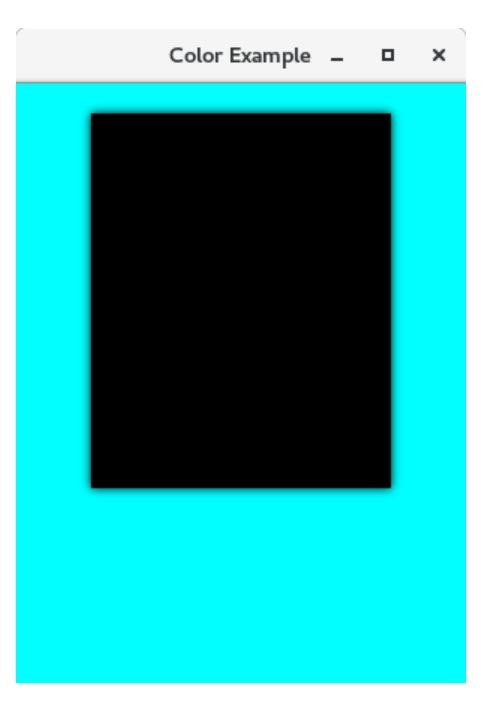
Along with the many techniques we have already seen, JavaFX also gives us the ability to create colors using HSB, which stands for Hue, Saturation, and Brightness. javafx.scene.paint. There is a static function called Color.hsb() in Color that takes three numbers, h, s, and b.
Example
package application;
import javafx.application.Application;
import javafx.scene.Group;
import javafx.scene.Scene;
import javafx.scene.effect.DropShadow;
import javafx.scene.paint.Color;
import javafx.scene.shape.Rectangle;
import javafx.stage.Stage;
public class Shape_Example extends Application {

  @Override
  public void start(Stage primarystage) {
    Group root = new Group();
    primarystage.setTitle("Color Example");
    Rectangle rectan = new Rectangle();
    rectan.setX(50);
    rectan.setY(20);
    rectan.setWidth(200);
    rectan.setHeight(250);
    rectan.setEffect(new DropShadow());
    root.getChildren().add(rectan);
    Scene scene = new Scene(root,300,400,Color.hsb(180, 1, 1));
    primarystage.setScene(scene);
    primarystage.show();
  }

  public static void main(String[] args) {
    launch(args);
  }
}
You can also try this code with Online Java Compiler
The JavaFX Line chart is a type of two-axis chart used to show the dynamics of any data or product over a particular time interval. They are created by plotting a series of points that can represent changes over a short or long period.
Are pie charts comparable?
Pies shouldn't typically be used to compare data across pies, judge the relative sizes of categories, or show percentages that don't add up to 100%.
What three elements make up a JavaFX application?
A JavaFX application will typically consist of three main parts stage, scene, and nodes.
What are the three life cycle methods of the JavaFX application?
The three life cycle methods of JavaFX application are public void init(), public abstract void start(Stage primaryStage), and public void stop().
What are the types of line charts?
There are three types of Line charts in Java. They are simple Line Charts, multiple Line Charts, and compound Line Charts.








 7+ registered

