Do you think IIT Guwahati certified course can help you in your career?
Introduction
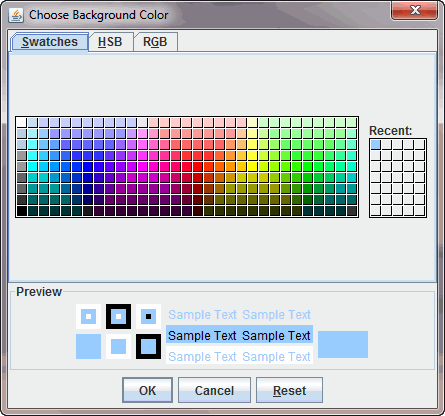
JColorChooser provides a control panel designed to allow a user to select a color in RedGreenBlue (RGB) format. The control panel is divided into two parts, where one part is a window to choose colors, and the other is the preview box.
JColorChooser has four color choosers, which are listed below:
Swatches: This chooser chooses a color from the swatches format.
HSV: This chooser chooses the color from the Hue-Saturation-Lightness color format.
RGB: This chooser is used to choose from the Red-Green-Blue format.
CMYK: This chooser selects the color from the process color or four-color model.
HSL: This is the color format which works on Hue-Saturation-Lightness representation of colors.
Class Declaration of JColorChooser
Syntax of JColorChooser is:
“public class JColorChooser extends JComponent implements Accessible”
Fields of JComponent
Fields of the JComponents are listed below:
protected AccessibleContext accessibleContext: AccessibleContext of JComponent is associated with this field.
static String CHOOSER_PANELS_PROPERTY: This field is the chooserPanel array property name of JComponent.
static String PREVIEW_PANEL_PROPERTY: This field is the preview panel property name of JComponent.
static String SELECTION_MODEL_PROPERTY: This field is the selection model property name of JComponent.
JColorChooser Constructors
Constructors are functions that initialize the objects of a class. In other words, we can say that a constructor is a function that calls all the features of a class. Depending upon different conditions, there are different constructors available in JColorChooser, which are as follows:
ColorChooser(): It creates a color chooser panel whose default color is white.
JColorChooser(Color col): It makes a color chooser panel with the declared initial color col.
JColorChooser(ColorSelectionModel m): It makes a color chooser panel with the stated color model.
JColorChooser Methods
A method is a function that executes only when it is called. We can also input some data into it through the parameters of the method. Every method has its specific task. There are so many methods of JColorChooser. Some of the commonly used methods are as follows:
addChooserPanel(AbstractColorChooserPanel p): It adds a color chooser panel to the color-chooser.
JDialog createDialog(Component comp, String title, boolean modal, JColorChooser Cpane, ActionListener okListener, ActionListener cancelListener): It creates a new dialog box and returns the declared ColorChooser along with Cancel, Reset, and Ok button.
setColor(Color col): This method will set the existing color of the ColorChooser to the mentioned color.
AccessibleContext getAccessibleContext(): It returns those accessible contents which are related to the JColorChooser.
setColor(int r, int g, int b): This method sets the present color of the color chooser to the defined RGB (Red, Green, Blue) color. In the syntax, r stands for red, g stands for green, and b stands for blue. The numerical value of all these colors should be between 0-255.
AbstractColorChooserPanel[] getChooserPanels(): It will return the defined color panels.
Color getColor(): This method returns the present color value from ColorChooser.
Set SelectionModel(ColorSelectionModel mod): A model that contains the defined color will be set.
Boolean getDragEnabled(): This method will return drag dragEnabled property’s value.
setDragEnabled(): This method sets the DragEnabled property that allows automatic drag handling by fixing the value as true. The default value of the DragEnabled property is false.
setPreviewPanel(JComponent pr): This method sets the present preview panel.
setUI(): This method sets a Look & Feel object that renders the component.
updateUI(): In this method Look & Feel change notification will be triggered by the UIManager.
Example of JColorChooser
package jcolorchooserdemo;
import java.awt.*;
import java.awt.event.*;
import javax.swing.*;
public class Main {
    public static void main(String[] args)
    {
        final JFrame frm = new JFrame("JColorChooser Demo");
        JButton btnf = new JButton("Choose Color");
        btnf.addActionListener(new ActionListener()
        {
            public void actionPerformed(ActionEvent a)
            {
                Color newCol = JColorChooser.showDialog(
                     frm,
                     "Choose Background Color",
                     frm.getBackground());
                if(newCol != null)
                {
                    frm.getContentPane().setBackground(newCol);
                }
            }
        });

        Container pane = frm.getContentPane();
        pane.setLayout(new FlowLayout());
        pane.add(btnf);
        frm.setDefaultCloseOperation(JFrame.EXIT_ON_CLOSE);
        frm.setSize(350, 250);
        frm.setVisible(true);
    }
}
You can also try this code with Online Java Compiler
Given below are the screenshots of the JColorChooser Demo Application:
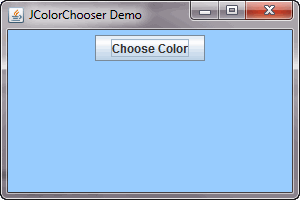
When we run this program, a window appears like a screenshot below, displaying a button named Choose Color.
Now, When we click on the “Choose Color” button, another window will appear In which the color panel will be seen, and from there, we can choose the color. A preview of the chosen color will be shown below.
And, when we click ok in the color panel, it will change the background color of the first window.
Frequently Asked Questions
How many fields are of JLable, and what are their names?
There are four fields of JLable whose names are:
accessibleContext
CHOOSER_PANELS_PROPERTY
PREVIEW_PANEL_PROPERTY
SELECTION_MODEL_PROPERTY
What is the purpose of “protected String paramString()”?
This method returns the JColorChooser’s String representation.
What is the work of “getPreviewPanel()”?
getPreviewPanel() returns the preview panel with the chosen color.
What is the getUI() used for?
“getUI()” is used to return the Look & Feel object that renders the component.
What is the default color of JColorChooser?
The default color of JColorChooser is White.
Conclusion
JcolorChooser is a class that comes under Java Swing; it offers a color control panel that allows a user to select a color in the Red, Green, Blue (RGB) format as part of designing purposes. This control panel is made up of two parts in which one is a color-choosing panel, and the other is the preview box. JColorChooser supports five color formats.










 7+ registered

