Do you think IIT Guwahati certified course can help you in your career?
Introduction
JPasswordField is a little component that enables modification of a single line of text without displaying the original characters, even while the view shows that anything was typed.
JPasswordField is considered to be source-compatible with java.awt.TextField used with echoChar set TextField with echoChar set is utilized. It is offered separately to make it simpler and safer to modify the JTextField's user interface without affecting password entries.
Typical usage of JPasswordField looks like this:
// create new object
JPasswordField passwordField = new JPasswordField(20);

// add to the container
frame.add(passwordField);

// get the password
char[] password = passwordField.getPassword();
Class Declaration
Declaration for javax.swing.JPasswordField class:
public class JPasswordField
extends JTextField
You can also try this code with Online Java Compiler
Constructs a new JPasswordField, with a default document, null starting text string, and 0 column width.
JPasswordField(Document doc, String txt, int columns)
Constructs a new JPasswordField that uses the given text storage model and the given number of columns.
JPasswordField(int columns)
Constructs a new empty JPasswordField with the specified number of columns.
JPasswordField(String text)
Constructs a new JPasswordField initialized with the specified text.
JPasswordField(String text, int columns)
Constructs a new JPasswordField initialized with the specified text and columns.
Jpasswordfield Class Methods
Here are some of the widely used Jpasswordfield Class constructors.
Class Methods
Description
char getEchoChar()
Returns the character to be used for echoing.
setEchoChar(char c)
set the echo character for JPasswordField.
char[] getPassword()
Returns the text contained in this TextComponent.
String getText(int offs, int len)
Deprecated. As of Java 2 platform v1.2, replaced by getPassword
String getText()
Deprecated. As of Java 2 platform v1.2, replaced by getPassword.
void setEchoChar(char c)
Sets the echo character for this JPasswordField
void updateUI()
This Reloads the pluggable UI.
protected String paramString()
Returns a string representation of this JPasswordField.
String getUIClassID()
Returns the name of the L&F class that renders this component.
boolean echoCharIsSet()
Returns true if this JPasswordField has a character set for echoing
Methods Inherited
java.lang.Object
javax.swing.JTextField
java.awt.Container
javax.swing.JComponent
javax.swing.text.JTextComponent
java.awt.Component
Example
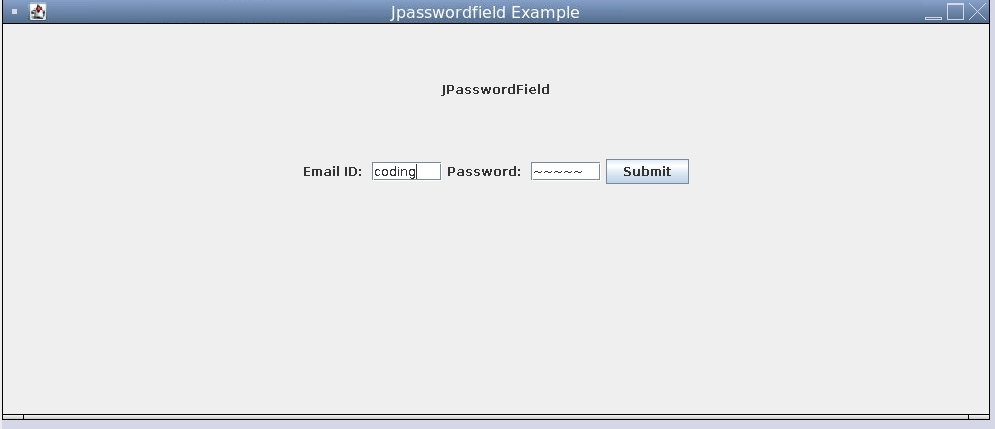
Program for entering name and password using JTextField and JPasswordField.
package com.codingninjas.gui;
import java.awt.*;
import java.awt.event.*;
import javax.swing.*;

public class SwingControlDemo {
	private JFrame mainFrame;
	private JLabel headerLabel;
	private JLabel statusLabel;
	private JPanel controlPanel;

	public SwingControlDemo(){
		prepareGUI();
	}

	public static void main(String[] args){
		SwingControlDemo  swingControlDemo = new SwingControlDemo();
		swingControlDemo.showPasswordFieldDemo();
	}

	private void prepareGUI(){
		mainFrame = new JFrame("Jpasswordfield Example");
		mainFrame.setSize(400,400);
		mainFrame.setLayout(new GridLayout(3, 1));

		mainFrame.addWindowListener(new WindowAdapter() {
			public void windowClosing(WindowEvent windowEvent){
				System.exit(0);
			}
		});

		headerLabel = new JLabel("", JLabel.CENTER);
		statusLabel = new JLabel("",JLabel.CENTER);
		statusLabel.setSize(350,100);

		controlPanel = new JPanel();
		controlPanel.setLayout(new FlowLayout());

		mainFrame.add(headerLabel);
		mainFrame.add(controlPanel);
		mainFrame.add(statusLabel);
		mainFrame.setVisible(true);
	}

	private void showPasswordFieldDemo(){
		headerLabel.setText("JPasswordField");
		JLabel namelabel= new JLabel("Email ID: ", JLabel.RIGHT);
		JLabel passwordLabel = new JLabel("Password: ", JLabel.CENTER);
		final JTextField userText = new JTextField(6);
		final JPasswordField passwordText = new JPasswordField(6);
		passwordText.setEchoChar('~');

		JButton loginButton = new JButton("Submit");
		loginButton.addActionListener(new ActionListener() {
			public void actionPerformed(ActionEvent e) {
				String data = "Username " + userText.getText();
				data += ", Password: " + new String(passwordText.getPassword());
				statusLabel.setText(data);
			}
		});

		controlPanel.add(namelabel);
		controlPanel.add(userText);
		controlPanel.add(passwordLabel);
		controlPanel.add(passwordText);
		controlPanel.add(loginButton);
		mainFrame.setVisible(true);
	}
}
OUTPUT
Frequently Asked Questions
What is Jpasswordfield?
JPasswordField is a little component that enables modification of a single line of text without displaying the original characters, even while the view shows that anything was typed.
JPasswordField is considered to be source-compatible with java.awt.TextField used with echoChar set TextField with echoChar set is utilized.
What is the use of set echo char method?
You can specify a character to display each time a user types a password into the JPasswordField using the echo char command.
What is getPassword in Java?
char[] getPassword() Returns the password as a character array.
What is JTextArea in Java?
A multi-line area that shows plain text is known as a JTextArea. Where it is reasonable to do so, it is designed to be a small component that offers source compatibility with the java. awt. TextArea class.
Which method is used to change the default character of JPasswordField?
The recommended field size, which in this case is at least 10 columns wide, is indicated by the argument supplied to the JPasswordField function Object() { [native code] }. For each character entered, a dot is displayed by default in a password field. Call the setEchoChar method to modify the echo character.
Conclusion
In this article, we have extensively discussed Jpasswordfield
We hope that this blog has helped you enhance your knowledge regarding Jpasswordfield and if you would like to learn more, check out our articles on













 1+ registered

