Do you think IIT Guwahati certified course can help you in your career?
Introduction
Django is an open-source Python-based web framework. Based on the MVT (Model template views) pattern, Django is a robust framework. MVT is the modified version of the MVC (Model View Controller) pattern. An American non-profit organization maintains it. The primary purpose is to make web development easy, clean, and secure.
Django is a trendy framework used to create web applications. As a beginner, creating a new project in Django can be an overwhelming process; as there are already a lot of files created for us, it might be confusing to know where to start. Before starting with the project structure in Django, let us begin with the basics.
MVT Architecture
Django follows the MVT architecture. MVT stands for Model-View-Template. In an MVT architecture, there are three parts to this architecture:
Model: The model provides a logical data structure to the application and maintains data with the help of a database.
View: The view is the user's interface when rendering the website. HTML, CSS, and JavaScript aid in the rendering process.
Template: The template has the static parts of the desired HTML output. It also has certain syntaxes which describe how dynamic we will insert contents.
MVT Architecture
Project Structure In Django
A project is the foundational unit of the Django web application. When a Django Project Structure is initialized, it will contain certain files by default.
The files created by default are:
manage.py: This file helps us interact with the project through the command line.
init.py: This is a python package. init.py is invoked whenever the package or any module in the package is imported.
settings.py: This file contains all the website settings.
urls.py: This file is used to store all the links of the project and the function calls.
wsgi.py and asgi.py: These files help the Django application communicate with the webserver.
Let’s look at what these files are used for in detail.
Creating A Project
The following command must be typed in the terminal to create a project:
$ django-admin startproject my_site
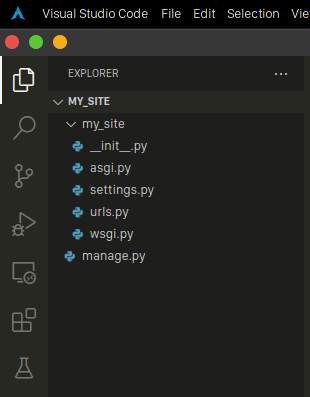
We can give any desired name instead of project_name for our project. The above-written command would create a project with the name “my_site”. A folder named “my_site” would be made, and inside that directory, there would be a file named “manage.py” and another directory with the name “my_site”. Here is the project structure in Django:
Project Structure
manage.py
The Command-line utility is used to either import or export metadata objects across different domains or setups. Command-line utility helps us create one or more objects within an object. The file “manage.py” is used in the Django project structure as a command-line utility. This file is used to perform various debugging, deploy operations, and run web applications.
The file "manage.py" contains the code for running the server, making migrations, and performing several other commands in the code editor. There are many commands which come under manage.py. Some of them are:
runserver: This command is used to run the server for our web application.
migration: If we make any changes to our database, we use this command.
makemigration: This command is used to apply new migrations to the database.
manage.py file
We don’t have to change any of the code in the manage.py file.
__init__.py
By default, the “__init__.py” file will be empty. This file is present in the project structure in Django to define that this particular directory is a Python package. This file tells the interpreter that the directory “my_site” in the above example is a Python package. We do not have to make any changes to this file as well.
The __init__.py files are needed to make Python treat the directories as containing packages. This is done to prevent directories with a common name, such as string, from unintentionally hiding valid modules that occur later on the module search path. It is invoked when the package or a module in the package is imported.
__init__.py file
setting.py
The "setting.py" file is one of the most important files in the Django project structure. It contains the Django project configuration. It is used to add all the applications and the middleware applications for our project. It also has information about the templates, static files, and media-related settings. It handles the database settings. The default database is sqlite3. We can change this database to Mysql, PostgreSQL, or MongoDB by configuring it in the file "setting.py".
settings.py file
urls.py
URL stands for Universal Resource Locator. URL is used to provide the address of resources like images, videos, websites, etc., that are present on the internet. We can access contents that are on the internet using their URLs. The file "url.py" is present in the project structure in Django to handle all the URLs of our web application. This is also an important file that creates other endpoints for our web application. In simpler terms, this file tells Django that whenever a user comes with a particular URL, then the user must be directed to a specific website or image as mentioned in the user.py file. By default, this file comes up with the URL pattern for the admin panel.
urls.py file
wsgi.py
WSGI stands for Web Server Gateway Interface. It basically describes how the server interacts with the web application. After the web application is developed, it must be hosted. Here we will be using a WSGI server to do it. There will be a Django middleware for any server that helps us with all the integration and connectivity issues. This file should not be changed when developing. We only need this file during deployment to a Web Server Gateway Interface server.
wsgi.py file
asgi.py
ASGI stands for Asynchronous Server Gateway Interface. The file “asgi.py” is present in the newer versions of Django. ASGI works in a manner that is similar to WSGI but with additional features. ASGI is like a successor interface to WSGI. As compared to WSGI, ASGI gives better freedom in Django development. Changes should not be made to this file.
asgi.py file
Files in Django App
Just like for the Django Project, Django App also has a set of files. They are:
_init_.py
admin.py
apps.py
models.py
views.py
urls.py
tests.py
We have discussed some of these files earlier. The explanations hold the same for Django Apps also. The files we haven’t seen in the Django project are discussed below.
admin.py
Admin.py is for setting the models into the Django administration. We do not have to create the admin interface as it is pre-built.
apps.py
This file is associated with the configuration of the apps. Usually, the default configuration is enough, and we rarely have to touch this file.
models.py
models.py holds the models of our web applications.
views.py
This is an important file, and it holds all the views. The views are usually stored as classes.
tests.py
Tests.py contains different test cases for the application. Tests.py will be used to test the application.
Frequently Asked Questions
What is the terminal command to start a server in Django? We can do python mange.py runserverin the terminal to start a server.
What is the difference between Django Project and Django App? A Django project is used for making the entire Web application. There will be one project to handle one complete website. There can be many Django apps inside the project. A Django App is used for managing a particular section of the website. In a typical web application, one app is used entirely for User Authentication, one entirely for Payments, etc.
Key Takeaways
Django is a high-level Python web framework that helps us create web applications that are maintainable and secure. Django is a trendy free and open-source project with many users and contributors. Django follows the MVT architecture.
The project structure in Django is easy to understand. On using the command to create a project, many files and directories define the project structure in Django. Some of the files created are manage.py, init.py, setting.py, url.py, wsgi.py, and asgi.py.







 1+ registered

