Do you think IIT Guwahati certified course can help you in your career?
Introduction
A Puppet is a tool that manages software configuration. Puppet includes its own declarative language to declare system configuration.
The user requires minimum programming knowledge to operate Puppet. It is designed to manage the configuration of Windows and Unix operating systems. We can declare the system resources using Puppets declarative language or via Ruby DSL.
⚙️Installation
The first step toward Continuous Delivery for Puppet Enterprise is installation. The initial installation of Puppet Enterprise is to understand architecture, select the appropriate TLS configuration, and ensure browser support and version of Puppet Enterprise. Also, it is important to configure your analytics data collection preferences.
🏗️Continuous Delivery for Puppet Enterprise Architecture
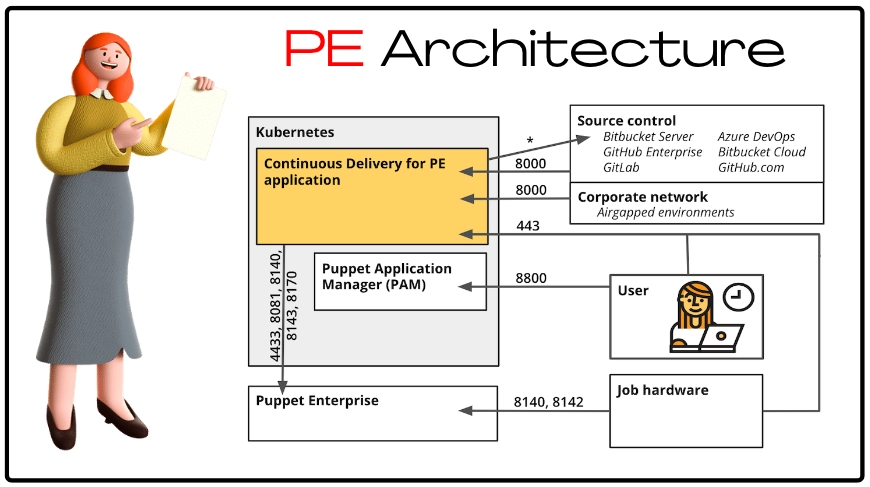
The servers selected as job hardware, the source control system, the browser that the user uses to access the web UI and Puppet Application Manager (PAM), and the user’s PE installation are all in contact with Continuous Delivery for Puppet Enterprise (PE).
Following is the diagram that represents the architecture and port requirements for Continuous Delivery for PE.
Port
Use
*(variable)
Continuous Delivery for PE makes API requests are made on this port. Your source control integration will determine the exact port number.
443
Users can access the Continuous Delivery for PE application's web UI over HTTPS on this port, which is used for communication between the Continuous Delivery for PE application and the task hardware servers.
4433
This port is used by the Continuous Delivery for PE application to communicate with the PE console (for authentication) and the node classifier.
8000
Webhooks from source control providers connect to Continuous Delivery for PE using this port by default. This port can be modified in PAM's Optional settings.
8081
This port is used to send queries to PuppetDB.
8140
This port is used by Continuous Delivery for PE application and job hardware servers to communicate with the Puppet server.
8142
This port is used by Continuous Delivery for PE job hardware serves and PE for communication. The communication is done via Puppet Agent.
8143
This port is used by Continuous Delivery for PE application to establish communication with Puppet Orchestrator.
8170
This port is used by Continuous Delivery for PE application to establish communication with the Code Manager.
8800
This port is used to accept PAM’s web UI’s HTTPS traffic from users.
You can configure ports 8081, 4433, 8143, 8170, and 8140 in the PE integration settings.
⚒️TLS Configuration
When deploying Continuous Delivery for Puppet Enterprise, you have a variety of TLS configuration options to select from (PE). Decide which installation architecture best satisfies your security requirements and constraints.
💿Basic Installation (Default Configuration)
When using automatic load balancing or Ingress load balancing, such as with Google Kubernetes Engine, this installation design is compatible with both single-node clusters and multi-node clusters (GKE). Port 8000 is reserved for webhook callbacks. For machine-to-machine communication, this architecture requires public certificates. TLS is frequently configured at the Ingress, whether in manual entry, self-signed, or certificate management form.
Port
Use
443
This port is used by the Continuous Delivery for PE application to communicate with the Continuous Delivery for PE job hardware servers.
5000
This port is used by the NodePort to communicate with the registry, in the offline installations.
8000
Webhooks from source control providers connect to Continuous Delivery for PE using this port by default. This port can be modified in PAM's Optional settings.
8080
On this port, Ingress communicates with query-service and delivers traffic to the Continuous Delivery for PE web UI.
9001
This port is used by the Continuous Delivery for PE job hardware servers to communicate with NodePort.
🌐Installation with a Proxy or Load Balancer Using Enhanced TLS
Internal certificates are used for machine-to-machine communication, whereas public certificates are used for external proxy TLS termination in this installation design. Rules are routed to different services inside Continuous Delivery for PE using the Ingress. The backend and web UI endpoints must be configured independently of the Ingress hostnames.
💻Deploy Continuous Delivery for Puppet Enterprise
Specify your first configuration setting and launch the first deployment of Continuous Delivery for Puppet Enterprise (PE) after installing Puppet Application Manager (PAM).
🪜Steps to Deploy Continuous Delivery for Puppet Enterprise with Internet Access
Upload your Continuous Delivery for PE license into PAM, then follow the on-screen instructions to install SSL certificates and confirm that your infrastructure satisfies the system requirements for Continuous Delivery for PE.
Click on Config, to configure your Continuous Delivery for Puppet Enterprise, and: 📌Enter the hostname. 📌Set a new password for the root user account. 📌Select where to host the webhook and local container registry endpoints. 📌Set up any additional settings that apply to your installation on this page, such as load balancing, specific endpoints, external databases, and TLS certificates. 📌Click Save config after you're done editing the configuration. A new Continuous Delivery for PE version is started by saving updated configuration settings.
Click on the Go to new version, which will redirect you to the Version history tab. Locate the new version in the All versions section.
Follow the preflight tests for the new version. While Continuous Delivery for PE checks your system to make sure your cluster satisfies minimal system requirements, the Running Checks indication is displayed. When the preflight inspections are finished: 📌If the status is Ready to Deploy, move on to the next step. 📌If the status is Checks Failed, click View preflights, correct the issues, and click Re-run. Repeat this step as needed.
When the version is prepared for deployment, click Deploy and keep an eye on the status of the application on the Application page.
Navigate to https://<HOSTNAME> and sign into Continuous Delivery for PE.
🧬Analytics Data Collection
Continuous Delivery for Puppet Enterprise (PE) gathers information about your product usage automatically. You can also choose not to provide this information when installing Continuous Delivery for PE.
Analytics data is gathered by Continuous Delivery for PE to better understand how our customers utilize the program. For instance, knowing how many control repositories you manage aids in the development of more accurate product testing. Also, it gives data on the most and least popular source control systems. That will help in deciding where to prioritize new functionality.
Frequently Asked Questions
What is Puppet?
With the aid of Puppet, you can manage and automate the configuration of servers. When using Puppet, you specify the ideal state for the infrastructure systems that you want to manage.
What is DevOps?
DevOps is a collection of cultural ideas, operational procedures, and technical resources that enhance an organization's ability to deliver products and services rapidly.
What is continuous delivery for Puppet Enterprise?
A solution for optimizing and making continuous integration and delivery of your Puppet code is called Continuous Delivery for Puppet Enterprise (PE). A prescribed methodology for testing and deploying Puppet code across environments is provided by Continuous Delivery for PE.
Is Puppet a CI/CD tool?
Yes, Puppet is a true CI/CD solution for modern development.
Why Puppet is used in DevOps?
Puppet has the ability to manage many servers, specify infrastructure as code, and enforce system configuration. Puppet is one of the best DevOps tools for managing numerous servers.
Conclusion
In this article, we have discussed the Continuous Delivery for Puppet Enterprise.







 1+ registered

