Do you think IIT Guwahati certified course can help you in your career?
Introduction📃
Puppet is a server configuration management program used to configure, deploy, and manage servers. It specifies each host's unique configuration and continually verifies that the necessary configuration is in place and hasn't been changed on the host. It gives you control over all of your configured computers, so a centralized modification instantly propagates to everyone.
In this blog, we will learn about impact analysis in continuous delivery for puppet enterprise.
Analyzing the Impact of Code Changes🧑💻
Impact analysis is a Continuous Delivery for Puppet Enterprise (PE) tool that, without actually integrating the new code, demonstrates the potential effects that new Puppet code might have on the infrastructure that PE manages. If you add impact analysis to a repo's pipeline, Continuous Delivery for PE automatically creates a report on every proposed code change to that repo. You may also generate impact analysis reports for commits in your control/module repos on demand.
There are three stages of Impact analysis.
💢 Generate impact analysis reports
💢 Run impact analysis on fewer nodes
💢 Limitations of impact analysis
We will learn these stages one by one.
Generate Impact Analysis Reports🤖
Impact analysis reports outline the potential risk and impact of suggested code modifications so you can decide how and whether to handle them. For every change uploaded to your repositories, effect analysis reports can be generated either on demand or by adding impact analysis tasks to your pipelines. Impact analysis reports are produced by comparing the deployment's current catalog with a catalog that was just prepared for the deployment conditions you specified.
Impact Analysis Workflow🛣️
Impact analysis focuses on a specific environment (like development) and a particular code version, both defined by a Git commit SHA. During an impact analysis run, Continuous Delivery for PE performs the following using the selected environment and SHA:-
⭐ Create a temporary branch with the name _cdpe ia_ in the control repository. Temporary branches are produced in the module repo, and the control repo is linked to the module repo when the module repo is being analyzed. The temporary branch is a short-term environment for deploying new code and monitoring potential modifications.
⭐ Deploy the temporary branch code corresponding to the targeted commit SHA.
⭐ Compare module deployment information between the target and temporary environments to determine module version changes.
⭐ Calculate Hiera parameter changes. Continuous Delivery for PE uses the hiera regex to find the hiera files if configured. Otherwise, it searches the data or hieradata directories for changes in Hiera files that end in .yaml.
⭐ Calculate the number of nodes that are affected:-
👉 Lookup nodes in PuppetDB that have resources where the file parameter matches a modified module version or a Hiera file. Versions of modules are searched for using the module's file path.
👉 For catalog input data that matches updated Hiera parameters, search PuppetDB.
⭐ Calculate the resources of affected nodes:-
👉 To obtain the most recent catalog for each modified node, query PuppetDB.
👉 For each impacted node, a new catalog should be created using the code delivered to the temporary environment.
👉 Compare the new (temporary environment) catalog to the existing (live environment) catalog for each modified node.
👉 Create the impact analysis report based on the differences between the catalogs found.
⭐ Report the impacted nodes and resources.
Generating an Impact Analysis Report on Demand🥷
You can produce an impact analysis report for any commit made to a control repository or module that Continuous Delivery for Puppet Enterprise (PE) monitors without triggering a pipeline to start.
Steps to generate an on-demand report are given below.
Step 1: Go to the control repository or module you wish to create an impact analysis report for in the Continuous Delivery for PE web UI.
Step 2: Select New impact analysis by clicking Manual actions.
Step 3: Choose the branch containing the code you want to examine, and then choose the commit that contains the modifications you want to examine.
Step 4: Choose the relevant node group and the PE instance that controls the nodes you want to analyze.
👉 When appropriate, choose an environment prefix for the control repo impact analysis.
👉 Choose the control repository where the environment code for the module is deployed for the module effect analysis.
Step 5: Set the number of concurrently compiling node catalogs. Although it will take longer to complete the impact study, lower numbers may affect performance less noticeably.
Step 6: Wait while the report develops after clicking Analyze. For big node groups, it could take a few minutes.
Step 7: To get the report after finishing the analysis, click View impact analysis.
Run Impact Analysis on fewer Nodes🦾
Impact analysis could take a very long time to run in an environment with many nodes. There are downsides if you choose only to analyze a portion of your total nodes.
Impact analysis is carried out on nodes in a specific environment. As a result, every node in the node group for the production environment is examined when your control repo pipeline does Impact Analysis in Continuous Delivery on your production environment. This may consume a lot of system resources and take a long time to operate if you have a lot of nodes. If the majority of your nodes are similar, it might make more sense to perform impact analysis on a portion of them rather than continually looking at every node. You must modify your environment structure to accommodate one or more impact-analysis settings.
If you're having problems with impact analysis performance, we propose altering the impact analysis destination to utilize a dedicated compiler or a pool of compilers. If you are already utilizing compilers for impact analysis and the runtime or performance overhead is intolerable, you can think about executing Impact Analysis in Continuous Delivery on fewer nodes. The following tradeoffs should be considered, though:-
💥 Not all nodes are analyzed: Running impact analysis on fewer nodes means that specific nodes are not analyzed. For example, if just 10% of your nodes are being analyzed, the other 90% are not. When your code is deployed, excluded nodes may experience unanticipated changes that were not noticed because they were not examined.
💥 Additional heap space is consumed: You must set up one or more dedicated impact analysis environments in order to execute impact analysis on fewer nodes. The code for each primary environment and related impact analysis environment is identical. Adding these more environments uses more heap space than deploying the same code to many environments since environments in Puppet Server use up heap space.
Limitations of Impact Analysis👽
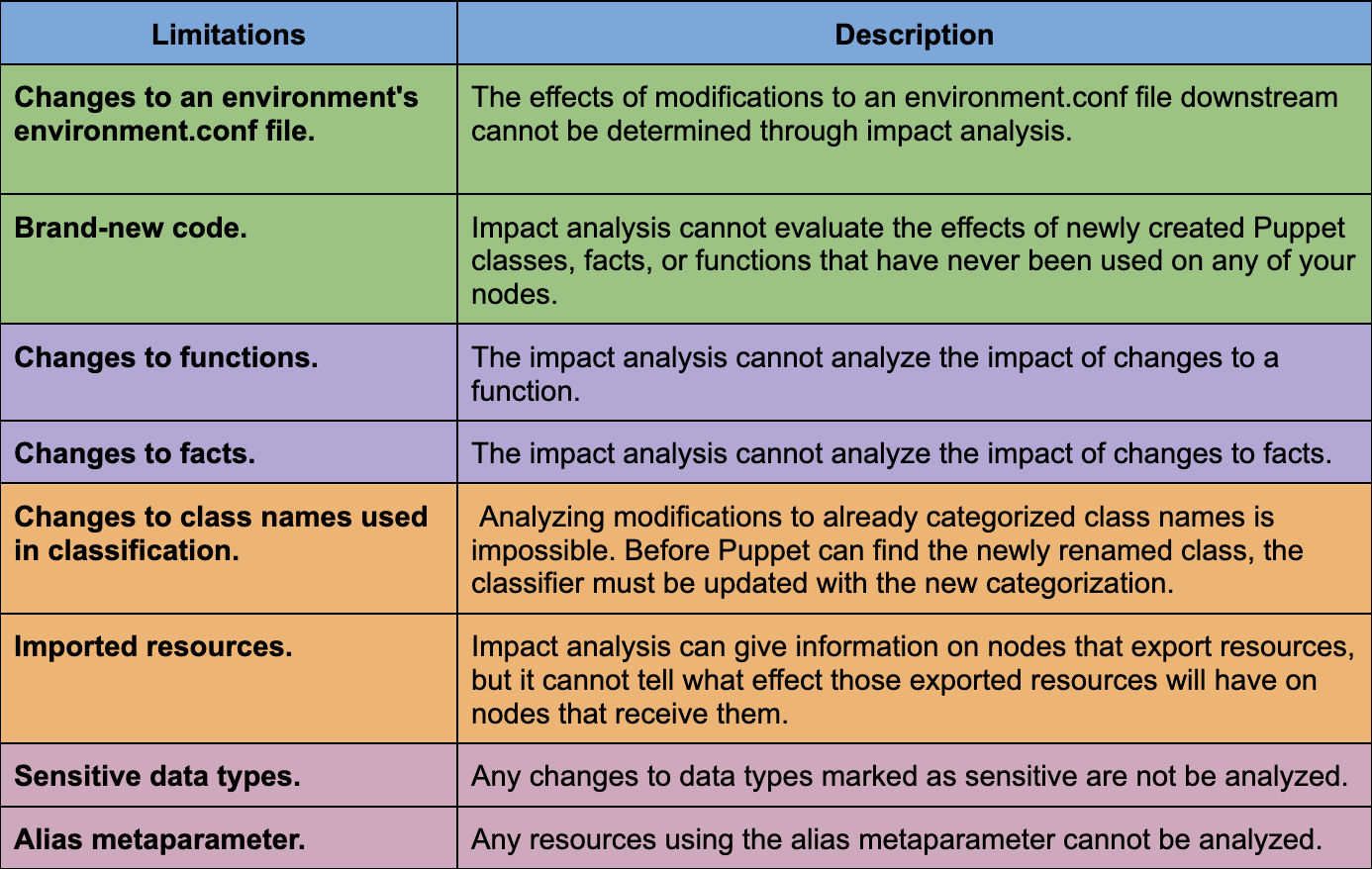
Impact analysis has some technological limitations, and modifications to your code may impact your infrastructure beyond what is shown in the impact analysis report.
Some of the limitations of impact analysis are given in the below table.
Frequently Asked Questions
What is DevOps?
DevOps is a set of cultural concepts, processes, and tools that improves an organization's capacity to provide applications and services at a high rate.
What is Puppet?
Puppet is a server configuration management program that may be used to configure, deploy, and manage servers.
Is Puppet a CI/CD tool?
Yes, Puppet is a true CI/CD solution for modern development.
What is continuous delivery for Puppet Enterprise?
A solution for optimizing and making continuous integration and delivery of your Puppet code is called Continuous Delivery for Puppet Enterprise (PE). A prescribed methodology for testing and deploying Puppet code across environments is provided by Continuous Delivery for PE.
What is Impact Analysis in Continuous Delivery?
Impact analysis in Continuous Delivery for Puppet Enterprise (PE) is a tool that, without actually integrating the new code, demonstrates the potential effects that new Puppet code might have on the infrastructure that PE manages.
Conclusion
In this article, we have extensively discussed impact analysis in continuous delivery for puppet enterprises. I hope you enjoyed reading this article on Impact Analysis in Continuous Delivery.








 1+ registered

