




Introduction
The architecture of a computer can be defined as a catalogue of tools that are visible to the user, such as a number of data bits, instruction sets, addressing techniques, etc. In contrast, the organization of a computer defines the way a system is structured such that all tools in catalogue can be used. The significant components of computer organization include CPU, ALU, memory, and memory organization.
This blog will discuss configurations of computer hardware and its components in detail.
Recommended Topic, Microinstruction in Computer Architecture and Difference Between Jfet and Mosfet
Computer Hardware Configuration
Consider the Block Diagram given below:
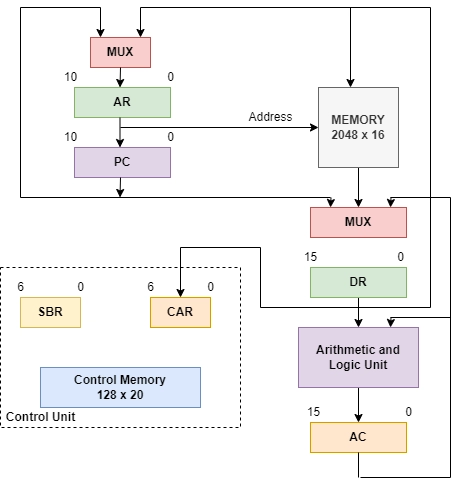
The given block diagram consists of the following components:
- Memory
- Registers
- Multiplexers
-
ALU
Let’s try to understand these components in detail further.
Memory Units
There are two memory units present in the given block diagram of Computer Hardware. i.e., Main Memory and Control Memory.
Main Memory
Memory is an essential component of computer hardware. It enables a user to perform basic tasks on the system. This memory is also known as Random Access Memory (RAM). This computer part stores operating system software, applications, and information related to the CPU to have fast and direct access to the stored data and perform tasks. It is one of the fastest types of memory that allows reading and writing data.
RAM is further divided into two parts:
-
SRAM: It stands for Static Random Access Memory. It is mainly used as a source of memory in embedded devices. The data stored in SRAM does not need to be refreshed continuously. This stored information in the memory remains a static image until it is overwritten or deleted. SRAM is more preferred over DRAM for specific uses like caches located in CPU. as it is less dense and more power-efficient when not in use.
-
DRAM: It stands for Dynamic random access memory. DRAM is a predominant memory source in PC and workstations. This memory constantly restores the information held in the memory. DRAM refreshes the data continuously by sending millions of pulses per second to the memory storage block. The density of DRAM makes it a better choice for main memory.
Control Memory
A Control Memory is a part of the control unit. A control memory consists of fixed microprograms that cannot be modified frequently. It contains microinstructions that specify the internal control signals required to execute register micro-operations. The machine instructions generate a micro instructions chain in the control memory that generates micro-operations that fetches instructions from the main memory, compute an effective address, execute the operation, return control to fetch phase, and continue the cycle.
Also read, microprogrammed control unit
Registers
The Registers are very fast computer memory used to execute programs efficiently. This is done by giving access to commonly used values, i.e., values in the point of execution at that instant. Hence, several classes of CPU registers work in coordination with the computer’s memory to run operations efficiently. Although accessing instructions from RAM is faster with a hard drive, it still is not enough for the CPU. For even better processing, registers are used.
Six registers commonly used in Computer Hardware are as follows:
Process Unit Register: AC(accumulator), AR(Address Register), PC(Program Counter), DR(Data Register).
Control unit register: SBR(Subroutine Register), CAR (Control Address Register).
Process Unit Registers
A processor register can hold an instruction, an address, or data such as bit sequence or individual characters. These registers are required for manipulating data and storing a memory address. After the current instruction’s execution is completed, these registers are used to calculate the address of the next instruction.
Let’s discuss some process unit registers used in computer hardware in detail:
-
Accumulator (AC): This is a general-purpose processing register frequently used to store data taken from the memory. It varies in numbers according to different microprocessors. This register consists of 16 bits.
-
Address Register (AR): This register consists of 12 bits and is used to store the memory’s address.
-
Program Counter (PC): This is used to keep track of the execution of a program. These registers consist of the memory address of the next instruction to be fetched. It points to the next instruction’s address to be fetched from the main memory when the previous instruction is executed. It also counts the number of instructions. The incrementation of the program counter depends on the type of architecture; For a 32-bit architecture, the counter gets incremented by four every time to fetch the next instruction. This register consists of 12 bits.
- Data Register (DR): These registers consist of 16 bits. They are used to hold memory operands.
Must Read hardwired and microprogrammed control unit.
Read Also - Memory hierarchy in computer network.
Control Unit Registers
Two control unit registers are used in computer hardware, i.e., SBR(Subroutine Register) and CAR (Control Address Register).
-
Subroutine Register( SBR): This register stores the return address for a subroutine whose value is further used to return the micro-program from the subroutine.
(Subroutine calls are the special type of branch where we return to one instruction below the calling instruction – provision must be made to save the return address since it cannot be written into ROM.)
- Control Address Register (CAR): This register receives addresses from four different paths. A multiplexer is used for this purpose.
Multiplexers
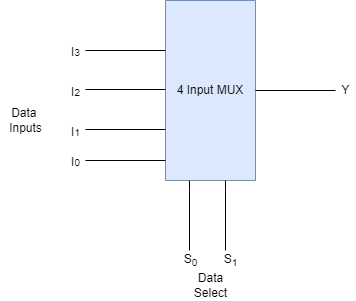
A multiplexer is a combinational circuit that contains several data inputs and a single data output depending on the select inputs. They are generally denoted by MUX. It also has data selector lines that specify which input signal needs to be switched to the output line. ‘n’ data selector lines are required for routing ‘2n’ input lines. The specific input data line for the output is decided on the basis of selection lines. The multiplexer is also known as a data selector since it selects only one of the multiple available data inputs.
Given below is an image of a 4-input multiplexer:
Consider the following truth table that determines the output for the above multiplexer.
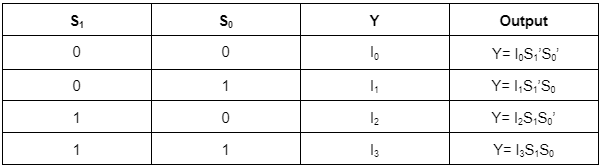
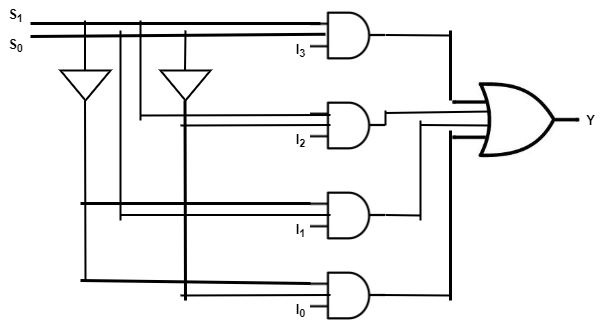
The complete expression for the data input is Y= I0S1’S0’ + I1S1’S0 + I2S1S0’ + I3S1S0. This expression can be implemented using inverters, AND, and OR gates.
Read about Instruction Format in Computer Architecture Demultiplexer
Arithmetic and Logical Unit
ALU is a main component of the CPU that performs arithmetic and logic operations. An ALU is also known as an integer unit, an integrated circuit within a CPU. It is the last component to perform calculations in the processor. It can perform all processes related to arithmetic and logic operations, including addition, subtraction, shifting operations, and Boolean comparisons (OR, AND, and NOT). It is further split into arithmetic units (AU) and logic units (LU). The operands and code used by the ALU help in predicting the operations that need to be performed according to the input data. It sends the information to the memory after processing.
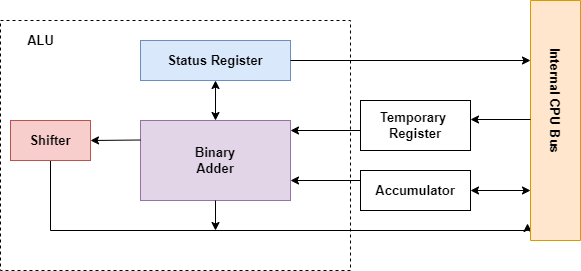
Besides addition and subtraction, ALU also handles the multiplication of two integers whose result is an integer. However, division operations may not be performed by ALUs as division operations may produce floating-point numbers. Instead, the floating-point unit (FPU) usually handles the non-integer calculations. Additionally, we can design an ALU to perform any operation. However, it becomes costly as the operations become complex as ALU takes up more space in the CPU.
The ALU handles the calculations required by the CPU. Most of the operations among them are logical. The ALU design decides how powerful the CPU will be. More power means more heat and energy consumption; hence, it must be a moderation between complex and powerful ALU to adjust the cost and speed.
The main operations performed by an ALU are as follows:
- Logical Operations: It consists of AND, OR, NOT, NOR, NAND, XOR, etc.
- Bit-Shifting Operations: This operation is responsible for the displacement of bits to the right or left by a certain number of places, known as a multiplication operation.
- Arithmetic Operations: Multiplication and division operations are costly. Hence, we can substitute addition in multiplication and subtraction for division.
Recommended Topic - Shift Registers in Digital Electronics and what is middleware

 1+ registered

