




Vaadin is a java web framework and web application development framework, and it is used to make high-quality web applications and user-friendly interfaces. Vaadin supports both the model server-side and client-side. The server-side consists of all the server-side frameworks and the client-side engine. The client-side engine runs as javascript code. The UI logic runs as a Java Servlet in a Java application server. After this, we will look at what MariaDB is.

MariaDB is the most popular open-source system and is the fork of a relational database management system. Developers developed it as a software fork(drop-in replacement) of MySQL, which plays a critical role in building the original databases.
MariaDB is based on SQL and follows the ACID property for transactions, including Atomicity, consistency, isolation, and durability. MariaDB also supports more storage engines than MYSQL and JSON APIs and multiple storage engines like InnoDB, Cassandra, and MariaDB ColumnStore. Now, we will see how MariaDB originated.
Origin of MariaDB
As MariaDB is MySQL's fork, Sun Microsystem acquired it in 2008. Further, Sun Microsystem was acquired by Oracle in 2010, with MySQL included. Then, for some reason, the founder of MySQL, Michael Monty Widenius, decided to fork MySQL and created a Monty Program AB company. He named MariaDB after the name of his second daughter Maria. And MySQL name on her first daughter name My.
The reason for creating the MariaDB foundation in December 2012 was to avoid any company acquisition like MYSQL. SkySQL is a company comprising of ex-MySQL. Unfortunately, many new exciting features of MariaDB are testing, performance, and finding a bug that is unavailable in MySQL. Now, we will discuss the installation of MariaDB, and after this, we will discuss Connecting to MariaDB.
Installing MariaDB
Now, We will discuss the steps to connecting to MariaDB. It's time to install MariaDB. Further, we will be discussing connecting to MariaDB.
STEP 1: Go to the browser and search for MariaDB download.
STEP 2: Now go to the page of mariadb.org.

STEP 3: Then, click on the download button there.
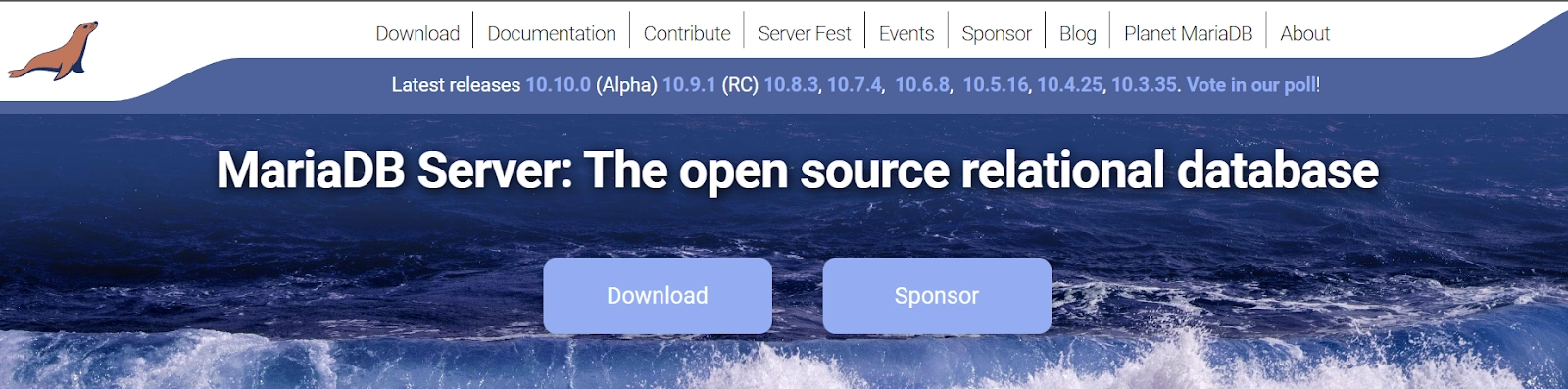
STEP 4: After clicking the download button, we get this interface.

STEP 5: Now, we have to select the version for this and select this version for windows.
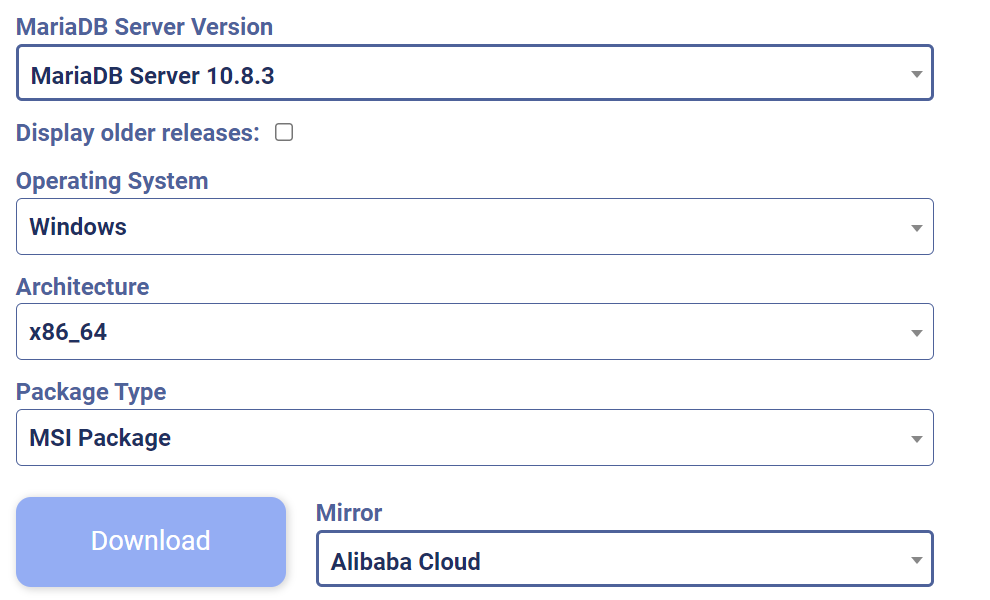
STEP 6: Now click on the download button.
STEP 7: After the completion of the downloading process, we get an executable interface which we keep on doing next-next. After that, we get an interface to set the password.

STEP 8: Set the password, tick the last checkbox, and click next.

Step 9: Again, click next to get this interface.

Step 10: Now click on install, and MariaDB is installed in your system, and then click on finish.
Step 11: Go to the command prompt and type (cd \program files\ MariaDB 10.8). By this command, you will get all the downloaded files and folders.
// at 10.8 put version of your own MariaDB version.

STEP 12: We go to the bin folder using the command prompt (cd bin) command. Then for accessing the database, we use the command mysql-u root -p. On hitting enter, it will ask for Enter password now. Use the password that you give to it while setting up. Directly, you get connected to the database.
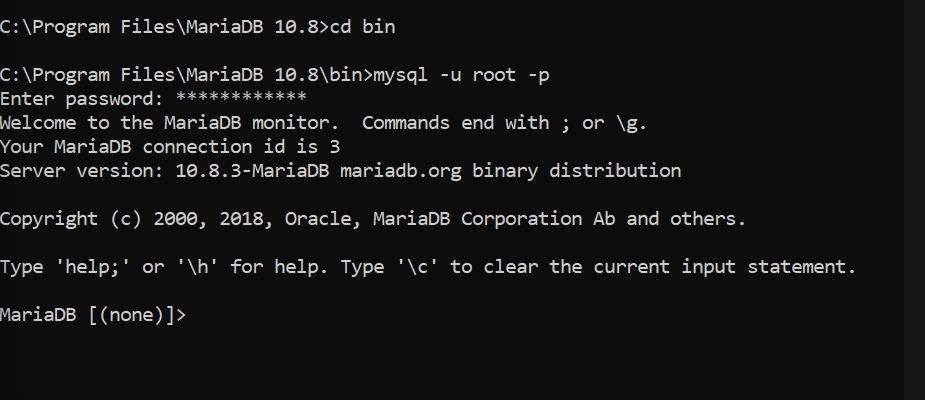
STEP 13: Now, we use the command show database to see the database.

Now, we will be discussing the topic of how to connect with MariaDB using Vaadin.


 7+ registered

