


 Try this free template
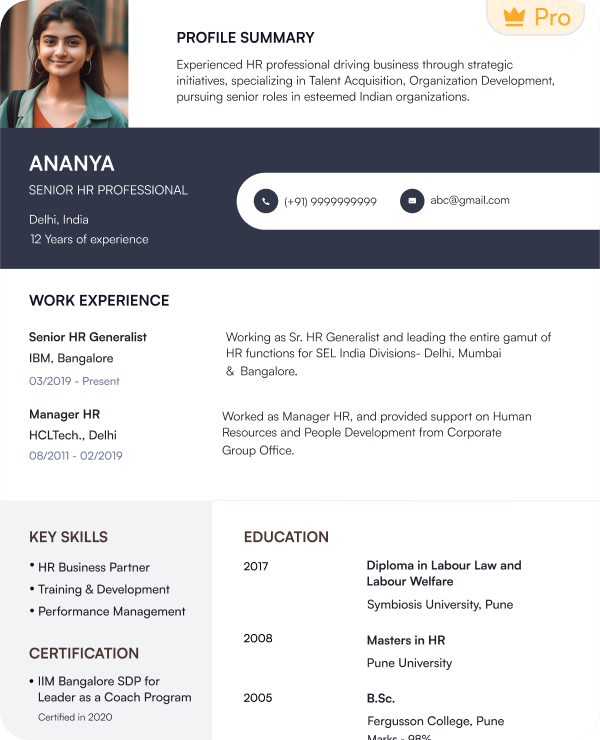
Executive Pro
Minimalist layout with clear hierarchy
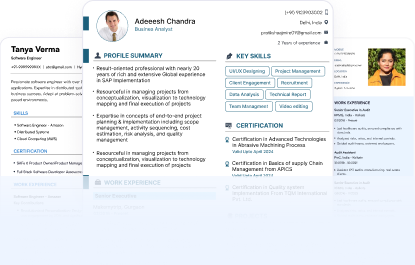
Get professionally designed minimalist resume templates for different roles and career levels. Every template is ATS-friendly and follows Indian hiring standards.
Try this free templateTry this free templateTry this free templateTry this free templateTry this free templateTry this free templateTry this free templateTry this free templateTry this free templateA minimalist resume template is an uncluttered one-page layout that includes the key information needed for a job application. It uses open space and simple styling to keep the page easy to scan. These templates avoid heavy graphics and decorative elements that can make a resume feel crowded.
Here are the key features of a minimalist resume template:
Minimalism does not mean cutting useful content. It means removing design elements that do not help present your profile. Naukri’s minimalist resume templates let you adjust sections and layout with our AI resume builder. The same design approach can also be used for minimalist CV templates.
Yes. Minimalist resumes work well for Indian job applications because they make professional details easy to review on screens and job portals. They are especially suitable for corporate and professional roles where a formal presentation is expected.
Large employers such as TCS, Infosys, Deloitte, EY, PwC, KPMG, HDFC Bank and ICICI Bank use structured online application systems. A minimalist resume can keep your information easy to locate during these applications.
Yes. Minimalist resume templates can work well with ATS because they use clear text and fewer visual elements. Still, a minimalist design is not automatically ATS-friendly. The structure and content must also be easy for the system to process.
To make a minimalist resume more ATS-friendly:
Naukri’s minimalist resume templates combine clean design with ATS-friendly structure. This helps keep your resume easy to process and simple for recruiters to review.
A minimalist resume format refers to the way your resume looks rather than how the content is arranged. You can use a minimalist design with any common resume structure.
This format lists your latest job first. It works best for:
For most job seekers this is the safest minimalist resume format.
This format gives space to both skills and work experience. It works well for:
This format gives more space to skills than work history. It can work well for:
A minimalist CV format can use any of these structures. Choose the one that presents your background most clearly for the role.
A minimalist resume gives space only to information that supports your application. Start with the essentials. Add extra sections only when they are relevant to the role.
The goal of a minimalist resume format is not to remove useful information. It is to avoid sections that take up space without helping your application. A minimalist CV format should follow the same principle.
A minimalist resume format should feel spacious and intentional. Use only the design elements needed to organize your information clearly.
| Element | Recommended Formatting Guidelines |
|---|---|
| Layout | Spacious one-column or balanced two-column layout |
| Font | Arial, Helvetica, Calibri or Lato |
| Body Text | 10 to 12 pt |
| Headings | 13 to 16 pt |
| Margins | 0.7 to 1 inch |
| Line Spacing | Around 1.1 to 1.3 |
| Colours | Black or dark grey with one muted accent |
| White Space | Clear gaps between sections |
| Section Titles | Short labels such as Experience and Education |
| Bullets | Short rounded bullets |
| Photo | Not required |
| Length | 1 page when possible |
| File Format | PDF unless the employer requests DOC |
A minimalist resume works best when unnecessary design elements are removed. Keep anything that helps explain your profile. Remove anything that only adds decoration.
A minimalist resume can use one or two columns. The right layout depends on what needs the most space on your page.
A one-column layout keeps all sections in a single reading flow. Use this format when your work experience is the main part of your resume.
A two-column layout separates main content from supporting details such as skills or certifications. Use two columns when you have several short sections to organise.
Use this minimalist resume sample to see how a clean layout uses white space and concise content to present professional details effectively.
Choose a minimalist resume template when the job values clarity and professional presentation over visual design.
Use one when:
Minimalist CV templates work best when your experience should take priority over design.
Minimalist resume templates can work across career levels. The best fit depends on what you need recruiters to notice first.
Minimalist resume templates keep the layout clean. But they may not suit every profile.
Choose a minimalist resume template based on your profile and the information you want to highlight.
| Best For | Template |
|---|---|
| Senior Careers | Executive Pro |
| Corporate Roles | Minimal Edge |
| Entry-Level Roles | Classic Plus |
| Technical Profiles | Tech Stack |
| Everyday Applications | Creative Spark |
| Detailed Work History | Corporate Slate |
| Modern Roles | Fresh Start |
| One-Page Resumes | Bold Impact |
| Formal Industries | Amber Classic |
Build your resume using Naukri’s collection of ready-made minimalist layouts. Personalize it with our AI resume builder in a few simple steps.
Naukri gives you more than a minimalist design. You can build your resume faster and update it easily for different job applications.
A minimalist resume works best when the content and design stay controlled from top to bottom.
I wanted a resume that looked clean and professional without unnecessary design elements. The minimalist template helped me keep the focus on my experience, skills, and achievements.

My previous resume had too much formatting and felt difficult to scan. This template helped me simplify the layout and present my technical experience more clearly.
I was looking for a resume format that felt modern but still suitable for corporate roles. The minimalist design gave my profile a polished look without making it feel crowded.
I had a lot of information to include, but I did not want the resume to look heavy. The template helped me organize my work experience, skills, and certifications in a clear structure.
A reverse-chronological format works best for most professionals because it shows recent experience first. A combination format can work better for skills-heavy profiles.
Yes. You can choose a free minimalist resume template from Naukri and download your completed resume in PDF or DOC format.
Naukri offers minimalist resume examples for different roles and career levels. You can use them to compare layouts before choosing a template.
Yes. Use a minimalist resume sample as a reference for section order, spacing and content structure. Replace the sample details with your own information.
Use one page when your relevant experience fits comfortably. Use two pages if you have a longer career history that cannot be presented clearly on one page.
Arial, Calibri, Helvetica and Lato work well because they are clean and easy to read.
A simple resume uses a basic and easy-to-follow structure. A minimalist resume uses deliberate spacing and restrained design to create a cleaner and more refined look.
Create contrast through font size, bold headings and spacing. Use one subtle accent colour and keep important sections clearly separated.
Yes. Most of our minimalist CV templates are compatible with Microsoft Word and Google Docs. You can customize them with our AI resume builder and download your finished resume in PDF or DOC format.
Browse our complete library of professional templates
Pick a minimalist template and create an impactful resume with Naukri’s AI-powered writing support.
