


 Try this free template
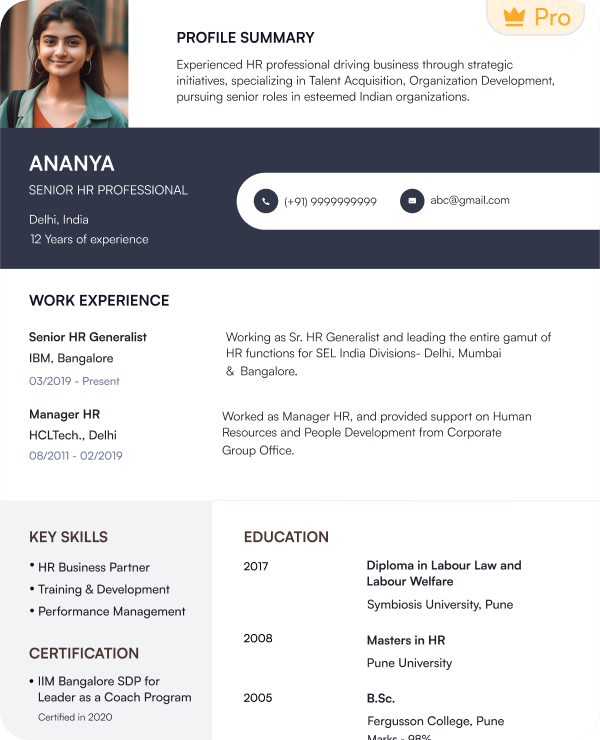
First Pitch
Simple format for entry-level sales professionals
Browse our collection of ATS-friendly sales resume templates built for modern hiring systems. Use layouts that match your specific sales role and experience level.
Try this free templateTry this free templateTry this free templateTry this free templateTry this free templateTry this free templateTry this free templateTry this free templateTry this free templateA sales resume template is a pre-formatted resume layout created for sales roles. It organizes your skills and sales performance into sections that recruiters can review quickly. You can replace the sample content with your own details and adjust the sections based on your experience.
Common features of sales resume templates include:
Sales CV templates can follow the same structure with added space for a longer work history or extra career details.
Choose a template that matches your sales role and experience level.
| Profile | Recommended Template | Why It Fits |
|---|---|---|
| Fresher Sales Candidate | First Pitch | Keeps skills and early experience prominent |
| SDR / BDR | Prospect | Suits prospecting and pipeline-driven roles |
| Sales Executive | Close Rate | Highlights targets and closing results |
| Business Development | Growth Track | Works for acquisition and growth roles |
| B2B Sales Professional | Quota Plus | Gives more space to experience and results |
| Territory / Field Sales | Market Reach | Shows regional sales performance clearly |
| Relationship Sales | Client Edge | Suits retention and repeat business |
| Sales Manager | Team Target | Highlights team and target ownership |
| Head of Sales / Sales Director | Revenue Peak | Suits leadership and revenue responsibility |
The best sales resume format is the one that puts your strongest proof near the top. Indian recruiters prefer the reverse-chronological format because it is ATS-friendly and shows work history in proper order.
This sales resume format gives the most space to your work experience and lists your latest role first.
Use it if you:
This format gives equal space to both your sales skills and work history.
Use it if you:
The functional sales resume format puts skills before work history. It gives less attention to the order of your previous roles.
Use it if you:
The reverse-chronological sales CV format is usually the better choice for experienced professionals because recruiters can see your latest sales performance first.
A good sales resume should show your work history and the results you achieved in each role. Here are the key sections to include:
Add this section only when you have formal recognition that adds value to your sales profile.
You can include:
A sales CV format can use the same sections with extra space for a longer career history and additional professional details.
Review these sales resume samples to see how resume content changes for different sales positions.
Yes. Our sales resume templates use layouts that are easy for applicant tracking systems to read. They keep important information in predictable sections and avoid design choices that may affect parsing.
The templates use:
However, the template alone cannot make a resume ATS-friendly. Your content also matters. Use accurate job titles. Add sales keywords that match your actual experience. Include the tools and skills mentioned in the job description when they apply to you.
Choose sales skills that match the role you are applying for. Add only the skills you have actually used in your work.
| Prospecting and Business Development | Selling and Revenue Skills |
|---|---|
| Lead generation | Consultative selling |
| Cold calling | Negotiation |
| Lead qualification | Closing |
| Prospect research | Upselling |
| Business development | Cross-selling |
| Pipeline development | Territory management |
| CRM and Sales Tools | Client and Team Skills |
|---|---|
| Salesforce | Relationship building |
| HubSpot | Client retention |
| Zoho CRM | Product presentation |
| Pipeline tracking | Objection handling |
| Sales reporting | Team leadership |
| Forecasting | Customer engagement |
Use a sales resume example to see how these skills can appear within the skills and experience sections.
Sales recruiters need to see how well you performed in the roles you handled. Add numbers that show your target achievement and contribution to the sales process. The right metrics will depend on the type of sales work you do.
Instead of: Managed sales for the assigned region.
Use: Achieved 112% of the annual territory target and grew regional revenue by 21%.
Use a sales resume example to understand how these results can appear within work experience. A sales resume sample can also help you decide which figures deserve the most visibility.
Check the job description and pick sales keywords that match your real experience. Focus on terms related to your role, tools, skills, and responsibilities.
Add these keywords to your summary, skills and work experience where relevant. Use the same wording from the job description when it matches your background. Avoid adding sales terms only to improve ATS matching.
Use the formatting guide below when customizing a sales resume template.
| Element | Recommended Format |
|---|---|
| Length | 1 page for early-career profiles 2 pages for experienced professionals |
| Font | Arial, Calibri, Aptos or Lato |
| Body Text | 10 to 12 pt |
| Section Headings | 13 to 16 pt with clear labels |
| Margins | Around 0.5 to 1 inch |
| Bullet Points | Round type |
| File Format | Choose PDF unless DOC or DOCX is requested |
A photo is generally not recommended for most sales resumes. Add one only when the recruiter specifically asks for it or when personal presentation is a stated part of the role.
A photo may be requested for:
You can create and download your sales resume in a few simple steps with Naukri’s AI resume builder and free templates.
Naukri gives you practical tools to build a sales resume faster and update it whenever your target role changes.
Use these tips to make your sales resume easier to review and more relevant to the role you are targeting.
I wanted my resume to show both my sales performance and understanding of technology products. The template helped me present targets, client accounts, and achievements in a much clearer way.

My experience covers lead generation, product demos, and enterprise clients. The template gave me a good structure to highlight these responsibilities without making the resume look cluttered.
I needed a resume that could clearly show revenue numbers, deal closures, and client relationships. This format made it easier to bring my key sales achievements to the forefront.
My previous resume focused too much on responsibilities and not enough on results. The template helped me organize my targets, conversions, and product experience more effectively.
You can find free sales resume templates on Naukri. Choose from layouts designed for different sales roles and experience levels.
Sales resume templates are usually shorter and built for job applications. Sales CV templates can include more detail when you need to show a longer work history or additional career information. You can also use Naukri’s AI resume builder to add extra sections when creating a CV.
A reverse-chronological sales CV format works well for experienced professionals because it places recent roles and sales results first.
You can find a sales CV example for freshers on Naukri. Look for examples that place education, internships and sales skills before full-time work experience.
Yes. Use a sales CV sample to understand section order and content placement. Replace the sample details with your own experience and customize it for the role.
Use one page if you are a fresher or have limited sales experience. Experienced professionals can use up to two pages when they have relevant roles and achievements to include.
Sales resume templates focus more on measurable achievements, such as clients won, sales made, and sales brought in. They place more emphasis on performance metrics than just job responsibilities.
Add such skills as lead generation, communication, negotiation, CRM tools, customer relationship management, and closing strategies.
Browse our complete library of professional templates
Pick a sales resume template that matches your career stage. Add your details and customize it with Naukri’s AI resume builder.
