


 Try this free template
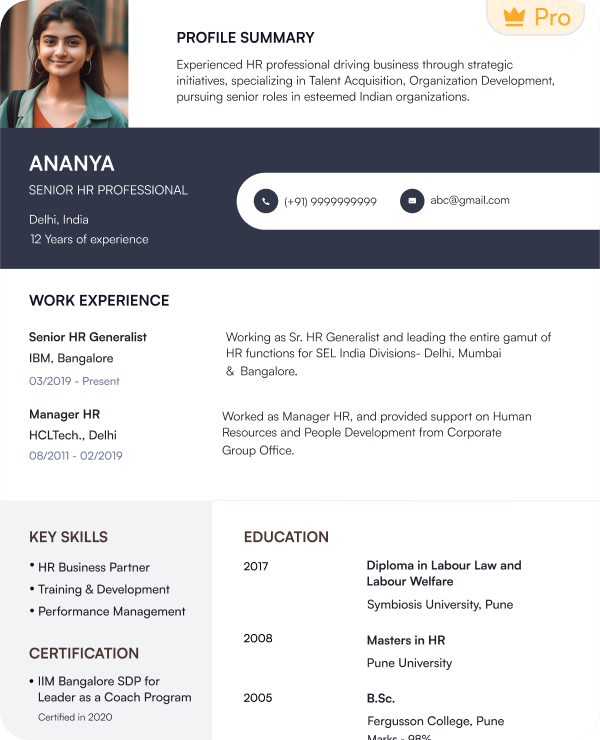
Leadership Profile
Highlights clubs, volunteering and leadership activities
Find student resume templates for different academic levels and career goals. Each template is designed with ATS compatibility and Indian hiring needs in mind.
Try this free templateTry this free templateTry this free templateTry this free templateTry this free templateTry this free templateTry this free templateTry this free templateTry this free templateA student resume template is a ready-made resume layout created for high school students and college students with limited work experience. It provides clear sections for education, skills, projects, internships and achievements so students can present their profile professionally when applying for internships or entry-level jobs.
Common types of student resume templates include:
The terms student resume and student CV are often used interchangeably in India. You can use Naukri’s resume builder and student CV templates to customize the sections based on the application you are preparing.
Students need resumes for different purposes at different stages of their academic and early career journey. Pre-designed templates make it easier to prepare the right resume without creating the layout from scratch.
You can use student resume templates for:
Use our student resume examples to understand how to organize education and early experience.
The best student resume format depends on your experience. Students with internships or part-time work can use a reverse-chronological format. Students with little work experience may prefer a combination or functional format that gives more space to skills and academic work.
A reverse-chronological student resume lists your most recent experience first. It is suitable for:
A combination format gives equal importance to both skills and experience. This format is suitable for:
A functional student CV format gives more space to skills than work history. It works best for:
| Student Profile | Recommended Format |
|---|---|
| High school student | Functional or combination |
| College student | Reverse chronological |
| Student with no experience | Functional or combination |
| Internship applicant | Combination |
| Recent graduate | Reverse chronological |
A student resume format should include sections that show your academic background and early experience. You can adjust the order based on the role or application.
A student CV format can include additional sections such as research and publications.
Choose a resume objective if you have little or no work experience. Use a resume summary if you already have internships or projects that show relevant experience.
A resume objective explains your career goal and the type of opportunity you want. It works well for high school students and first-time applicants.
Example: Commerce student seeking a summer internship to apply classroom knowledge and develop practical business skills.
A resume summary gives a short overview of your skills and relevant experience. It works well for college students with internships or strong academic projects.
Example: Computer science student with 3-month internship experience in web development and 2 academic projects using Python and JavaScript.
Your skills section should reflect the role you want. Start with skills from the job description that match your actual knowledge or experience. Avoid filling this section with generic strengths.
| Technical / Hard Skills | Professional / Soft Skills |
|---|---|
| Microsoft Excel | Communication |
| Google Workspace | Teamwork |
| Python | Time management |
| Canva | Problem solving |
| Data analysis | Leadership |
| Social media tools | Customer service |
| PowerPoint | Organization |
| Basic coding | Adaptability |
Add only the skills you can support through coursework or projects. You can also use internships and extracurricular activities as proof of relevant skills.
The best keywords usually come from the job or internship description. Use terms that match your actual skills and experience.
Look for keywords related to:
Add relevant keywords to your objective or summary. You can also use them in your skills and experience sections.
Use the same wording from the job description when it accurately matches your background. Avoid adding keywords that you cannot support with real experience.
Yes. Naukri’s student resume templates are built to help applicant tracking systems read your details correctly. The layouts keep key sections easy to scan and reduce formatting issues that can affect ATS parsing.
To improve ATS readability:
You can also use Naukri’s ATS Resume Checker to review your resume before applying and identify areas that may need changes.
A student resume should be simple to read and easy to review. Use the guidelines below when setting up your student resume format.
| Element | Recommended Format |
|---|---|
| Length | Keep it to 1 page in most cases |
| Layout | A clean single-column layout |
| Font | Arial, Aptos or Calibri |
| Body Text | 10 to 12 pt |
| Headings | Clear section titles with 14 to 16 pt font |
| Margins | 0.5 to 1 inch |
| Bullet Points | Short and specific (•) |
| Photo | Add one only when the application asks for it |
| File Format | Use PDF unless the employer asks for DOC or DOCX |
| Avoid | Heavy graphics, and decorative fonts, tables and text boxes |
These guidelines can also be used for a student CV format.
Choose a student resume template based on your academic level and the type of application you are preparing.
| Profile / Need | Template | Why It Fits |
|---|---|---|
| High school student | First Step | Gives education and activities more space |
| College student | Campus Ready | Balances education with early experience |
| Internship applicant | Intern Track | Highlights projects and relevant skills |
| Engineering or IT student | STEM Start | Gives technical skills more visibility |
| Creative student | Creative Student | Works well for design and media profiles |
| Student with strong projects | Project Showcase | Gives academic projects more space |
| Scholarship applicant | Scholar Apply | Highlights achievements and academic records |
| Campus placement | Campus Ready | Balances education with skills and internship |
| Student with leadership experience | Leadership Profile | Gives activities and leadership more visibility |
| First-time job applicant | First Step | Keeps skills and early experience easy to scan |
Naukri’s resume builder lets you create a student resume without setting up the format yourself. Follow these steps to build and download your resume:
You can also upload the completed resume to your Naukri profile after downloading it.
Naukri’s student resume templates help you build a professional resume faster and adapt it for different academic or early-career applications.
A good student resume should show what you have done and what you can bring to the role. Use these tips when preparing your application:
I didn’t have much work experience, so I was unsure how to build my resume. The student template helped me highlight my education, projects, skills, and internship experience clearly.

I wanted a resume for internship and placement applications. The template made it easier to organize my technical skills, academic projects, certifications, and achievements in one place.
My previous resume looked too basic and did not reflect my academic and internship experience properly. This template helped me present my profile in a more professional and structured way.
I had several college projects and technical skills but wasn’t sure what to prioritize. The template helped me keep the most relevant information visible and easy to scan.
Reverse-chronological is the best CV format for students with internships or part-time work. A combination or functional student CV format works when you don’t have any work experience.
Add your contact details and education first. Then include skills and relevant projects. Add internships or part-time work when available. A student resume sample can help you understand how to arrange each section.
Yes. Freshers can use student resume templates when applying for their first full-time job. A fresher resume template should give enough space to education and internships. It should also include projects and skills.
Students need a resume for internships and campus placements. It can also be used for part-time jobs and scholarships. A resume helps present education and skills in one professional document.
Include your GPA when it supports your application or when the employer asks for it. Add it under the education section.
Yes. Volunteering can show teamwork and responsibility. It can also demonstrate leadership and communication skills.
A reverse-chronological fresher resume format works well for many recent graduates. A combination resume format for freshers can also work when skills and projects need more space.
Usually no. Add references only when the employer or application asks for them.
One page is enough for most students. Keep the space for education and skills. Add projects and relevant experience.
Yes. Naukri offers free student CV templates that you can customize for different applications using the AI resume builder.
A resume is usually shorter and customized to a specific job. A CV format for fresher applications can include more academic information like research work.
You can find free resume samples for freshers on Naukri. Use the examples to understand the layout and section order.
Yes. You can use a resume template for freshers on Naukri and customize it with your details.
Browse our complete library of professional templates
Skip the layout setup and formatting work. Choose a student resume template and add your details to create a ready-to-download resume in minutes.
